Whether you’re a blogger, marketer, or small business owner, your dedication shines through your writing. You’ve poured your heart into your work, investing endless hours into research, content creation, and meticulous revisions. Nothing is more satisfying than finally pressing the “publish” button on your masterpiece.
But the sad reality is, you can have the greatest content in the world, but unless you get it in front of the right people, it can’t impact anyone.
Think your blog has what it takes to rise to the top of the search results? You may be surprised to learn how many subtle blog SEO strategies you could be missing.
What Is Blog Optimization?
Blog optimization is the process of amending your blog to enhance its visibility in search results. Blog optimization often includes:
Well-written metadata
Internal linking
Descriptive anchor text
Effective image alt text
Optimized content for featured snippets and AI Overviews
We’ll go into more detail below, but for a summary, download our easy-to-follow blog SEO checklist.
Keep meta titles around 50-60 characters. According to Moz research, approximately 90% of your meta titles will appear correctly if they’re under 60 characters. Meta description length should be around 155-160 characters.
The challenging part is that Google sometimes adds the date or bolds certain keywords to match a query, which may add space. Also, letters are varying widths (i.e. the letter “l” takes up less space than a “W”). Since Google actually registers pixels rather than characters, it’s best to keep it on the lower side of those ranges to account for this.
2. Keep it unique. Use a different primary keyword, meta title, and meta description for each page on your site to avoid keyword cannibalization (competing keywords).
3. Put your keyword at the beginning of your meta title. Since users (and Google) read left to right, you’ll want the user to immediately see the match to their query.
4. Avoid quotation marks in meta descriptions. Google may truncate the rest of the description if you use them. Also, avoid brackets or parentheses.
5. Don’t stuff your metadata with keywords. Keyword stuffing is when you unnaturally repeat the keyword multiple times to try to appease search engines.
6. Write for your user first, not the search engine. Create a positive experience!
7. Match the meta title to the H1 (the main title on your page) if possible. This can reduce the chance of rewriting by about 20%. If you decide to make them different, make sure they’re related so the user knows they went to the right page.
Additional Metadata Info:
While meta descriptions aren’t ranking factors, they do persuade users to click on your result over others. This can increase your click-through rate, which is a ranking factor.
Use numbers and ampersands (&) to save space.
Capitalization doesn’t affect metadata. Personally, we suggest capitalizing the first letter of each word for consistency.
Include a call to action. Or, rather, a call to value. Describe the value the user will get from clicking on your result.
Generally, Google prefers dashes to pipes. However, pipes take up less space and some experiments have shown a higher click-through rate (so customers prefer it).
Personally, we like to use a dash when describing something relevant (i.e. Train Rides – All Ages Welcome) and a pipe with two individual things, such as a title and a brand name (i.e. Train Rides | Strasburg Rail Road).
Blog SEO Tip #2: Optimize For Featured Snippets and AI Overviews
What Is A Featured Snippet?
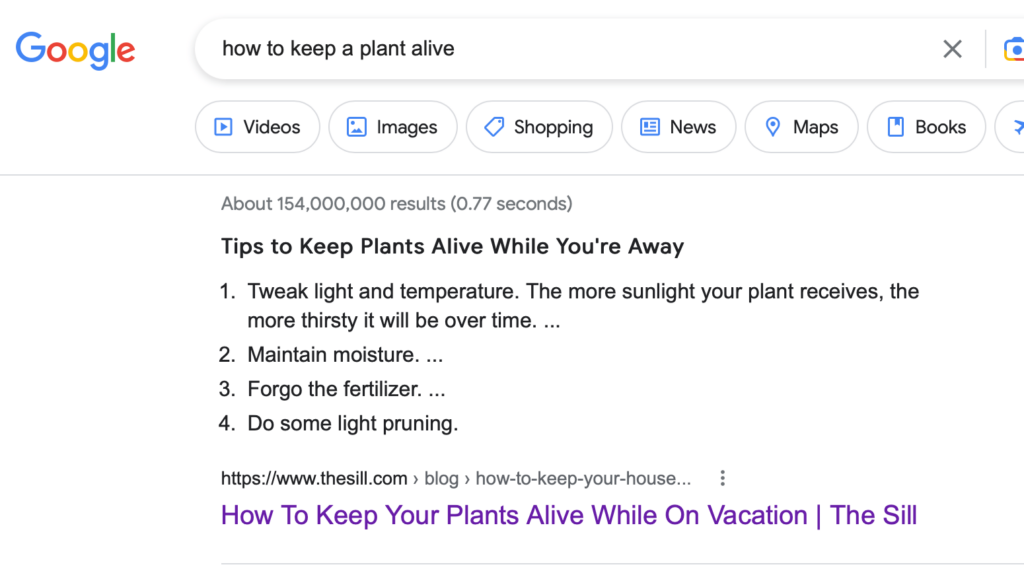
A featured snippet is a short piece of content that appears at the very top of a search engine results page. This is often referred to as “position 0.”
How To Optimize For Featured Snippets and AI Overviews
When doing keyword research, select questions as your secondary keywords. Then, use them as headings. Optimize for the featured snippet by answering the question in 30 words or less.
Types Of Content To Include To Optimize For Featured Snippets and AI Overviews
Short, direct answers to questions
Bulleted or numbered lists
Tables/charts
Videos
Tools or calculators
Blog SEO Tip #3: Optimize Images
Alt text (a.k.a. “alt attributes,” “alt tags,” “alt descriptions,” or “alternative text”), is a short piece of content that describes what’s happening in the image. This allows search engines and people with disabilities who use screen readers to understand the image. Additionally, if the image doesn’t load, the alt text will show instead.
How To Effectively Write Alt Text For Search Engines & Screen Readers
A picture is worth a thousand words. But in this case, be concise. Keep it under 125 characters (that’s when screen readers typically cut off).
Don’t start with “A picture of” or “An image of.” Google knows it’s an image, and screen readers will announce that it’s an image before reading the alt text, so it would be repetitive.
Put a period after alt text so the screen reader will pause, creating a better user experience.
For decorative images, such as icons, the search bar magnifying glass, line page breaks, etc., use an empty alt attribute.
Note: This doesn’t mean leaving it out. If you leave it out, the screen reader will assume you forgot to write alt text, and may read the file name instead. This could just be random numbers/letters, creating a negative user experience. Use alt=”” to signal an empty alt attribute.
Going along with this, a descriptive image file name is helpful. Use keywords if applicable, and use hyphens, not spaces. We wouldn’t recommend going back and updating all of your image file names, but going forward, it’s a good practice.
Proofread! Spelling a word wrong could entirely change the image’s meaning.
For images with captions already on the site, you don’t need to include the captions in the alt text.
With linked images, describe the action rather than the appearance.
i.e. A question mark image that leads to a contact page could say, “Contact Our Experts” for its alt text rather than “question mark.”
Unless it’s an acronym, don’t use all caps. Screen readers may spell out entirely capitalized words.
For charts and graphs, list all important details in the text of the blog so that those with screen readers understand what it’s illustrating.
Include keywords if appropriate (but don’t stuff them). 62.6% of all Google searches are through Google Images, so including keywords in your alt text gives your images the chance to rank for them. Let’s look at an example below.
For this image, you may be tempted to say, “people shaking hands.”
However, try more descriptive alt text like, “A real estate agent and new homeowner shaking hands after closing a deal.” This provides context and a chance to rank in Google Images for keywords like, “real estate agent,” “new homeowner,” or “closing a deal.”
In addition to writing alt text, you should compress your images to reduce load time for a positive user experience.
Blog SEO Tip #4: Add Relevant Internal Links With Detailed Anchor Text
What Is Internal Linking & How Do Internal Links Help SEO?
Internal links lead from one page on your site to another page on your site. This helps users (and Google) navigate to other relevant pages. Here are just a few ways internal links help SEO:
Helps Google bot discover other pages on your site faster
Creates a well-structured website hierarchy, leading to the most important pages
Anchor text is the clickable, linked text throughout your content. Its purpose is to describe to your user (and Google) what that linked page is about. Follow these anchor text best practices:
Keep it succinct, yet relevant to the page it’s linking to.
Context is important. You look at the words around it – Google does, too!
Rather than repeating the same anchor text throughout your page, use a variety. Google’s penguin algorithm update in 2012 addressed spammy links. If your links all had the same anchor text, Google may penalize you, assuming you purchased them.
Beware of competing keywords. Essentially, don’t use your primary keyword as anchor text because you’ll be sending people to a competing site. This might confuse Google on which site to rank higher for that keyword.
Use keywords if they’re relevant, but avoid keyword stuffing. Here’s an example directly from Google on keyword-stuffed anchor text:
Ensure anchor text is clearly clickable (underlined/a different color). Also, don’t cause confusion by underlining things that aren’t clickable.
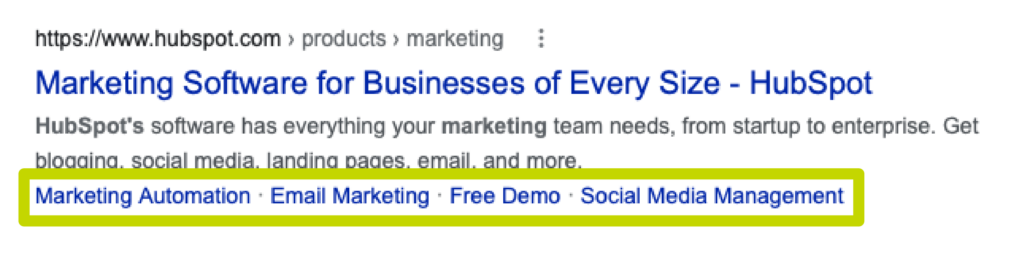
Use a table of contents for easy navigation. It could also improve your click-through rate from the search results because Google may include “jump to” links.
Summary: The Importance Of Writing SEO-Friendly Blog Posts
While you’re optimizing new content, it’s also a good idea to refresh older blogs for SEO with updated keyword research, links, and information.
If you’re looking for insight into a more in-depth content creation strategy, get in touch with our content marketing specialists to learn how we can generate and/or optimize the best content for your industry.
In part one of our local SEO series, we talked about how your business can reap the many benefits of local SEO by understanding what goes into ranking well. We mentioned one of the most important ranking factors for local SEO was backlinks.
One of the best ways to gain backlinks for your website is to add your business to as many relevant local SEO directories as possible. With a well-thought-out and researched local SEO directory strategy, you can put your business in front of highly targeted users and show up on the most important search engines.
Are Directories Valuable for Local SEO?
Adding your business to some, if not all of the local SEO directory listings below, will add value to your business, including both algorithmic and user benefits.
Generating backlinks for your site through directories can increase your chances of ranking well on search engines. Each backlink, a link that goes from one website to yours, essentially acts as a “point” in the local SEO algorithm regardless of what search engine you are trying to rank on.
Some directories will have higher point values than others due to their domain authority. When your site gains backlinks from directories, you are adding “points” to your site which will be a positive ranking factor that you will see.
Perhaps the most important and valuable part of adding your business to directories is getting your basic information in front of highly-relevant audiences. If you are strategic with your directory submissions, you can send your information to users who are lower down in your marketing funnel.
For instance, if you are a roofing business, you can add your company to local directories like Angi , HomeAdvisor, or Roofing Insights, a specific directory for those looking to get their roof replaced.
Local SEO Directory: Do’s & Don’ts
With all of the factors mentioned above, you can see just how important adding your business to local search directories is. You can boost your online reputation through various review sites, create backlinks to your site, and gain brand awareness. However, there are some do’s and don’ts when adding your site to directories.
Do’s: Be Consistent
Many of the local business indexes share data. That’s why it is important to have the same information displayed on each business listing you create.
At the absolute minimum, all of your local business listings should include the same:
Business name
Address
Phone number
Website address
Short description
These names, addresses, and phone numbers (NAP) must be exactly the same across all the listings you submit to. Additionally, create the same message. Make sure your categories and taglines are similar to avoid confusion.
Local listings all require you to add a business description, and it’s best to provide a long and short version. Adding all this information over and over again is tedious, so create two descriptions of your business:
A short description (about 125 characters)
A longer description (about 300+ characters)
With the descriptions ready, all you have to do now is copy and paste them to each of the local listings below to properly reap the local SEO benefits for your business.
Don’t: Add To Spam Sites
A general rule of thumb when submitting to local SEO directories is to check for spamminess. If a site looks like spam, it probably is. One way is to check a site’s domain authority via Moz. Generally, any site scoring lower than 20 would be considered spam and having links on those sites will add toxic links to your site.
Do: Claim Your Listings
As mentioned above, you may find that you are already listed on many sites, but you need to claim your listing. You may also notice that some of the information is incorrect. Make sure to change that when you claim your business listings.
Don’t: Target Irrelevant Listings
There are thousands of possible directories to add your business to and you may be tempted to add your business to every single one of them. However, targeting irrelevant directories will hurt you. Not only are you deceiving search engines, but you are also providing misleading information to the user that found your site.
Do: Add As Much Information As Possible
In addition, add as much information as possible. The more information you add, such as pictures, logos, and staff photos, the better. You want your listing to stand out from the competition.
In fact, Google Business Profile, recommends adding at least 22 photos to your profile. Tower Marketing recommends getting professional photography done to properly showcase your business.
Don’t: Create Duplicate Listings
There are many reasons why your business might have duplicate listings. Maybe your business moved locations or a previous effort was placed on creating a listing on that particular site.
Whatever the situation is, duplicate listings can confuse users and search engines. As noted above, the key to creating a successful local SEO directory strategy is consistency. If possible, delete the old listings or claim and update them.
Best Online Business Local Directories
Take a couple of hours and add your business website to these top-rated local SEO directories.
While these listings are generally used for any business, we also highly recommend checking out Moz’s Directory Listings page. Here you can find the top industry-specific directories to add to.
If you don’t see your industry there, Tower Marketing’s local SEO team can help you find the best directories for your local SEO strategy.
Top Free Business Listings
Google Business Profile is the one free listing we encourage every business to utilize.
While there are thousands of free business listings online to choose from, these are the ones we would recommend starting with regardless of your industry.
Google Business Profile (GBP) formerly known as Google My Business.
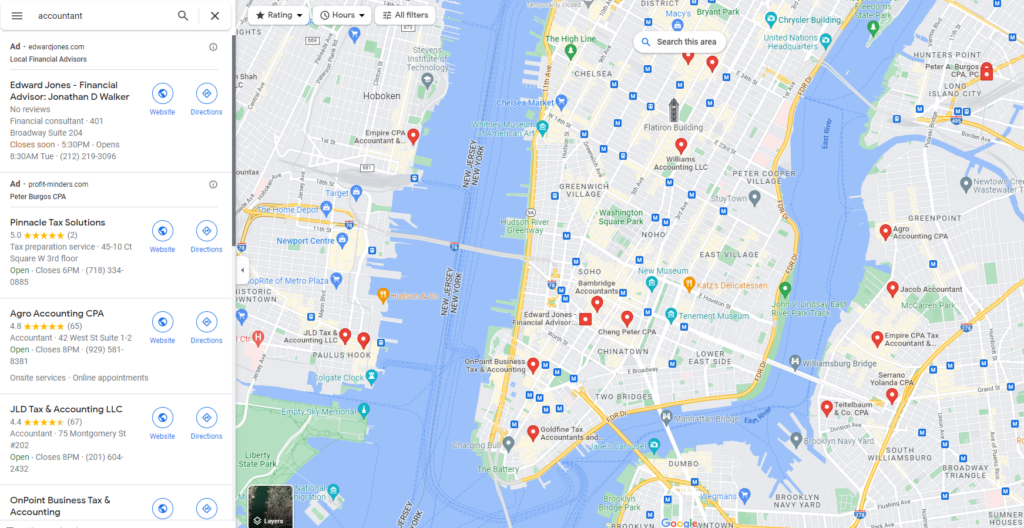
Having a Google Business Profile listing is probably the most important first step when trying to rank in the top local results. All you need to get started is a Gmail account and if you don’t have one, create one. Adding your Google Business Profile listing information here will help you to be found across Google platforms, including organic search results, and the Google Maps Pack.
It should be a top priority for any business to have its location listed on Google Maps. More users are searching for products and services with local intent and using GPS navigation as a way to guide them to different locations. Optimizing your Google Business Profile page will help your business to be found on Google Maps.
Bing Places for Business
This business listing is powered by Bing.com and operates in a similar fashion to the Google My Business listing service. Bing Places for Business is a Bing portal that enables local business owners to add a listing for their business. With Bing Places for Business, once you have your Google Business Profile set up, you can import that information directly onto Bing so you do not have to redo essentially the same work.
Apple Maps
Apple Maps is one of the most used map platforms in the world. Local SEO Guide estimates that at least 75-100 million adults it. With your business listed, users can see directly in the app your reviews, photos & categories just like Google Maps.
Please note that you can submit a business listing for free on Apple Maps but often the information is pulled from other sources such as Yelp.
Yahoo Listing via Yext
Getting a Yahoo Listing isn’t as easy as Bing or Google. In order for you to claim your listing on Yahoo, you have to go through Yext.
These listings are very similar to Bing or Google. Use your same NAP across Yahoo as well.
Please note, you can claim your free listing on Yahoo via Yext but there are also more premium options that allow you to distribute your information across up to 50 platforms.
Facebook
You will need to create a Facebook business page, which means you will first need to have a personal account on Facebook. Add your business name, description, and website, and connect with users socially.
Yelp
Most people think you need to be a restaurant to be listed on Yelp. Not true. Any US business can be added to the local business listings.
Foursquare
Foursquare is a local search and discovery app and is a fantastic business listing to be included. Make use of their location data by adding your business.
Insider Pages
Insider Pages is a web directory looking to offer users the best recommendations. Not only do you want your business listed here, but you also want people who use this site to recommend you.
TripAdvisor
TripAdvisor is great for B2C businesses. This free business listing online allows you to share your hours, upload photos, and more importantly, customers can leave reviews. There’s also a Q&A section where you can answer your most commonly asked customer questions. TripAdvisor profiles can also be shared across other directories online.
Best of the Web (BOTW)
BOTW is a general web directory listing for both commercial and non-commercial sites. Each listing is manually approved and, therefore, search engines value the citation of businesses listed here. This is one of the oldest internet web directories and is organized by category, offering content-rich and well-designed websites.
Superpages
This is a great online that acts much like the Yellow Pages. Superpages is a local business directory including phone numbers, ratings, reviews, maps, driving directions, your address, website, hours of operation, and more.
NextDoor
While NextDoor is often thought of as a social media platform for connecting with your neighbors, it is also a great place to list your business. Here you can share posts with people in your community making it one of the more powerful local SEO directories out there. Your business can even interact with users much like Facebook or Instagram as well.
Citysearch
Citysearch is a web-based city guide offering information about local businesses using categories throughout different states in the US.
HotFrog
HotFrog is a commercial website directory sorting businesses according to location and category.
Yellow Pages
Yellow Pages is one of the most well-known off-site and on-site directories. Everyone has heard of it or used it, at some point. Having your business listed here is a must.
Top Paid Business Listings
The Better Business Bureau is one of the best paid local SEO directories.
Please note, as of the time of this writing, you have to pay to be on each one of these listings. Each platform additionally has multiple pricing levels with the option to pay for advertising as well. We recommend adding costs for the platforms into your marketing budget.
Angi FKA Angi’s List
Angi formerly known as Angi’s List, is one of the most powerful listings you can add to your local SEO directory strategy especially if you deal with homeowners. While Angi is free to join, the most powerful way to use Angi is to pay for lead generation. You can also send and build custom quotes, request payments, and integrate with QuickBooks making it one of the more forward-thinking business directories.
Better Business Bureau AKA BBB
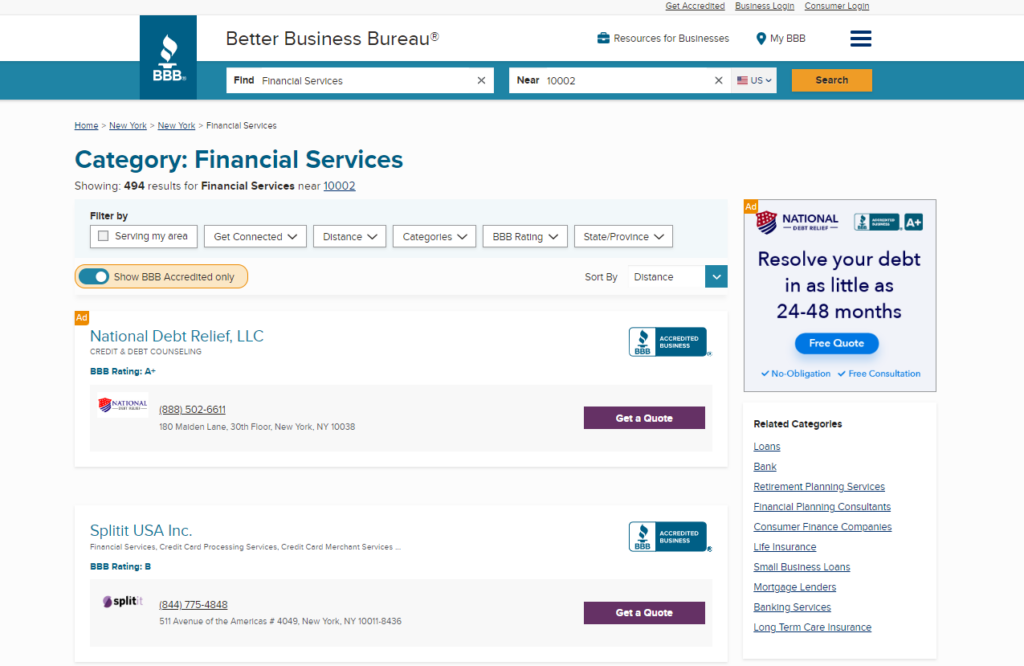
The Better Business Bureau is a nationwide nonprofit organization with a self-described mission of “focusing on advancing marketplace trust”. Once again this is free to join but to become an accredited business in the BBB, that comes with a fee. With the fee, you show customers “that you are an honest, ethical business that they can trust.”
Within their listings, users have the option to search for BBB Accredited Businesses only OR all businesses which includes the free account. In each listing is a list of complaints from consumers, average star rating as well as your NAP.
HomeAdvisor
HomeAdvisor is a great local SEO directory to add your business to if you deal with homeowners. Getting your business on HomeAdvisor is only paid and there are no free options so do careful research before deciding if it’s a good fit.
Chamber of Commerce
Listing your business on your local chamber of commerce website is a great way to reach local customers and network with other businesses. While each chamber of commerce has different pricings, you will most likely not be able to join for free.
Taking the time and effort to add your business to the listings above and to your industry’s niche directories will be worth it. There is both a local SEO algorithm and user value to adding to each website.
We at Tower Marketing have done this for our clients across almost every industry you can think of. We understand it can cost time and money to add to each directory. But we can help you find your industry’s niche directory and even do the hard work for you with our local SEO services.
Our team of experts will help get your business ranking well locally no matter where you conduct business. Contact us today to get our local SEO expertise.
Ever wondered if there’s merit to updating old blog posts for SEO instead of always focusing on new content? One of the most popular questions we hear from a review of our content calendars is “why are we doing a rewrite — do we need to do that?” (The short answer? Yes!)
When it comes to your blog, new isn’t always better. Sometimes there’s value in refurbishing what you have.
That’s why we’re going to take a closer look at the top 5 benefits of rewriting blog content. And towards the end, you’ll find tips on how to update blog posts for SEO in a way that can help your performance in search.
1. It Can Boost the Performance Of Your On-Page Optimizations
If your blog was published several years ago, you likely have some new competition trying to rank for the same query. But with some research into keywords, you can assess what kind of keyword updates will help your content writing strategy.
Plus, since our language is always evolving you’ll be able to capitalize on new ways of speaking about a topic. That way you’re capturing trending terms in your industry.
Keywords aside, you can also look at re-organizing the internal links used in your blog. An up-to-date internal linking strategy is important since it creates a better journey for visitors navigating your site. Plus, you can include new, relevant pages that were created and those pages will also benefit from being linked to applicable blogs.
And last but not least, when you update a blog you have a fresh chance to look at the schema. That way you can make changes that will positively affect which queries the blog is showing for. (And make sure it isn’t showing in the wrong searches, which can frustrate users.)
2. It Creates A Positive UX (User Experience)
Old blogs can have a few problems, such as:
Broken links
Dense content (with no/few headings or images)
Poor display on mobile
But fortunately, when you go to update a blog there are some workarounds. To start, you can use this handy tool to find any broken links. And while you’re revising the writing, you can also look at doing more visually with the blog.
With the help of tools like Canva, Unsplash, and Pexels, you don’t need to be a designer to create infographics or pay for an expensive subscription to find stock images. Although, when possible it’s better to use in-house over stock imagery, since it lends a more authentic feel.
Either way, including multi-media content in SEO-optimized content can extend your reach. Using rich media like videos, infographics, etc., can help your blog get pulled into different types of search features.
Visuals aside, make sure you consider mobile visitors. Keep paragraphs extremely short (2-3 sentences) so they don’t appear as walls of text on someone’s device. Otherwise, you risk someone immediately leaving because of how difficult the blog is to read.
Ultimately incorporating these practices will help ensure that anyone finding your content has a better experience. Which can affect important digital marketing metrics, like reducing bounce rates or creating a higher pages per session.
If you want more ways to improve your site’s UX, read our blog on 7 easy UX improvements to make on your site.
3. It Can Boost Your Brand’s Credibility
In Netflix’s show “Inventing Anna” (based on a real story) there’s a moment where a journalist is discussing the effects of content and the internet. She tells her husband “People forget but people use Google… and Google never forgets.”
And as a marketer, I couldn’t help but resonate with that line and commit it to memory. It’s easy to forget all the blogs published on your site once you have a lot of them — but Google doesn’t.
This means that an old piece from several years can still pull into a search, even if some of the information is a bit dated. And that in turn can dilute your brand’s reputation as a credible expert.
A good blog content strategy will help boost your E.A.T. (expertise, authority, and trust) on different search engines. But old blogs with incorrect information can degrade that among users.
Any time you see new research released or notable consumer shifts, take note of older pieces that should be revisited. Make sure the content you have in them holds true to the current industry.
It can definitely be difficult to keep tabs on your content library if you have a lot. So we recommend setting up a content index where you at minimum log details on the pieces you’ve created, keywords targeted, and publish dates.
That will help you identify blogs that need rewriting. And further down we’ll also look at how you can use Google analytics to spot potential targets for updating as well.
4. It Can Increase Your Click-Through Rate in the SERPs
At the end of the day if two pieces are pulled into a search and look fairly similar, but one was published more recently — which one do you think users will pick?
In the SEO world, fresh content is a google ranking factor. Google (and other SERPs) will tend to show more recent results at the top of searches. Keep in mind that you can’t trick the system and just re-do the publish date on a blog to take advantage of this.
Based on how search engines crawl your content, they’re also looking to see significant content updates paired with that date change. (Something we’ll discuss below in getting started updating blogs.)
5. It’s A Time-Saving Content Creation Tactic
If you’re in charge of any marketing efforts, you know that some seasons are busier than others. An added benefit of working blog updates to your blog publishing schedule is that they are typically faster to do than starting from scratch.
Where to Start: How to Update Old Blog Posts for SEO
Now that you have an idea of the benefits of rewriting content, you may be curious how often should a blog post be updated. There’s certainly no hard or fast rule, but what we find works best is a blended approach.
For example, in a 6-month content calendar, you could work on 2 blog rewrites and 4 new blogs. That way you’re still creating truly fresh content, but you’re holding your business accountable to keep older pieces in good shape.
As you look to get started, here is some helpful advice to guide you.
Tips For Identifying Blogs To Update
The most successful way to create a content strategy that wins in the SERPs is to identify your topics based on data instead of gut decisions. So you’ll want to make sure that you have a content reporting system in place to track the performance of what you’re publishing.
Once everything is tracking properly, you can identify blog updates in a few different ways:
Find low-ranking queries on Google Search Console and see if there are opportunities.
Identify blogs with an extremely high bounce rate. (Above 90%, since blogs typically have bounce rates between 70-90%.)
Find blogs getting the top clicks from queries and spot-check titles to find ones you know are old but are still getting a lot of traffic.
Steps For Updating Old Blog Posts for SEO
Whether you’re wondering how to republish a blog on WordPress or update one on a different CMS system (Shopify, Squarespace, etc.), here are some tips to keep in mind.
Step 1: Find the original blog and make sure that when you have content finalized, you update it directly in that post.
Step 2: Revisit your original primary keyword and do research. Is it still relevant or is there a new one with more opportunity?
Step 3: Re-write the content as you see fit. Keep the parts you think work well, but create new content wherever it’s needed.
Step 4: Once it’s ready to post, go into your post and replace the old blog with your rewritten one.
Step 5: Make sure to add an editor’s note at the bottom of the updated post to clarify. That way if someone finds your blog but sees comments on it from before the publish date, it doesn’t look suspicious.
Eg., editor’s note: “This blog was originally published on April 25, 2019. It was updated on March 25, 2022.”
Step 6: Keep the URL as is if possible. If not, update it but make sure you have a redirect put in place, in case someone saved that old link and tries to access the piece.
Step 7: Adjust the blog snippet to ensure it accurately describes the updated blog when users find it in SERPs.
Step 8: Revise the publish date to reflect the date you’re pushing the rewritten blog live and publish the piece.
Looking to elevate your blog strategy to better compete in the SERPs? See how our content services can support your business by creating optimized content that helps you connect with your audience online.
Whether you listen to Christmas music year-round or dread the holiday rush, there’s no denying that the holidays are the most profitable time of year for many businesses. In fact, estimates from the National Retail Foundation attributed between $755.3 to $766.7 billion in sales last holiday season alone.
In order to capitalize on some of the biggest shopping days of the year, here are a few of our favorite holiday marketing ideas and advertising tips.
General Tips for Holiday Advertising
Before we dig into the tactics that can help boost your business during the holiday season, it’s important to understand the bigger picture of marketing during the holidays. Here are five goals to keep in mind when planning your holiday marketing campaigns.
1. Be Timely
It’s never too early to start planning your holiday marketing ideas and initiatives. Pages can take up to 45 days to rank, so we recommend moving any web-based tactics live no later than mid-October. While Christmas isn’t until the end of December, many people start shopping in early- to mid-November, well before Black Friday deals hit.
2. Be Brief
With advertising competition at an all-time high, attention spans are short. Keep your messaging short, sweet, and impactful for the best results.
3. Stay Focused
Online noise and increased ad costs mean that your holiday advertising ideas have to be sharply focused to make an impact. If you have a limited budget, focus on a few key days of sales based on historical data from years past.
If you’re looking for the strongest return possible on a small budget, remarketing is another great option, as you’re likely to see a higher conversion rate by advertising to former and current customers.
4. Respect Your Brand
Just because it’s the holiday season doesn’t mean that your blue brand has to transform to red and green! Consider what the holidays look like visually for your business, and allow your foundational brand to shine through in every marketing initiative you undertake.
Here are some holiday angles to consider:
Feel-good, charitable, emotional, and grateful
Exciting, flashy, and full of great deals
Fun, bright, and family-focused
Non-denominational, winter-focused, or inclusive of all winter holidays
When choosing a direction for your holiday marketing ideas, always consider your business’s brand, tone, and overall marketing goals. Slapping a graphic Santa Claus on your year-round advertising simply doesn’t cut it.
5. Be Truly Competitive
Don’t expect to own the market and see a massive boost in sales if you’re only willing to offer 10% off and free shipping. In order to succeed at marketing during the holidays, you’ll need to be generous with your sales and special offers, especially to loyal customers who have waited all year to make a big purchase and get a great deal.
If you’re a service-based company, consider offering vouchers or pre-orders that customers can buy now and use later. Not only does this create urgency and encourage sales, but it allows you to pre-schedule and guarantee your next year of business ahead of time.
Holiday Search Optimization
In order to rank during the competitive holiday season, you’ll need to foster strategic search engine optimization (SEO) on your website year round. That being said, here are a few considerations to keep top-of-mind to expand your optimization during the holidays.
Holiday SEO & PPC Strategies
SEO and PPC should be a major focus when it comes to holiday marketing ideas. Making timely gift guide landing pages for holiday search terms is one of the best ways to capitalize on the busy shopping season.
Fill these pages not only with best-selling products but thoughtful content that will help customers who are unfamiliar with your business make a quick and easy purchase. And, be sure to focus on internal linking and all of the usual SEO-boosting suspects to get your pages ranking.
Keep in mind that like with any paid medium during the holidays, you’ll pay more per click than you do during other times of the year. The heavy competition can be discouraging when deploying your holiday marketing ideas through PPC, but it can pay off big if you are strategic in your keywords and bids.
The Merits of Google My Business
An often-overlooked element of your website’s search engine optimization is your Google My Business (GMB) profile. This panel allows customers to view your company’s store hours, reviews, and updates without even having to click through to your website.
Be sure to complete your GMB profile before the holiday season begins, and revisit it frequently to ensure your hours, contact info, and other store details stay up to date.
The holiday season is one of the best times to grow your email list organically. The trick? Offering direct, valuable savings to customers to encourage them to sign up. Once you have a customer hooked, here are a few tricks to prevent them from unsubscribing:
Use subject lines to create urgency around sales and deals
Create email automations for abandoned carts
Offer valuable content like gift guides and product tips
Inboxes are especially cluttered this time of year, so be sure that each email you send has a true purpose and won’t simply frustrate your customer to the point of unsubscribing.
Holiday Social Advertising Strategies
With high costs and oversaturated platforms, social advertising during the holidays can be incredibly competitive. You’ll have to be at the top of your game if you want to stand out among the crowd.
Giveaways, contests, and other content that encourages audience engagement can be particularly helpful in breaking through the noise. While you have limited space to get your message across, try to think about your audience and speak directly to them in a novel and creative way to grab their attention. At the end of the day, authentic ads that showcase great deals will do far more than screaming at users with all caps and bright flashing signs.
Writing Content for the Holiday Season
When it comes to holiday marketing ideas, content is everything. Here are three tips to keep your content thriving and bringing in new customers.
1. Be Timely
We can’t stress enough the importance of timeliness when it comes to seasonal content. It can take weeks or months for your content to be indexed and served to users. And, many users start researching holiday decorations, gifts, and more up to two months before the big day.
That means any search-driven content you have planned needs to go live no later than October. It may feel strange working on holiday copy before fall has even arrived, but it will pay off big time come the holiday season.
2. Consider Your Unique Holiday Customers
During the holidays, millions of people shop for gifts at stores they’re unfamiliar with. One of the best ways to earn a new customer is to make sure they have everything they need to make a decision (and a purchase), even if they’re unfamiliar with your industry.
Consider building out your product pages further to aid in product comparison and streamline decision-making. Product guides that go over sizing, features, and the differences between product models can also make online shopping a breeze for those unfamiliar with your store.
3. Utilize Internal Linking
Internal linking is one of the top ways that Google understands the architecture and content relationships on your website. This means that high-quality internal linking can help your holiday-themed blogs gain traction faster when every day counts.
Use links with purpose. No reader wants a constant bombardment of product links without any explanation to help them make a decision. Be sure to include plenty of helpful and educational content links, as well.
Breaking the Mold with Creative Holiday Campaigns
With so much noise online, you’ll need to think differently when brainstorming holiday marketing ideas if you want to stand out in your customers’ eyes. Consider the go-to marketing tactics of competitors and industry leaders, and then brainstorm adjacent or opposing ideas to get started.
One of our favorite innovative holiday marketing strategies over the years was a digital holiday card we created for local law firm Barley Snyder. They wanted a unique and memorable way to wish their clients and colleagues a happy holiday season. We planned, designed, and animated a custom digital greeting card that was equal parts meaningful and charming.
Whether you work with a digital marketing agency or an in-house marketing team, you’ve probably received reports that have a lot of information you don’t fully understand.
In this blog, we’ll explore the key performance indicators (KPIs) you should pay attention to, regardless of your industry. We’ll also review how you can analyze your digital marketing performance metrics and explain what your spend is going towards.
What Are Internet Marketing Metrics?
There are two buzzwords you’ll hear when talking about digital marketing: analytics and data.
Not sure what these terms mean in the context of Internet marketing? Simply put, analytics help us see the data that’s being processed to provide us with the valuable performance metrics we use to make informed business decisions.
That raises yet another question: what are marketing metrics, and which ones should I be paying attention to?
Marketing metrics are the measurable, quantifiable insights you or your agency use to measure the success of campaigns and projects. They’re the most important indicators you should pay attention to because they help you determine exactly where your money is going.
We’ve established that you need data to make informed decisions. But which metrics should you pay attention to on your report?
Digital Marketing KPIs: What They Are, Why They Matter, & How to Analyze Them
While there are hundreds of metrics to consider, we’re going to review the most important digital marketing KPIs for each marketing channel. Each of these metrics are important, but you can’t draw a single conclusion without looking at the bigger picture.
Overall Digital Marketing KPIs
The KPIs below apply to every channel and are fairly universal across digital marketing.
Impressions
What It Is
Impressions are how many times your content is shown to a user.
Why It Matters
Impressions matter for many reasons. The most important reason is that they reveal how many people are seeing your content, whether it’s an ad in a PPC campaign or an Instagram post.
How to Analyze It
For a brand exposure campaign, higher impressions are great. But for a lead generation campaign, impressions may not be as important as key events.
Clicks
What Is It
Clicks are how many people click on your content.
Why It Matters
Clicks are when a user takes the action you want them to. This could be clicking on a sale link in an email, reading news from a social media post, or clicking on a video ad.
How to Analyze It
You should analyze clicks for every campaign you run online. If you see low clicks, be sure to dive into the issue. It could be a simple spelling mistake on your ad copy, or it could mean you’re targeting the wrong audience.
If you see an abundant amount of clicks on your content, make note of this and document exactly what you think is working.
Click-Through Rate (CTR)
What It Is
Click-through rate is the number of clicks divided by the number of impressions.
What It Means
You can use CTR to determine which campaigns are successful and which ones need improvement. For example, if you received 1,000 clicks on an ad that had 5,000 impressions, you would have a 20% CTR.
How to Analyze It
First things first: there is no “good” click-through rate. Every campaign, industry, and business has different benchmarks for CTRs. Google Ads campaigns have much lower click-through rates than Instagram ads, but this doesn’t mean one is working better than the other.
If you see a dip or increase in your CTR, always question it within the bigger picture. Was there a change in the wording on a button? Was there an engaging picture?
Engagement Rate
What It Is
According to Hootsuite, “engagement rate is a formula that measures the amount of interaction social content earns relative to reach or other audience figures. This can include reactions, likes, comments, shares, saves, direct messages, mentions, click-throughs, and more (depending on the social network).”
Engagement rate can be a critical deciding factor when allocating more marketing spend. If you see that videos are driving traffic to your site and experiencing a long retention period, you should consider spending more on videos. The same goes for a low engagement rate. If you see that videos are not performing well, you may decide to reduce your video budget.
Conversions (Now called Key Events)
What It Is
Key events are actions that users complete on your site.
What It Means
If you’re a service-based company, one key event is lead generation. On the other hand, an eCommerce website’s key event could be purchasing a product. Simply put, a key event is a final action a user completes on your site.
How to Analyze It
In most cases, key events mean nothing without a business goal. If you find you’re exceeding or underperforming your key event goals, it may be time to:
Reevaluate your objectives.
Ask your marketing agency what they’re seeing on their end
Key Event Rate
What It Is
Key event rates are the percentage of website visitors that complete a key event. This is calculated simply by taking the number of key events divided by users, or impressions.
What It Means
Key event rate should be one of the first metrics you look at when checking your reports. This is because it’s a simple way to determine if your digital marketing is working or not.
How to Analyze It
A high key event rate can indicate a successful campaign, and a low key event rate signals something isn’t quite working.
Cost Per Key Event
What It Is
Cost per key event is the total cost of the traffic (or impressions) by the number of key events.
What It Means
In other words, cost per key event is the actual spend it took to obtain a customer.
How to Analyze It
Cost per key event is the easiest way for you to answer, “how much did it cost me in advertising to get my customer to do action X.”
You should use cost per key event to evaluate your online advertising success. Don’t be alarmed if your cost per key event is high when you first start digital marketing. It should decrease over time, and if it doesn’t, contact your marketing agency to solve this problem.
Cost Per Acquisition (CPA)
What It Is
While cost per acquisition is often confused with cost per key event, cost per acquisition is the total cost of a campaign divided by the number of key events.
What It Means
Just like cost per key event, this is an easy way for you to examine the dollars and cents that went into your acquisitions.
For example, if your total budget was $1,000 and you received 50 key events, you paid $20 per acquisition.
How to Analyze It
Like most KPIs, there is no “good” CPA. Every online business has different factors – such as margin and prices – that make up a “good” CPA. As you analyze your CPA, ask yourself, “is the cost of acquiring the new customer worth it?”
Customer Lifetime Value
What It Is
Customer lifetime value (CLV) is a metric you can use to determine the total revenue of a customer throughout their relationship with your business.
What It Means
You can use this metric to determine how much you can expect to make from one single customer. If you own a car dealership, you might see a high CLV, as a new car will need to be serviced often. If you own a service-based business that offers a one-time setup, you can expect a lower CLV.
How to Analyze It
Analyzing your CLV can be tough, as it may remain stagnant. However, this can be a valuable opportunity for you. If you can figure out ways to improve your CLV – such as loyalty programs and offering more services – you can greatly benefit from analyzing this metric.
Email Marketing KPIs
List Growth Rate
What It Is
List growth rate allows you to calculate whether your email list is growing. You can calculate the list growth rate by subtracting the number of unsubscribers from the number of new subscribers and dividing that by the number of email addresses in your list.
What It Means
List growth rate is an easy way to determine if your email list is growing or declining.
How to Analyze It
You can use list growth rate to evaluate whether you should increase or cut back on your email marketing efforts.
Click-to-Open Rate (CTOR)
What It Is
Click-to-open rate, according to Active Campaign, is the percentage of people who open an email campaign and also click on a link within that campaign.
What It Means
Looking at your CTOR is a great and simple way to measure your campaign’s effectiveness.
How to Analyze It
Analyzing CTOR is often better than measuring your open rate on your email. Open rate calculates the amount of subscribers who opened your email while CTOR also looks at those subscribers who opened the email, which ones also clicked on the links.
Looking at your click-to-open rate will give you a better idea of who is engaging with your emails the most and if they are not, should you segment that list to further hone the strategy.
Unsubscribe Rate
What It Is
Unsubscribe rate is the opposite of list growth rate, as it shows you the percentage of users who opted out of your mailing list after a campaign.
What It Means
Looking at your unsubscribe rate tells you which types of emails are working for you.
How to Analyze It
Analyzing your unsubscribe rate may be counterintuitive at first, as you may think, “my emails aren’t working” and move on. But a high unsubscribe rate may be a good thing. Everybody wants bigger email lists, but there is value in only sending emails to only the most willing and engaged recipients.
On the other hand, your unsubscribe rate may be a bad metric to look at because it may mean your emails have no value and that people on your list want out. Or, it could be a signal that you’re sending too many emails.
SEO KPIs
Backlinks
What It Is
Backlinks are links from other websites directing users to your website.
What It Means
The number of backlinks you have is important for a multitude of reasons. Essentially, backlinks act like votes for a search engine. The more backlinks your website has, the more a search engine sees you as a trustworthy site.
How to Analyze It
When analyzing the number of backlinks you have, you should look at whether the number is increasing or decreasing when compared to another period.
If your number of quality backlinks is increasing, you should continue to invest in SEO. If you see a low number of backlinks, you should probably still invest more in SEO to get “votes” for your site.
Keywords
What It Is
Keywords are specific phrases, questions, or ideas that define what your content is about.
What It Means
The number of keywords or “search queries” you have on your site is essential to a high-ranking website. The goal is to drive users to your site through your content, which should have keywords that users are searching for. The more keywords you have, the better chance you have of driving organic traffic to your website.
For example, when you Google “what is the best coffee grinder for under $100?”, the keyword is “Best Coffee Grinder For Under $100”.
How to Analyze It
When analyzing keyword queries on your report, take note of ones that are outperforming other queries on your site. This will give you a better understanding of your customers and how they got to your site.
For example, if you see an increase in traffic on your site for product X, it may be worth investing in more content explaining the benefits of that item. You could also create search ads around that product, as you know people are searching for it
Visibility Percentage (%)
What It Is
According to SEMrush, “visibility % is based on click-through rate (CTR) that shows a website’s progress in Google’s top 100 for keywords from the current tracking campaign.” In layman’s terms, visibility percentage is how often your website is found by users.
What It Means
You can use visibility percentage to determine whether your website is being shown to users. A higher visibility percentage means you have a better chance of bringing in new users through your site.
How to Analyze It
You can use visibility percentage as a baseline metric to help you measure your overall SEO efforts. If you’re seeing a growth in visibility percentage, that means your SEO is generally performing better. On the other hand, a drop in visibility percentage may be caused by outside factors, such as algorithm changes.
Indexed Pages
What It Is
Indexed pages are specific pages on your site that a search engine contains within its database.
What It Means
It’s important to consider the number of indexed pages on your site that a search engine has in its database. Pages that have been successfully indexed can be found by users through keywords and relatable content.
It’s also important to look at your non-indexed pages, which are pages you don’t want users to find via a search engine, but still have some sort of value to you. These could be thank you pages sent to eCommerce customers after they purchase an item.
How to Analyze It
Looking at indexed pages is a quick and easy way to see if the content on your website can be found by potential customers. If you see your number of indexed pages increasing, you know more people can find your content, visit your page, and possibly convert.
Domain Authority
What It Is
According to MOZ, “Domain Authority (DA) is a search engine ranking score developed by Moz that predicts how likely a website is to rank in search engine result pages (SERPs). Domain Authority scores range from one to 100, with higher scores corresponding to greater likelihood of ranking.”
What It Means
Domain authority is an SEO KPI, but it is not a Google ranking factor. Instead, it’s an AI-based ranking developed by MOZ to predict how well your site will rank compared to your competitors.
How to Analyze It
Generally speaking, a higher Domain Authority score means your business will show up higher in search results than your competitors. Conversely, a lower Domain Authority often means you’ll be ranked lower than the competition. If you see that your DA is increasing, that means your investment in SEO is working.
How Customers Search For Your Business
What It Is
How Customers Search For Your Business is a local SEO metric found within Google My Business (GMB). This metric is actually a combination of three metrics: direct, discovery, and branded searches.
Google defines these three metrics as:
Direct. People who find your business profile by searching for your business name or address.
Discovery. People who find your business profile by searching for a category, product, or service.
Branded. Customers who find your listing by searching for a brand related to your business.
What It Means
Looking at this metric allows you to determine how people are finding your business profile on Google. If you know what users are searching for, you or your agency can optimize your content to match those trending metrics.
How to Analyze It
When analyzing this metric, be sure to look at the three metrics included in How Customers Search For Your Business. If you see that your search is lacking direct traffic, you may want to optimize your web pages to include your brand name in the page titles.
Pay Per Click (PPC) KPIs (Google Ads & Facebook)
In this section, we’ll review PPC KPIs, which include both Google Ads and Facebook. Most people do not realize that Facebook ads are technically PPC, even though it’s a social media channel.
Return on Ad Spend (ROAS)
What It Is
Return on ad spend measures the amount of revenue your business earns for each dollar you spend on PPC advertising.
What It Means
At the most basic level, ROAS measures how effectively you’re spending your advertising dollars.
How to Analyze It
When looking at ROAS, it’s important to remember that the higher the number, the better. For example, let’s say your ROAS is 10:1. This means that for every dollar you’re spending, you’re making $10.
ROAS is often confused with ROI. However, ROAS looks specifically at the campaign level, while ROI looks at the overall investment.
Social Media Marketing KPIs
Likes/Followers
What It Is
Likes and/or followers on a social media channel are the number of people who are following your page.
What It Means
Depending on the social media platform you’re tracking, likes and/or followers are an indication of how many people are using your channels.
How to Analyze It
When looking at your follower count, you can analyze several things. Ask yourself questions like, “is it worth continuing to push our social media if we’re not seeing any engagement?,” “should I run a campaign to boost my followers?”, and “should I hire someone to optimize my campaign if I see value in it?”
It’s important to think of your social media channels as another website for your business with the goal of being a 24/7 sales tool.
Top Posts
What It Is
Top posts on your social media channels are your top-performing posts during a given period of time.
What It Means
Looking at top posts helps you determine exactly what type of content is working for you. You should consider factors like the subject, content type (images, videos, and links), the time you posted, etc.
How to Analyze It
When looking at top posts, you should be able to draw several conclusions and make decisions accordingly. If you see that all of your top posts in a given month were videos, you should probably invest more spend into videos.
How Metrics Can Be Used (and Misused)
Data-based decision-making is often at the core of digital marketing and what makes digital marketing so special. You can pinpoint where every cent you spend goes and whether it’s effective.
If you compare a traditional marketing campaign to a digital marketing one promoting the same product, there’s often ambiguity with the former. Do you know how many people saw your billboard on the side of the highway? You may have an estimate, but with digital marketing, you can measure exactly how many people saw it.
Metrics Are Often Misused
While there’s often an emphasis on metric-based decisions, it’s important to remember that, in the end, they’re just numbers and percentages. It may be a tough pill to swallow, but you may be misusing your metrics.
Let’s look at an example from two different points of view: Person A and Person B.
Let’s say you are running a Google Ads campaign that’s spending $5,000 a month to drive traffic to a particular product. Your click-through rate and impressions are higher than normal, but your key events are zero.
Person A stops the campaign completely because they spent all of that money and didn’t get a single sale.
Person B looks at the same campaign and sees an issue. The ads are working, but something on the actual product page may be broken. They determine that there’s no purchase button on the page, which led to zero key events.
This is a simple example of how metrics can be used or misinterpreted. Both people were looking at the same metric, but one saw it as an issue, while the other saw it as a signal that something else was wrong.
Collecting and analyzing your digital marketing performance metrics is only valuable if you take the time to consider what they mean to your original investment.
Common Ways That Metrics Are Misused
Collecting the wrong information. If you collect the wrong information, how can you make smart decisions based on that data? You can imagine the trickle-down effect this might have.
Looking at vanity metrics.Vanity metrics are important, but they’re not necessarily the best figures to use when making decisions. Impressions are a great example of this. You may have a ton of impressions, but if they aren’t achieving the goals you’ve set, does it really matter? This is why looking at the bigger picture is so important.
Never changing metrics. Business goals change all the time, and so should your metrics. How can you determine ROI if you’re measuring the wrong things?
Having too many metrics. There are thousands of metrics you can collect and analyze, so picking the most important ones for your business may be difficult. Choosing the wrong metrics can lead you down the wrong path.
Tips for Explaining Reports To Other Stakeholders
You’ve learned the various digital marketing performance metrics that make up each channel. Now, it’s time to learn how to explain your reports. Here are four tips to keep in mind when explaining your digital marketing reports to other people:
Explain each metric in the simplest terms possible. The key to explaining your marketing report to anyone is to explain it in Layman’s terms. The best way to explain your ROI is to put it simply. Let’s say you spent $2,000 on a PPC campaign that earned 10 key events on a product that costs $500. You may know this, but if you explain what this means to a five-year-old, you would say, “We spent $2,000 and got 10 people interested in our $500 product, meaning we potentially have $5,000 in sales. This means we’ve potentially made $3,000 on this campaign.”
Avoid vanity metrics and focus primarily on data involving investments. The truth is that not every digital marketing performance metric carries the same weight. Does a social media follower increase mean more than the average CPC on your social media campaign? Probably not. At Tower, we only include the most important metrics that our clients care about, but not every agency will do this. You’ll see every single metric available, even though you may only need to pay attention to dollar amounts. We encourage you to sit down with your agency and figure out which metrics mean the most to you.
If you have older reports to draw on, compare the numbers. If you happen to keep all of your old reports, reference them. If you don’t have them, ask your agency to pull the numbers again. How can you know what’s working and what isn’t if you don’t compare last month’s reports to the previous month or the previous year? This is one of the best ways to explain whether your investment is or isn’t working.
Look at everything together. This is ultimately what each report is for. While every digital marketing channel looks different, they’re all smaller pieces that make up the greater part of your business. Don’t just take one part of your report and look at it as a positive if there are negative aspects, too. Seeing the bigger picture is the best way to gauge the success of your digital marketing efforts.
What’s Next?
Now that you’re an expert – or at least better informed – regarding your digital marketing report, you should be able to analyze your return on your digital marketing investment.
Need help digging further into your digital marketing reporting? We do all the analysis for you so you can focus on what matters most. Work with our Internet marketing specialists to ensure you’re getting the most out of your online efforts.
Have you heard about Google’s new Core Web Vitals? An addition to the four existing Page Experience signals, Core Web Vitals are crucial to the best possible user experience (loading, interactivity, and visual stability). Google will gradually start rolling out these metrics in mid-June, and they’ll play a full role in ranking determinations by the end of August. In this blog, we’ll take a closer look at each of the Core Web Vitals, how they’ll impact your website, tools for improving them, and more.
What Are Google’s Core Web Vitals?
Core Web Vitals assess user experience (on desktop and mobile) in terms of speed and how quickly visitors can interact with a page. Each Core Web Vital “represents a distinct facet of the user experience, is measurable in the field, and reflects the real-world experience of a critical user-centric outcome.”
Rather than focusing solely on text elements, Core Web Vitals evaluate the quality of overall user experience (UX) within a page. There are three Core Web Vitals:
Largest Contentful Paint (LCP)
First Input Delay (FID)
Cumulative Layout Shift (CLS)
LCP assesses performance and loading, FID responsiveness and interactivity, and CLS visual stability. Core Web Vitals make up the largest portion of your Google Page Experience Score, which also includes the following existing search signals:
Mobile Friendly
Safe Browsing
HTTPS
No Intrusive Interstitials
We’ll take a closer look at Page Experience Score later in this blog. Let’s start by digging into the details of each Core Web Vital.
Core Web Vital #1 :: Largest Contentful Paint (LCP)
Largest Contentful Paint (LCP) measures how quickly the largest content element on a page loads. This is typically a large, block-level piece of text, image, or video. Rather than assessing load time for the entire page, LCP examines how long it takes a page to load from the user’s point of view, which is the most important page speed metric of all.
A good LCP is less than 2.5 seconds, which means the largest element shows within 2.5 seconds of when the page starts loading. Optimizing your LCP is important because longer load times are proven to have a severe negative effect on bounce rates. To improve your LCP time, consider:
Removing large page elements
Upgrading your web host
Implementing lazy loading
Removing unnecessary third-party scripts
Core Web Vital #2 :: First Input Delay (FID)
First Input Delay (FID) measures the amount of time from when a user first interacts with a page to their browser’s response to that interaction. User interactions include (but are not limited to) the following:
Selecting a menu or navigation option
Clicking a link or button
Entering text into a field
Opening an accordion menu on mobile
FID goes beyond your PageSpeed score because it measures the time it takes for a user to complete a specific action. That means it requires field data from real-time users and cannot be generated through lab simulations.
A good FID should be no more than 100 milliseconds to provide great user experience on the web. To improve your FID time, consider:
Utilizing a browser cache
Removing non-critical third-party scripts
Deferring (or minimizing) JavaScript
Core Web Vital #3 :: Cumulative Shift Layout (CSL)
Cumulative Shift Layout (CSL) calculates the total number of layout shifts that occur as an entire page loads. In other words, it determines how quickly a page is visually stable during the loading process. Page stability during loading helps ensure visitors don’t click something by mistake or have to re-learn where links, buttons, and fields are.
A good CSL is anything less than 0.1. Your score can be as low as 0 and increases every time shift layouts occur. In other words, a higher score means elements are jumping around a lot while your page loads. There’s no maximum score, but Core Web Vitals score 0.25 or above as “Poor.” To improve your CSL score, consider:
Adding additional UI elements below the fold
Ensuring ad elements have reserved space
Defining size attribute dimensions for media
How Do Core Web Vitals Fit Into Google’s Ranking Factors?
Core Web Vitals are a crucial new component of a metric set known as Page Experience signals. These assess a page’s overall user web experience by considering the most important non-text elements. In other words, they consider how users perceive their interactions with a page and how useful that page is in satisfying their query. We’ll examine the four existing Page Experience signals below.
1. Mobile Friendly
This assesses how easy websites are to navigate on mobile devices. This includes the accessibility of links and on-page elements, along with content readability. Every part of a page should be just as functional on mobile as it is on desktop, which is the foundation of responsive design.
2. Safe Browsing
Safe Browsing determines whether a website has problems like hacked content, phishing, and malware. It’s focused on ensuring that visitors can safely browse for what they’re looking for.
3. HTTPS
This metric assesses the security of a website and whether it’s being served over HTTPS per Google best practice recommendations.
4. No Intrusive Interstitials
This signal ensures that essential on-page content is not obstructed by intrusive interstitials (pop-up ads), promoting a pleasant browsing experience.
How Are Your Core Web Vitals Scores Calculated?
Core Web Vitals scores are calculated using the 75th percentile over a 28-day window. In other words, it uses three of four site visits (75%) to determine whether a page meets the target for each Core Web Vital. If a page satisfies the recommended scores for all three metrics, it passes the Core Web Vitals assessment.
How Will Core Web Vitals Impact Your Website?
While Core Web Vitals are certainly important, it’s key to understand that Google considers hundreds of unique signals when ranking web pages. However, Core Web Vitals can make a significant difference for pages that are competing for extremely competitive terms. Core Web Vitals will evolve continuously over time as user expectations change, so it’s crucial to stay informed.
How Can You Improve Your Core Web Vitals Scores?
There are many free tools you can use to analyze and improve your Core Web Vitals scores. Bettering these metrics can help you outperform your competitors and rank higher in Google search engine results pages. We recommend the following tools to review your Core Web Vitals scores and uncover opportunities for improvement.
Tool #1 :: Google Search Console Core Web Vitals Report
If you want to improve your Core Web Vitals scores, start with Google Search Console’s Core Web Vitals Report. Located in the “Enhancements” section of your Search Console account, the Core Web Vitals Report provides an overview of how your entire site is performing.
Screenshot of Tower Marketing’s Core Web Vitals Report.
The Core Web Vitals Report uses field data from the Chrome User Experience Report to group indexed URLs by issue. This is because UX problems on similar pages are typically caused by the same underlying problem. Each URL is scored as “Poor,” “Needs Improvement,” or “Good.”
Once you’ve pinpointed a problem, you can remediate it using tools like Google PageSpeed Insights or Google Lighthouse. The following two sections examine these tools in more detail to help you optimize for UX.
Tool #2 :: Google PageSpeed Insights Report
Your Google Search Console Core Web Vitals report links to a corresponding report in Google PageSpeed Insights, which is powered by Lighthouse lab simulations. PageSpeed Insights measures Core Web Vitals using both lab and field data. Focus on the “Opportunities” and “Diagnostics” sections to identify issues on each URL and effectively optimize for site speed.
Screenshot of PageSpeed Insights loading Tower Marketing’s website.
Tool #3 :: Google Lighthouse
Google Lighthouse is an automated tool that runs audits against a URL and creates a report on that page’s performance. Lighthouse 6.0 includes lab metrics for Largest Contentful Paint (LCP) and Cumulative Layout Shift (CLS), making it an invaluable tool when assessing Core Web Vitals.
Total Blocking Time (TBT)
Lighthouse 6.0’s third new metric is Total Blocking Time (TBT), which correlates directly with First Input Delay (FID). Simply put, TBT calculates the total time between LCP and Time to Interactive (TTI). TTI is the amount of time from when a page starts loading to when it reliably responds to user interaction.
Time to First Byte (TTFB)
The “Opportunities” section of your Lighthouse report also includes Time to First Byte (TTFB). As the name suggests, this is the amount of time it takes a browser to receive the first byte of page content.
Time to Interactive (TTI)
Included in the “Performance” section of your Lighthouse report, Time to Interactive (TTI) measures how long it takes a page to become fully interactive. TTI works alongside TBT to pinpoint and diagnose interactivity issues that can negatively impact your FID. Because it’s not field-measurable or user-centric, TTI isn’t included in Core Web Vitals.
Tool #4 :: Google Search Console Page Experience Report
The Page Experience Report combines your Core Web Vitals report with the other four Page Experience signals: Mobile Friendly, Safe Browsing, HTTPS, and No Intrusive Interstitials. Taking a deep dive into each component of the Page Experience signal can help you uncover new opportunities for improvement, which can be particularly helpful in tie-breaker situations.
Tool #5 :: Google Chrome User Experience (CrUX) Report
The Chrome User Experience Report is an anonymous public report of user experience data from millions of web pages. It measures field data (as opposed to lab data) on all three Core Web Vitals and doesn’t factor in simulations or Googlebot visits. Seeing how your pages perform in the field is a great way to pinpoint valuable improvement opportunities.
Tool #6 :: Google Chrome DevTools
Google Chrome DevTools are built into the Google Chrome browser and are designed to help you diagnose and remediate issues that can lead to a high CSL. They also measure TBT, which is beneficial when looking to improve your FID.
Tool #7 :: Google Chrome Web Vitals Extension
Available in the Chrome Web Score, the Web Vitals Extension measures all three Core Web Vitals in real-time. This instant data on loading, interactivity, and layout shifts helps you identify opportunities that can make a big difference.
Tool #8 :: Semrush Site Audit Tool
The Site Audit Tool in your Semrush account reports on a variety of data that correlates with Core Web Vitals. This includes loading speed metrics, HTTPS security protocols, JavaScript and CSS errors, crawlability, and more.
Partner with Tower Marketing to Improve Your Core Web Vitals Scores
The best (and easiest) way to identify and remediate Core Web Vitals issues is by working with an agency like Tower Marketing. Our experienced team of web developers and SEOs have the tools to bring your site up to Core Web Vitals recommendations, and we’ll fix any problems as they arise.
Want to check Core Web Vitals for your site and see how you stack up against these new Page Experience metrics?
This post was originally published in October 2016. It was updated in November 2019.
Eight seconds. A website user’s attention span lies somewhere around eight seconds. In the time it’s taken you to read these opening lines, you’ve probably picked up your phone at least twice, were distracted by something in your peripheral vision, or started mentally making a to-do list.
There’s a lot of competition for users’ attention online (and offline), so here are a few ways you can fight against short attention spans and entice users to stay on your website for longer than a goldfish can concentrate on something (which, for the record, is nine seconds).
Shorter Attention Leads to Higher Bounce Rates
Bounce rates reflect whether your website visitors click through to the second page of your site, or if they leave after viewing just a single page. These are called single interaction visits. They can often be a sign that your website is too difficult to use, information is not easily found, or the information within is uninteresting/unappealing to your users.
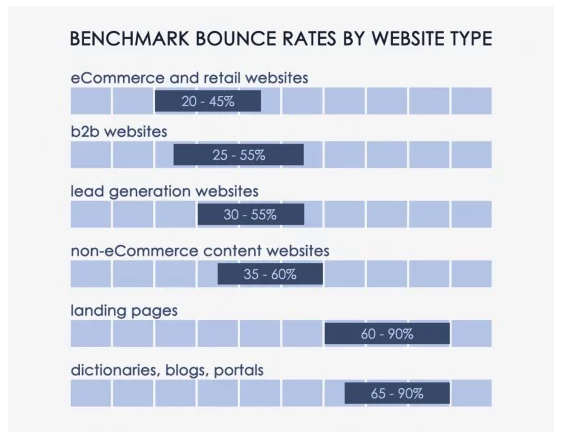
Average bounce rates can vary between 20 – 90% depending on the type of website you operate or even the type of page users are viewing. The chart below, created by Conversion XL, shows that eCommerce websites average a 20 – 45% bounce rate, while blogs and special landing pages average a bounce rate of 60 – 90%.
Online shoppers typically spend a longer average time on a website as they browse multiple products. However, blog posts or landing pages can have a considerably higher bounce rate, especially if they are not designed, written, or formatted to grab visitors’ attention.
But, also consider that a high bounce rate doesn’t always mean your website is in trouble. A visitor looking for your address or telephone number can quickly visit a locations page, contact page, or even the homepage and find the information they need very quickly. While it may result in an average bounce rate of 70-90%, it also results in satisfied users.
How to Keep Visitors on Your Site Longer
The Faster the Better
The very first way you can lose a website user’s attention is by keeping him or her waiting. The speed at which your site loads can make or break you in terms of keeping a user on your site. And users have the need for speed.
47% of consumers expect a web page to load in 2 seconds or less.
33% expect load time on a mobile device to be equal to or faster than their desktop.
You can test a page’s load speed by using Google PageSpeed Insights or Varvy. If your results come in higher than user expectations, you may want to pay attention to the following elements of your site:
Reduce server response times
Condense images and media
Prioritize visible content
Enable browser caching
Optimize CSS, HTML, and JavaScript
Minimize redirects
Know Their Habits
One of the best ways to keep web users’ attention is to build your site and present your content to mirror the way they read (or, more than likely, skim) through your site. There’s no shortage of research on how people interact with websites, but here are some of the highlights we pulled to help you harness your readers’ attention.
Readers Follow An F-Pattern
When researchers conducted an eye-tracking study, looking at how users viewed thousands of web pages, a dominant reading pattern emerged. The F-shaped pattern showed that readers typically scan three main areas of a web page.
A horizontal movement along the top of your content area.
A second, but shorter, horizontal movement further down the page.
A vertical movement, which researchers called a “slow and systematic scan” down the left side of the content.
They Go Beyond the “Digital Fold”
Because of a website user’s short attention span, marketers often feel they need to cram as much information as possible into the top part of their website, which is often referred to as “above the fold.” And yes, it is important to provide key information to your readers as quickly as you can, but the main point here is “key,” not “all.” Smart web users know they need to scroll down a web page, and they will happily do it. In fact, analysis from over a billion web visits shows that 66% of attention on a normal media page is spent “below the fold.”
Users also know that the call-to-action and suggested next steps are found at the bottom of the page, which is why the bottom is the second most-viewed section of a web page. Give them what they’re looking for with a strong call-to-action to round out each web page.
Engage With Video Content
There are many good reasons to incorporate video into your website. Video allows you to tell the stories that help users learn about and trust your brand. Video also provides users with short attention spans with an option beyond reading through pages of long-form content. Videos are quick and colorful and keep users engaged longer.
Don’t be intimidated by video. Not everything you create needs to be splashy, high-production content.Here are a few ideas for video content to include on your website:
Homepage video
Product demonstrations
How-to videos
Brand story/history video
Client testimonials
User-generated video
Grab Visitors’ Attention with a Friendly Reminder
How many browser tabs do you have open right now? Is the article you started reading with your morning coffee still there? You may have already forgotten why you went to those sites in the first place. A multi-tasking audience with a short attention span can be hard to overcome, but we discovered a fun way to make your site’s browser tab stand out from the rest and encourage visitors to return to their session. Just take a look at these two browser screen grabs…
Did you catch the difference? The “Thoughts on Users” tab changed to “Don’t Forget to Read This…” when I clicked over to another tab. A small touch, sure, but in that eight-second span, it may be just enough to bring back an attention-challenged user.
P.S.
I’ve hidden eighteen typos in this post to ensure that you were paying attention. Just kidding, I didn’t.
If you need help creating the written, visual, or video content that grabs visitors’ attention, contact our digital marketing specialists!
It’s here. The day has come, the plot has been dug out, and net neutrality has been laid to rest. That’s right — net neutrality is officially a thing of the past. On June 11, 2018, net neutrality rules were repealed despite the fact that 83% of Americans didn’t approve of it.
So…now what? What is net neutrality and why did we have it in the first place? What makes it so important and how does the end of net neutrality affect the general population and the world of digital marketing? We’re taking a deep dive into net neutrality to get a better picture of what this big change means for our future.
What is Net Neutrality?
Also known as “open internet,” net neutrality is the standard that Internet Service Providers (ISPs) follow by providing consumers with access and free range to all content, apps, and websites on the internet. Net neutrality prohibits the favoring and/or blocking of one website or product over another.
There’s no denying that technology rules a majority of our lives. Have a question? Google it. Want to buy a product? Ask Siri or Alexa to search for it for you and add it to your shopping cart. The internet has been free for all to use. All websites were accessible and you could easily look up or navigate to any page. But now? Net neutrality is dead and the internet will have more regulations.
Why is Net Neutrality Dead?
The Federal Communications Commission (FCC) has been against net neutrality for some time now. Despite reluctance from many politicians and the general public, the FCC repealed net neutrality in order to get rid of “unnecessary regulations” that were previously set in the Open Internet Order of 2015 Act during the Obama-era. In its place, the Restoring Internet Freedom Order was initiated.
The Restoring Internet Freedom Order was designed by the FCC to protect the open internet while promoting a better, faster, and cheaper internet for consumers. However, contrary to its name, the order has ended public utility regulation and handed it over to large, money-driven corporations.
Net Neutrality vs. Non-Neutrality
Let’s get into the thick of it, shall we? Every story has two sides and we wouldn’t be giving this subject justice if we didn’t map out what net neutrality has done for us up until now, and what will be different without it.
With Net Neutrality
Versions of net neutrality have existed since the conception of the internet. Looking back, we can identify how net neutrality has affected the way our country works.
High Competition — Internet neutrality created competition between all types of businesses, both big and small.
Business Equality — Net neutrality promoted an equal marketplace so small businesses had a fighting chance against bigger businesses.
More Innovation —There was always the urge to produce the next best thing, so companies of all sizes and types worked as hard as they could, helping to amplify innovation and growth.
Minimal Start-Up Costs — Neutrality helped to keep prices low for both start-up businesses and consumers. If you were a new business owner looking to create an online store, you didn’t have much standing in your way.
Low Consumer Pricing — Customers reaped the benefit of companies competing for business since each company would try to provide the lowest prices for products or services. Some companies would even offer free information, resources, and items to generate traffic and pull in leads.
Without Net Neutrality
We aren’t psychics and we can’t predict exactly what will happen now that net neutrality is gone. However, we can speculate on some of the situations that may arise now that the internet is more regulated.
Required Payments— ISPs will be able to take control over the internet by requiring a payment from website owners and users looking to receive high internet speeds.
Bandwidth Throttling — ISPs will be able to throttle bandwidth (purposely slow down and speed up internet services) and favor large companies that pay high premiums over smaller, competitive companies with small budgets. The high speeds, also called “fast lanes,” will allow certain websites to load faster than others. That’s extremely important since it’s been reported that just about half of consumers expect pages to load within 2 seconds, and 40% will leave a website if it takes longer than 3 seconds to load.
Website Blocking — ISPs may begin blocking smaller or competitive sites from users just because they favor one over the other.
Less Competition — With net neutrality no longer helping to push for competitive pricing, the cost of goods and services will increase. If websites are being required to pay high premiums to have their site found, they will need to gain that revenue from another source, such as their profits from selling to consumers.
High Consumer Pricing — ISPs may require the general public to pay for higher-quality apps, large data plans, and fast streaming speeds. And don’t forget about pesky fees and taxes! They’ll increase as well.
How Non-Neutrality Will Change the Marketing Game
So, what does the end of net neutrality mean for marketers? Originally, net neutrality created a high demand for internet marketing services because they focused on increasing organic traffic. Without net neutrality, competition between businesses may be uneven. This means the use of high-quality digital marketing services will be more important than ever before.
If ISPs favor large companies that pay high premiums and the internet is flooded with those websites, superior internet marketing efforts will be necessary to keep other business websites relevant. Marketers will need to invest more time, energy, and money into the channels they can control or manipulate. In addition, marketing companies might have to charge more for their services if they want to guarantee that clients will be placed in the fast lane.
With all of that said, non-neutrality will not change how search engines such as Google or Bing display results. For example, if someone is searching for a burger joint, Search Engine Results Pages (SERPs) will still show smaller restaurants that serve burgers first because they’re local.
Non-Neutrality & Content Marketing
Content marketers will have a harder time getting their content seen by their targeted audience. Unfortunately, if a website isn’t paying premium fees, it may be subject to slower load times and page blocking, which would keep users from visiting the site.
With that in mind, creating good, helpful, and insightful content will be vital for websites to be successful. If you want a shot at bringing in customers and keeping them coming back, you need to grab them from the get-go. Entice them with your content and make sure they know that your website is one they’ll want to keep coming back to for information.
Non-Neutrality & SEO
Net neutrality allowed websites to be ranked by content, keywords, and effective use of linking. With non-neutrality, SEO will be affected by content marketing struggles. Traffic may be limited at times due to ISPs blocking specific sites from potential users. Website blocking could also affect external linking since some of your users may not be able to access external websites.
The more satisfied users that visit your site, the higher your search ranking will be. Site speed, design, and ease of navigation also play a significant role in overall success. With the help of SEO tactics and strategies, you can ensure your website is found by more users despite any difficulties that may arise due to non-neutrality.
Non-Neutrality & Social Media
While most social platforms don’t currently charge you to use their services, ISPs may charge you to access them on devices or restrict the use of competitive apps. For instance, in Portugal, a country without net neutrality, users have to buy packages in order to access social media platforms.
Since users may be charged to view their own social accounts, some may stray away from social media altogether. Account followings could shrink and the cost to advertise on social media platforms would increase. However, with the aid of social media experts, your social media accounts can stay afloat and relevant to users that do stick with social platforms.
What Will Happen Now?
It will take a bit of time for the effects of non-neutrality to be felt across the U.S. However, the fight for net neutrality is far from over. Many Americans are still outraged by the prospect of being stripped of their internet freedom. In hopes of changing the final outcome, individuals opposed to non-neutrality are encouraged to make their voice heard by visiting Battle For The Net’s web page. There, you can easily write to Congress and find other resources to help in the fight to save net neutrality.
Do I Still Need Digital Marketing?
Yes! Actually, you need it more now than you did when net neutrality was alive. Impeccable content marketing, SEO, and social media skills will be necessary to ensure your website is the best it can possibly be. Digital marketing will push your business to the top, making your website the one users want to click on and navigate to. Become as successful as possible by placing content marketing, SEO, and social media specialists in the driver’s seat when it comes to your online presence.
What’s your take on net neutrality and the FCC’s Restoring Internet Freedom Order? Let us know your thoughts.
To carry on the theme of spring cleaning, I am going to talk about cleaning up your site and how to get rid of the bloat that may be costing you visits and leads. If you publish content on a regular basis, such as blog posts, podcasts, or videos, your site will inevitably grow over time. Too much content can clog up the system making it difficult for search engines to know which piece of content to deliver to the user. As your site grows, it is highly suggested that you identify the content that is not performing well or that is not helping your visitors. The main emphasis here is keeping the quality content and removing the junk.
A Real World Example
In Tower’s case, we have covered the topic of website audits three times over the last three years. In all honesty, we don’t need three blog posts about website audits, just one will do. Therefore it was my task to find the website audit pages and compare them in terms of content value, usefulness, the amount of traffic they drive, their page authority, and links back to those pages. Once I found the page that I believed to be of the most value I had a couple of options, either:
no-index the pages that don’t perform as well
301 redirect the lesser quality pages to the more valuable page
Create a new “super” page and redirect the other website audit pages to the new URL
In this case, I chose to 301 redirected the under-performing pages so that their equity would be passed onto the main website audit blog post that we wanted to promote. Let’s dig into more detail about how to do this.
Is There Such a Thing as Too Much Content?
Yes, websites can become very bloated with low-quality content that is not performing as well as other similar content pieces. When users came to the Tower website and searched for “website audit” they found at least three different results, all of which are very similar. This meant the users needed to choose which post to view, guessing at which one was most applicable to their needs. This can negatively affect the user experience. It is far better to have one result for the website audit topic. Users no longer need to make a choice, allowing them to click through more confidently
When to Delete
In some cases, when reviewing your content, it may be best to simply to delete older pages that have been added over the years. Content like old event pages, coupons that have expired, or blog posts that are outdated, incorrect or no longer apply are low-hanging fruit. Ultimately you only want pages that are applicable and offer value to the user. If a page no longer does that, you may want to consider deleting it. Note: When you delete pages, you need to 301 redirect the users to an appropriate page, otherwise it will cause your site to have broken links.
When to Consolidate
In some cases, as with the Tower Marketing example where we had three similar blog posts, it may be worthwhile creating a new page that has all the best elements of each individual page, called a “super page.” The goal here is to create a unique, high-quality piece of content that does not outdate itself and can be easily updated. Note: Doing this would require a 301 redirect to point the three older pages to the new super page.
When to Noindex
If you don’t know which pages to delete and redirect, another option would be to noindex the pages. While this does not help with duplicate content issues on your site, it can help search engine to not index a group of similar pages on the web. Tags and Categories are examples of URL extensions that we at Tower noindex because they can bloat the search results and cannibalize the rankings of pages that are more relevant. Note: Noindex still allows the bots to visit that page, they will however not be added to the SERPs.
Benefits of Cleaning Up Your Site
Cleaning up your site has several advantages, one of which is making the articles that are most important to users easy to find. Web designers and SEO’s need to work together to make sure that UX (user experience) is maintained. As mentioned earlier, having multiple search results for the same query can hinder the user journey and UX. When you clean up your site it also allows for better search results. A clean site makes it easier for search engines to index and categorize which page best represents a user’s search query. As noted above, having one super page instead of three can help rankings.
Ready to slim down your website? Contact our specialists today to start the cleanup process.