0

Dedicated business founders sharing insights, highly critical consumers searching for great products, and users sharing absurdly hilarious real estate listings from Zillow—what do they all have in common?

The future of search: community.

Reddit is a social news aggregation, web content rating, and discussion website built around more than 100,000 communities (AKA subreddits). Businesses no longer need only focus groups and surveys to find out what people are thinking—they just need a free account.

These social tribes are all about transparency: honest answers to real-world questions, unsponsored product reviews, Q&A’s, and complaints. And search engine optimization giants like Google have taken notice.

That’s why Reddit is the number one destination online to build authenticity, trust, and awareness with the real audience behind your brand.

In this blog, we’ll explore why Reddit is a critical tool for building your online presence in the age of AI, breakdown who should use Reddit for marketing, review organic and paid advertising methods, and cover do’s and don’ts for winning on the platform.

Why Using Reddit for Marketing is Suddenly Crucial

image Using Reddit for Marketing: How to Hook Your Audience (+5 Do’s and Don’ts)

In a Reddit study, results show that 74% of people agree that Reddit helps them make faster purchase decisions.

Have we got your attention?

Although Reddit has been around for over 20 years, the platform became the 2nd most visited domain on Google search in 2025. Why?

Let’s explore a little backstory and explain how it can transform the way you market.

The Trust Factor: Why Search Engines Prefer Reddit

In August 2023, businesspeople, marketers, and anyone with an online presence had a historic moment—the Google “hidden gems” update shifted focus to authentic, user-generated content.

Gone were the days of editorial and review sites dominating the world web—the world’s conversation space suddenly became the most valuable real estate on the internet.

The result? From July 2023 to August 2024, Reddit’s visibility skyrocketed with a 1,348% increase in visibility on Google…

The “Google Zero” Effect: Reddit and AI Search

image 1 Using Reddit for Marketing: How to Hook Your Audience (+5 Do’s and Don’ts)

In May 2024, another Google update caused a seismic shift in the internet community—the Search Generative Experience (popularly known as AI overviews). And it created a new phenomenon dubbed the “Google Zero Effect.

Google was no longer just a search engine—it was an answer engine. A user could ask a question and get an instant answer at the top of the search engine results page (SERP) without ever needing to click a single link.

That’s where Reddit enters the scene once again. In February 2024, Google announced a partnership with Reddit to train its AI models with a goldmine of genuine, human conversations from the platform and made it one of the most important spaces on the internet. AI has truly transformed the landscape of modern marketing and it’s one of the most powerful tools available when used responsibly.

How Reddit Marketing Can Reshape Your Brand Awareness Strategy

Google updates, SEO, and AI training—how does it impact your marketing today?

There are several key advantages to becoming a Redditor:

  • Become a part of the world’s largest online community and keep up with competitors
  • Raise your brand’s ranking on Google search results and appear in AI answers
  • Engage and build community with your target audience in niche, subreddit communities
  • Speak with customers directly to answer questions about your product or service
  • Gather feedback in real-time and build a library of user-generated content from positive comments

Want help navigating the ever-changing world of Reddit advertising?

Which Industries Fit the Reddit Marketing Audience?

Reddit is like a hangout with friends and colleagues—it encourages social engagement and discourages self-promotion.

To gauge what’s appropriate, imagine what you would and wouldn’t feel comfortable inserting into a natural conversation. The unique culture of Reddit strongly impacts which businesses succeed.

Industries that thrive are those that naturally engage a tribe of followers with depth, passion, or technical detail. Thousands of subreddits exist for everything from hobbyists (3D printing, art, hiking) to professional communities (financial services, trade skills).

At the same time, Redditors frown on transactional businesses that don’t build community. Generic products like toothpaste or toilet paper may receive some product reviews, but they likely won’t build a dedicated audience. Hyperspecific local businesses without a unique hook like a dentist’s office or accounting firm also might struggle on the platform.

Organic Reddit Marketing: Transparency is King

Contribute before you promote—it’s the golden rule of Reddit. Users upvote what they like (“karma”) and downvote what they don’t. A subreddit is the opposite of a billboard because it’s an authentic space.

Let’s take Mint Mobile as an example. When you hear about the brand, you might think of Ryan Reynold’s brilliant commercial campaign, but the company has also experienced huge success on Reddit.

image 2 Using Reddit for Marketing: How to Hook Your Audience (+5 Do’s and Don’ts)

It’s actually a “semi-official” subreddit. Mint Mobile doesn’t control or moderate the content because it was founded by volunteers. Rather than attempting to take it away by starting their own channel, employees joined the forum and started posting.

They even provide a dedicated customer support professional for questions, concerns, and complaints. The outcome? 59,000 weekly visitors to the Mint Mobile community. Mint Mobile’s team truly understands Reddit for marketing and they’re gaining traction through organic channels.

So, how can you begin to leverage Reddit for brands? There are several key strategies you can use to get started:

  • Share content: If you share great content, they will come. Creating great blogs, articles, videos, and infographics within the right niche can get people chatting.
  • Build a subreddit: You can build a subreddit dedicated to your brand where people discuss your product or service. It’s also a place to host giveaways, perform market research, search out beta testers, and so much more (your creativity is the limit).
  • Host an AMA: An AMA (ask me anything) is a planned event with a scheduled time where a brand or influencer chats with users to connect with them directly.
  • Provide customer service: Redditors often come to the platform to find a forum of answers on customer service and technical support questions. It’s an opportunity to capture user attention with a dedicated space for troubleshooting and turn a complaint into a success story.

Reddit Advertising: Targeting High-Intent Communities

Want to take it to the next level beyond organic marketing and reach customers not engaged on your subreddit? Reddit advertising is another popular option.

Reddit paid ad formats include:

  • Text (promoted posts)
  • Image
  • Video
  • Product
  • Carousel
  • AMA (ads in feed)
  • Conversation (ads in comment threads)

Reddit targeting offers a wide range of common ad demographic tools, but one feature stands apart from the crowd. Businesses can place their ads on specific subreddits, reaching highly niche audiences where they go to read about their interests. It’s the opposite of interrupting someone with an irrelevant ad.

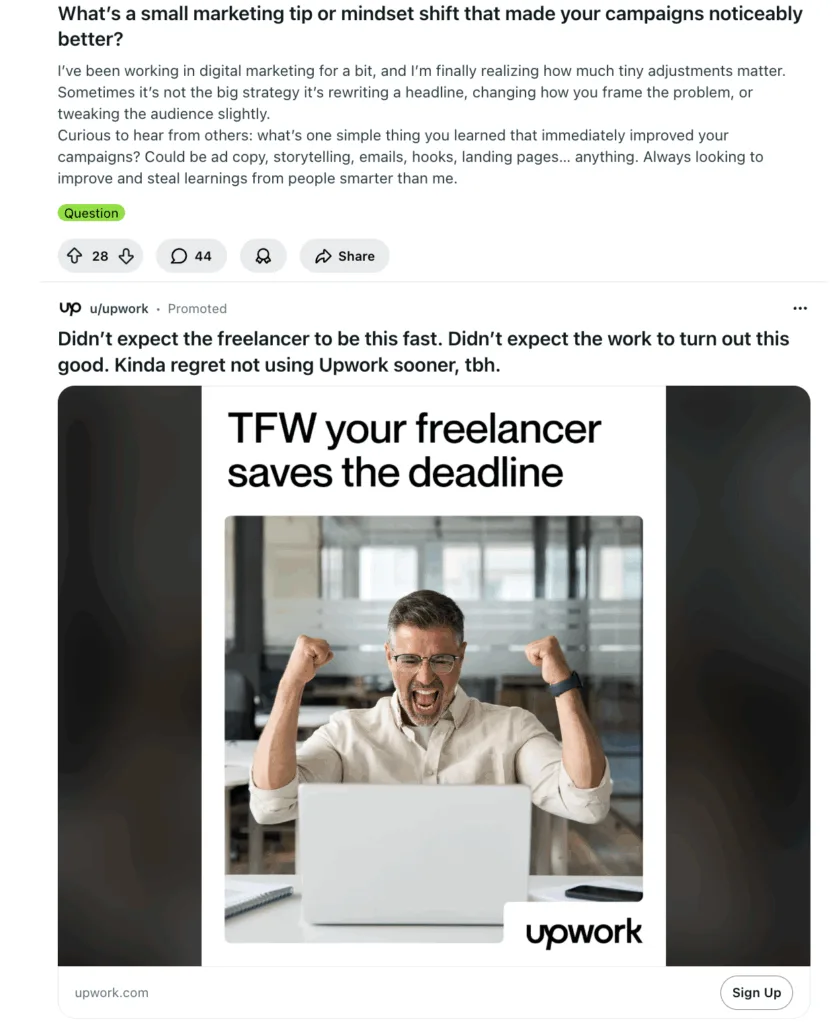
Want to promote digital marketing services? Simply create an ad and set it to target the r/marketing subreddit and you have the potential to reach 127,000 new customers who are actively thinking about marketing. For example, Upwork targets people interested in hiring freelance marketers with a promoted image ad on the forum.

image 3 Using Reddit for Marketing: How to Hook Your Audience (+5 Do’s and Don’ts)

The 5 Do’s and Don’ts for Using Reddit for Marketing

When you’re new to Reddit, it can seem like a big task to dive deep into the waters and join the community. Thankfully, there are tried-and-tested do’s and don’ts to get off to a positive start with your audience.

Do’s

  • Do observe and learn: Every subreddit is an ongoing conversation with a unique culture, inside jokes, and socially acceptable behavior. Quietly observe and watch before you start posting.
  • Do contribute value: The key to Reddit is popularity—you want to add something to the conversation that informs, inspires, or entertains. Show what makes you unique and share your passion and expertise.
  • Do be transparent: Always be honest about your background on Reddit, especially if you’re a brand ambassador or employee. Redditors expect to speak with real, unbiased people.
  • Do encourage communication: Reddit is famous for praise and criticism. It’s vital to communicate with customers honestly, listen to their feedback, and accept positive and negative outcomes with grace.
  • Create Reddit native content: Instead of simply linking to an external website, create posts designed to help Redditors. Speak to the community with detailed text posts, infographics, or original image albums designed to live on Reddit and encourage ongoing conversation.

Don’ts

  • Don’t ignore subreddit rules: Every community has volunteer or paid moderators with a set of guidelines. They usually specify the type of content and rules on what you can post (including promotional material). Missing an important rule can get you banned easily.
  • Don’t debate downvotes: One of the fastest ways to hurt your brand image is to begin debating on Reddit. Actions speak louder than words—if someone says something unfair or untrue, receive the feedback and work to correct it over time.
  • Don’t use generic accounts: Avoid using accounts that sound like a corporate identity. Ask members of your team to join the conversation with authentic identities.
  • Don’t neglect the comments section: Once you launch a subreddit, it needs regular upkeep. Not replying to comments will lower your activity and lead to negative comments left unresolved.
  • Don’t reuse content: It’s also vital not to repost the same content across multiple subreddits. Eagle-eyed Redditors will pick up on it fast and realize the engagement is not genuine. You need well-written content that’s true to yourself and gently leverages copywriting psychology to persuade readers to explore your brand further.

Need help developing a strategy to maximize your Reddit marketing? Our content marketing specialists can guide you to identify your audience on Reddit and build a tribe that boosts awareness for your brand with organic and paid tactics.

Impressions are rising, but clicks are decreasing. Year over year, your site performance looks like it’s declining. Meanwhile, Google is adding new AI features to Chrome. In fact, every search engine is right now. 

Right now, our clients want to know how AI overviews are impacting their marketing. Is SEO dead? Is Google dead? Should you even produce content?

So let’s dive into the most frequently asked questions around AI overviews, SEO, and what that means for your content marketing.

First, Let’s Define AI Language

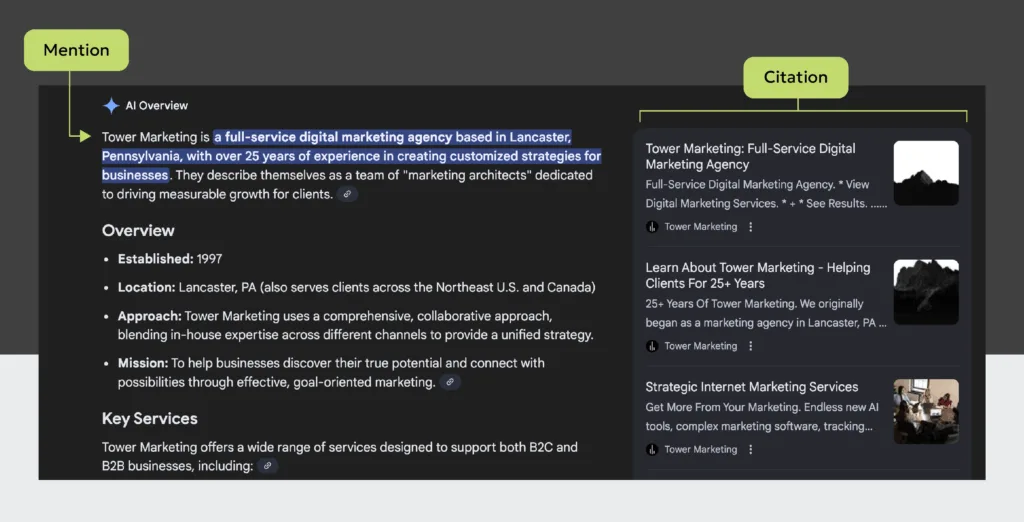
An example showing an AI mention vs an AI citation

FAQs About AI Overviews Impact On SEO & Marketing

1. Are traditional search engines (like Google) still important?

The best way to answer this question is to regularly evaluate your traffic in Google Analytics, or whatever tool you use. Study where your traffic is coming from. Note changes or shifts. 

Focus your efforts on the channels you already see users coming from, because that tells you where your audience spends their time.

Recently, I looked at 2024 vs 2025 data for a client. While they’re seeing more traffic from AI referrals, the majority of traffic to their site is still coming from search engines. For example, 11K sessions to blogs came from a traditional search, while 300 came from an AI referral.

That said, are search behaviors changing? Absolutely. My message this year has been that the places and ways we can search are fracturing.

For example, more people are searching Reddit because they want insights from real people. ChatGPT released Atlas. Pinterest is more of a search engine than it is a social platform. Instagram posts now show in search results.

That’s why it’s important to use real data to evaluate which platforms you need to focus on in your SEO strategy. And build your strategy across all channels, not just one.

2. Can I see where I’m showing up?

There are a few tools right now. One of the more trustworthy ones is Semrush’s AI Toolkit. I’ve also had hit-or-miss experiences with SpyFu’s SpyGPT tool. (If your brand has a more local reach, you may have a harder time getting results.)

Another workaround is to isolate referral traffic in your GA4 reporting from popular AI sites. This will measure visits from citations, but it still can’t offer you insights into brand mentions. 

Specifically for Google, AI mode counts toward any totals you see in your Search Console reporting. That said, there’s nothing in place yet to filter and only see AI mode impressions, clicks, and other data. 

Some of this is likely due to the extreme personalization AI search accommodates. And the way it’s integrated into the search experience. The setup makes isolating and collecting data complex. Some of these companies may also be viewing AI overviews as an evolution of search, making them hesitant to start treating AI like its own channel/source.

Want to make sure you’re showing up where your audience is online?

3. How can I tell if AI overviews are affecting my traffic?

Zero-click marketing. If you notice your site content is getting more impressions and fewer clicks, it’s a sign you’ve been impacted. AI overviews are contributing to that.

Here’s an example of what our SEO team has been calling the “alligator mouth.” In their AI overview analysis, they noticed this trend starting across all our clients when features in Google search become more integrated during April 2025.

AI Overview SEO Reporting 1 AI Overviews, SEO, & Your Content: What’s Happening With Organic Search Right Now?

4. Is content even relevant anymore?

Content is always relevant. It’s currency! However, what that content looks like should evolve. Match what people enjoy consuming. (Remember how early Facebook used to be all text posts? Content changes.) 

Plus, content provides context on what you do. And context is key for increasing your chances of ranking in AI overviews.

A regular search engine ranks pages primarily on keywords and link authority. (With a few other mysterious ingredients in the mix that we’re not privy to.)

But AI ranks based on contextual information, expertise, entity authority, and also its understanding of the user and what they’re searching for. Its goal is to deliver a personalized answer and results can look wildly different between users, even with the same prompt.

It’s time we reframe our thinking in marketing content.

Blogs are a piece of the puzzle. We don’t expect users to read the whole article anymore. They’re great because they feed AI context, which can help with getting an AI citation. 


But other content that’s equally important now includes:

  • Case studies or project examples
  • PDFs and rich multimodal resources
  • Video
  • Infographics
  • Real photography (not stock)
  • Specialized landing pages outside your core site pages
  • Resource hubs and collections

Also, sometimes businesses look at content with a narrow perspective, only focusing on its value in search. This misses its potential. A good content strategy helps your brand by:

  • Helping prospective clients discover you
  • Supporting the selling process
  • Providing something valuable to your email subscribers
  • Engaging your current clients to foster loyalty
  • Making it easy for others to recommend your brand
  • Creating a memorable experience around receiving a product or service

5. How can I rank and appear in AI overviews?

The path forward here is less certain than SEO. AI search is changing rapidly right now, making it hard to answer. But in 2025, Google gave us some hints

I’ve also been recommending the following tips. In my experience, the clients who were already doing this are the ones who are getting marketing results from AI overviews.

  • Keep content fresh. Update top-performing content around 6-12 months.
  • Create a lot of context with diverse types of content. 
  • Produce a lot of content to build up that context around who you are.
  • Craft longer pieces (like blogs) and answer a lot of niche questions.
  • Boost your authority and recognition with reviews, social signals, etc.
  • Show proof of what you do with real-world examples.
  • Execute SEO best practices, like making sure crawlers can find your content and having structured data that matches it.

Want to scale your content production, but make sure you’re still creating pieces that have value?

The Takeaway: All LLMs Are Not Equal

Semrush has been collecting data on the differences between LLMs. They’ve related the era we’re in now to the early days of Google and Yahoo when they had different algorithms.

For example, their team has noted that Perplexity is more likely to pull a summary from citations and share the source. Gemini often gives sources in its AI overviews and in initial answers. However, ChatGPT doesn’t typically give links until the 3rd or 4th prompt. 

It’s still too early to optimize for each LLM. We don’t know all the factors yet, and the LLMs themselves are still developing. The best choice right now is to focus on what’s a smart marketing strategy to begin with. Because of all the changes happening in search, we’ll have to rethink how we measure marketing attribution in the years to come.

But for now, the way to win with AI overviews, SEO, and content is to focus on what’s best for the person who is using it. If you pursue that instead of focusing on gaming the system, you’ll stay ahead of the changes just fine.

If you’re looking to make an impact in social media marketing within the professional sphere — LinkedIn is where you want to be. Breaking into the world’s largest professional networking platform may seem daunting. That’s why we created this LinkedIn ads checklist to guide you through creating, setting up, and launching successful campaigns.

How to Set Up a LinkedIn Ads Account

Before we jump into our LinkedIn ads checklist, it’s important to review how to set up a LinkedIn ads account. To start, go to your LinkedIn homepage. At the top of the click For Businesses, and select Advertise.

If you already have a Business Manager account, click on your profile image or Business Manager logo in the upper right corner of the page.

Note: To create a new ad account, you must be a Business Manager admin. After creating a new ad account, it will automatically be added to the selected Business Manager. 

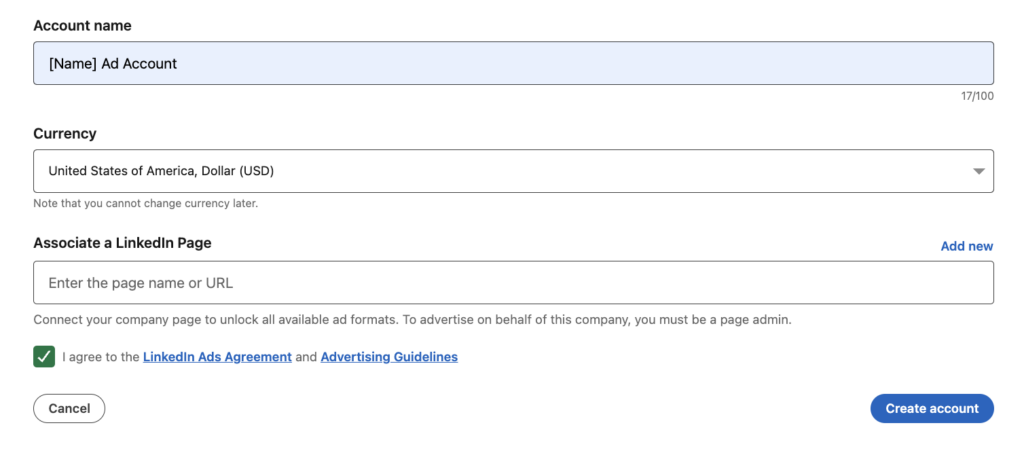
If you don’t want your new ad account to be owned by a Business Manager account, select your profile instead. Then, choose the name, company page, and currency for your new account. 

After creating a new account, you’ll be granted account manager and billing admin access. As an account manager or billing admin, you can add partners to the ad account. 

LinkedIn ad account set up page.

LinkedIn Ads Checklist 

Now that you understand the basics of how to set up a LinkedIn ad account, you can move on to creating your ads. Our LinkedIn ads checklist is your guide to ensuring successful campaigns.

Step 1: Select or Create a Campaign Group

The LinkedIn ad campaign set up begins with a campaign group, then a campaign, and lastly an ad. To begin, you’ll sign in to LinkedIn Campaign Manager and click on the respective account name. 

This will take you to the campaign creation page. From here, you can select or create a campaign group for your individual campaign and ads. If it’s your first campaign, you will need to start by filling out the Campaign Group details

When creating a new campaign group, LinkedIn gives you the option to choose a group objective (see step 3), budget, and schedule (see step 4). However, you can also choose to opt out of doing this if you’d like your individual campaigns to use different objectives, budgets, and run times.

If you already have a campaign group, click on the name of the Campaign Group you’d like this new ad campaign to live under. 

Step 2: Select Your Campaign Objective

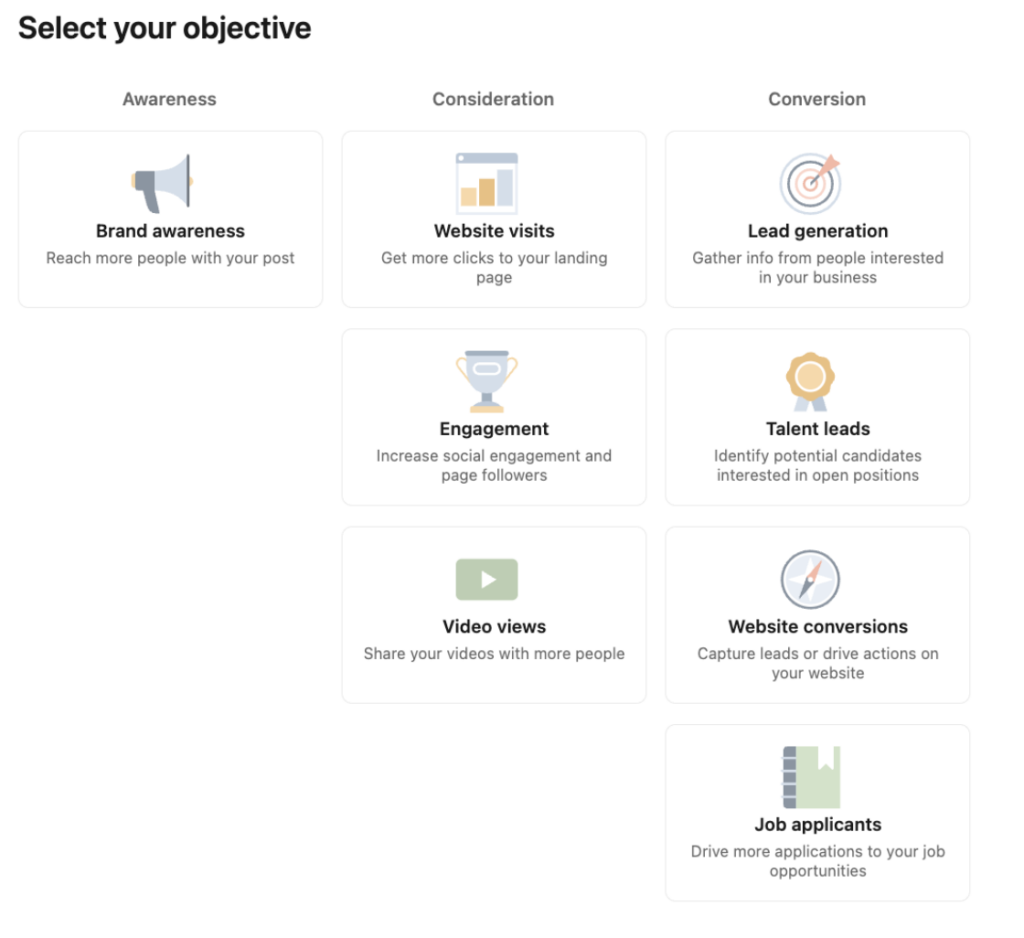
The next step in our LinkedIn ads checklist is choosing the correct campaign objective. This plays a key role in learning how to run successful LinkedIn ads. There are seven objectives you can choose from, all of which can be broken down into three main goals: awareness, consideration, and conversions. Below, we’ve outlined the details of each objective and its benefits. 

Awareness campaigns maximize your brand visibility through impressions. This objective is ideal for top-of-the-funnel brand building

  • Brand awareness

Consideration campaigns encourage your customers to take action to find out more about your business. These objectives are good for getting clicks that send users to your website, interacting with your posts, taking social actions, or getting more company followers. The options for consideration campaigns are:

  • Website visits
  • Engagement
  • Video views

Conversion campaigns focus on lead generation and tracking actions on your website, such as downloads, form submissions, phone call clicks, and more. These objectives are one of the most effective ways to capture leads and gather data that you consider valuable: 

  • Lead generation
  • Website conversions
  • Job applicants

Note: To run conversion campaigns, you must use conversion tracking (we’ll discuss this in further detail below). 

LinkedIn ad campaign objective selections.

Step 3: Select Your Group Budget & Schedule

There are multiple options for setting LinkedIn ads budgets and schedules. The first option, Dynamic Group Budget, allows you to set one central campaign group budget in Campaign Manager. 

LinkedIn automatically shifts the spending within that group to the campaigns that are performing best and giving you the best results, depending on your goals (like clicks, leads, or conversions).

However, like we mentioned above, you can also choose to select a LinkedIn ads budget and schedule at the campaign level. We will cover this further down (see step 7). 

Step 4: Build Your Target Audience

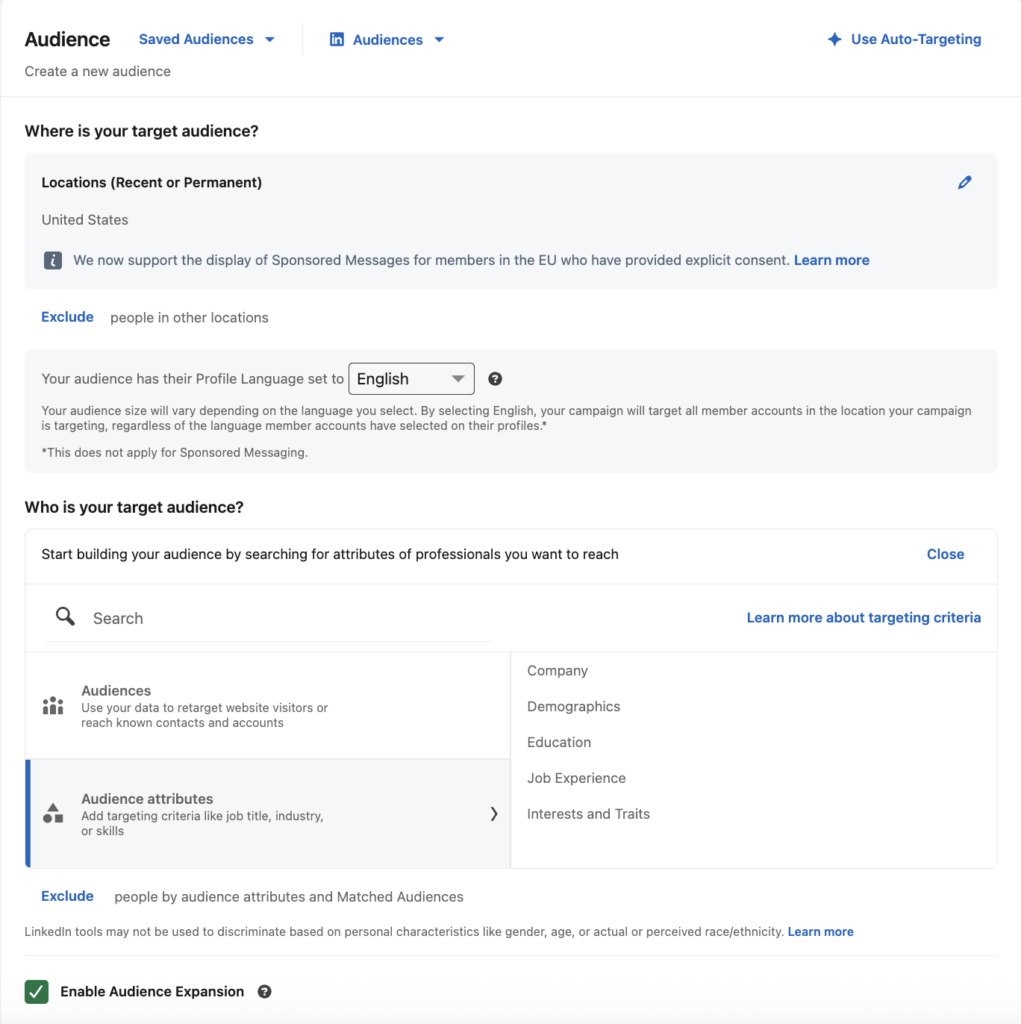
There are numerous LinkedIn ads targeting options, from professional traits to personal interests. When building your target audience, it’s important to keep a few things in mind, such as your advertising goals, location, budget, and more. 

  • Location: continent, country cluster, country, state, region/market area, county, and city.
  • Company: company connections, company followers, company industry, company name, and company size. 
  • Demographics: age and gender.
  • Education: degrees, fields of study, and member schools.
  • Job Experience: job function, job seniority, job title, member skills, and years of experience.
  • Interests: groups and member interests. 
LinkedIn ad campaign audience targeting set up.

Besides the traditional LinkedIn ads targeting options, LinkedIn allows advertisers to expand their audience by enabling Audience Expansion or building a Lookalike Audience

These permit LinkedIn’s algorithms to identify additional audience members that are similar to your initial target audience. Using either option can help advertisers reach a broader audience that’s still relevant and generate more data. 

Advertisers can also customize LinkedIn ads targeting with business data they’ve collected themselves. These are known as Matched Audiences and can be used for retargeting, contact targeting, or company targeting.

It’s important to note that your audience size will play a key role in how your campaigns perform. Best practices recommend keeping your target audience over 50,000 for Sponsored Content and Text Ads, and over 15,000 for Message Ads. 

Step 5: Select Your Ad Format 

The next step in our LinkedIn ads checklist is to select your ad format and placements. LinkedIn offers various formats, including:

  • Sponsored Content: Carousel, Document, Thought Leader, Event, Article & Newsletter, Single Image, and Video Ads. 
  • Message Ads: Ads that are shown in LinkedIn messaging.
  • Text Ads: Right rail and top banner ads.
  • Dynamic Ads: Follower, Spotlight, and Content Ads.
LinkedIn ad campaign ad format selections.

Step 6: Select Your Budget & Schedule

If you did not set a budget at the campaign group level, you will do so now. There are two types of LinkedIn ad budgets to choose from for your campaigns:

  • Daily budget: how much you can spend per day for that particular campaign.
  • Lifetime budget: the total amount you want to spend throughout the campaign. 

After choosing which LinkedIn ad budget option best suits your advertising efforts, you’ll be prompted to select the duration your campaign will run. You can choose to run your campaign continuously with a start date or on a fixed schedule with a start and end date

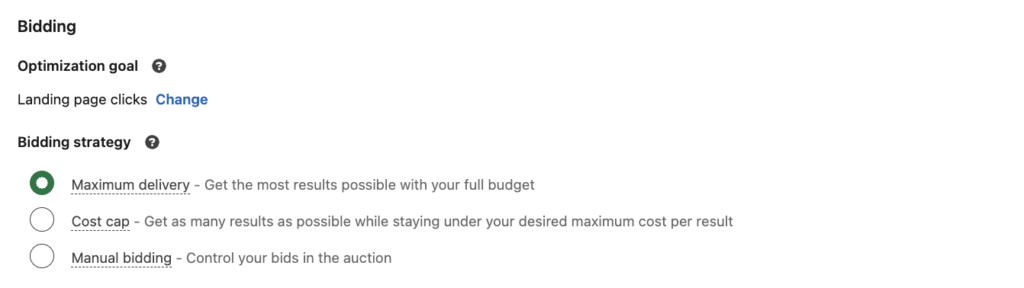
Next, you’ll notice there are bidding options available. LinkedIn ad bidding is how you compete with other advertisers on LinkedIn. There are two bidding options available when setting your campaign budget: 

  • Maximum delivery bidding: allows LinkedIn to set a bid that gets the most results while delivering the full budget.
  • Manual bidding: allows advertisers to set their preferred bid for the auction.
LinkedIn ad campaign bidding strategy options.

We recommend starting out with maximum delivery bidding if you’re new to running ads. Since you’re just starting out, you may not have as much of an idea on what bids are competitive against others vying for your audience. And maximum delivery bidding will allow you to establish what the average cost per result is for your business.

Step 7: Set Up Conversion Tracking

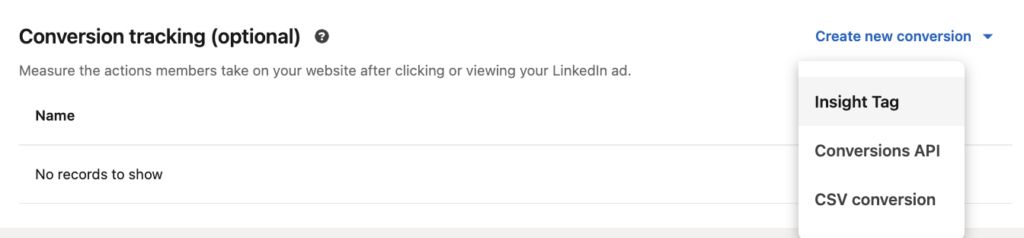
While it’s not mandatory for all campaigns, setting up LinkedIn ads tracking is highly recommended and can be done by adding the LinkedIn Insight Tag to your website. Once it’s set up, you’ll be able to participate in the following actions: 

  • Conversion tracking: track when a LinkedIn member account visits a page or takes an action on your website after viewing or clicking your ads.
  • Website audiences: create and build custom audiences to retarget LinkedIn member accounts that visit your site. 
LinkedIn ad campaign conversion tracking options.

Step 8: Set Up Your Ad(s)

Now that you’ve completed your LinkedIn ad campaign setup, it’s time for you to focus on creating your ads. Ad requirements will vary depending on the format you’ve chosen in step 6. Generally speaking, some best practices for LinkedIn ads include:

  • Featuring engaging ad creative and visual content (imagery, videos, graphics, etc.).
  • Using strong call to actions (“Sign Up”, “Download”, “Shop Now”, etc.).
  • Addressing your audience directly in headlines and copy.
  • Creating multiple ad variations (4-5) per campaign. 
  • Optimizing ads and destination URLs on all devices (desktop, mobile, tablet, etc.). 
  • Trying A/B testing to see how different criteria perform. 
LinkedIn Ads Checklist Blog Image 7 1 Don’t Miss A Step: Your Complete LinkedIn Ads Checklist

Step 9: Review & Launch

Finally, we’ve reached the last step in our LinkedIn ads checklist — you’re ready to review and launch your campaign. This is where LinkedIn will ask you to add or confirm the payment method, as well as look over the details of your campaign. After clicking Launch, your campaign will enter a review process before it’s pushed live. 

Note: To estimate the impact of your campaign before launching, use the Forecasted Results guide.

After your campaign is live, don’t forget to monitor its performance. Once the campaign has accumulated enough data, you can see detailed information about the professionals who clicked and converted on your ads under the Demographics tab. You can then use these insights to improve your ad content, creative, targeting, and testing.

Digital marketing specialist reviewing ad performance metrics.

Whether your goal is brand awareness, website traffic, or more reviews, we create social ads that cut through the noise. Let’s work together to strengthen your social media marketing strategy. 

Ready to see what LinkedIn ads can do? Our specialists are here to build social campaigns that tick every box on your customized LinkedIn ads plan.

Color is a powerful tool. It affects mood, catches attention, and can be used to influence purchase decisions both positively and negatively. However, people don’t perceive color the same way.

Roughly 2.2 billion people around the world have a specific visual impairment that interferes with how they process colors. This makes it difficult to access or understand information portrayed by color alone.

By creating an accessible color palette that’s easy to read, you can design a website that is both aesthetically pleasing and easy to navigate for everyone.

Let’s explore how you can use website color palette accessibility to your website’s advantage. 

Why Website Color Palette Accessibility Matters

Color accessibility is about creating color palettes and combinations that are visible to people with visual impairments, like color blindness or vision loss. Designing for color accessibility means creating inclusive websites where color combinations are clear to your audience. 

This results in websites that are easier to navigate and understand, ultimately providing a superior user experience while meeting regulations.

Accessible color palettes benefit those without disabilities as well. For example, adults with age-related vision changes or those reading on low-resolution screens can benefit from an accessible color palette. Also, people who are in bright sunlight or dimly lit environments can still read content if it has the right color scheme and enough contrast.

You might hear someone ask, “Is there a universal color for accessibility?’ While there isn’t a single universal color for accessibility, black text on a white background is considered to be the easiest for people to read. However, this blog will equip you with more options than that you can create a color palette that fits your brand and serves your site users well.

1. Understand ADA Compliant Colors

Understanding ADA compliance and website colors can be tricky. Unfortunately, it’s not as simple as a checklist you can reference when building your site. The law only states that you must provide “reasonable accessibility” to people with disabilities, like the ability to use a screen reader and fill out forms.

Although it isn’t a legal standard, most developers and designers follow the Web Content Accessibility Guidelines (WCAG 2.0), which include three levels of compliance: AAA, AA, and A.

Accessibility consists of more than color, but we’re going to focus on which level your site would fall into based solely on your use of color.

WCAG Levels of Accessibility


If you’re working on a new website or a website redesign, knowing the differences of each WCAG level can help make the design process easier. 

Level AAA

This is the strictest level of compliance. Level AAA is often used by government agencies, medical providers, and organizations that receive taxpayer funding. Level AAA requires a higher contrast level of at least 7:1 for normal text and images and a 4.5:1 level for large text.

Level AA

This is the medium level of compliance. For the majority of companies, level AA provides a good balance between meeting the legal requirements for usability and still giving designers flexibility. Level AA color guidelines require normal text and images to have a minimum color contrast ratio of 4.5:1 and large text to have a contrast ratio of at least 3:1.

Level A

This is the lowest level of compliance and is not recommended in terms of color. Color combinations that fall below levels AA or AAA will be considered a “fail” by color-checking tools.

How Compliance is Determined

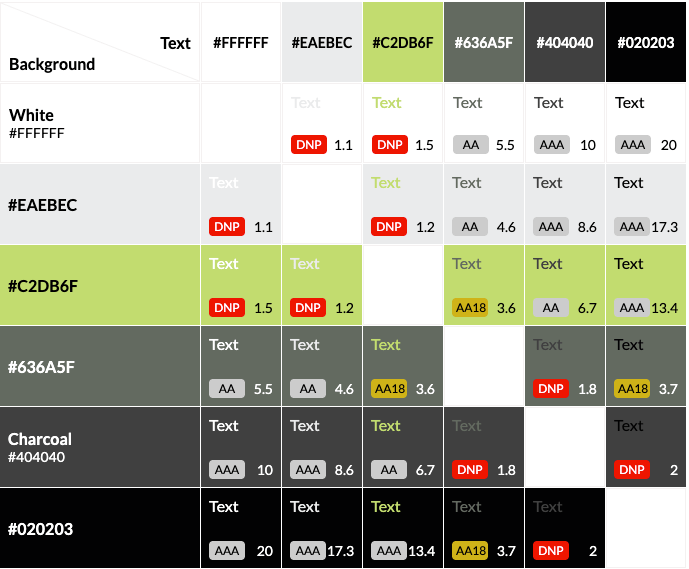
Your design’s level of color compliance depends on two factors: the contrast ratio between the foreground (text) and the background, as well as the point size of your text.

A contrast ratio of 7 or higher is considered AAA compliant, while 4.5 through 7 will meet AA standards.

Tower Color Contrast Checker blog Unlocking the Importance of Website Color Palette Accessibility

An example of a color contrast checker using Tower’s brand colors.

Some color combinations will be AA18 compliant, meaning they are readable at 18px (or 14px bolded) and above. If you do choose to use “borderline” complaint colors like these, however, you should take into account that text may scale down for mobile and no longer meet this size threshold. 

Of course, there are exceptions to every rule. If your client is using a font that’s unusually tall or narrow, you may need to find a contrast ratio even higher than the AA minimum.

If you need to redesign or update your website to be ADA-compliant, our team of designers and developers is ready to help.

2. Check Colors for Accessibility

To ensure your colors meet accessibility standards and are ADA-compliant colors, follow these simple steps:

Use a Contrast Checker Tool: Input the hex codes for text and background colors, or upload your design to a tool like:

Test Your Design: Whatever tool you use will provide a contrast ratio and indicate if your design meets WCAG guidelines.

Adjust Colors for ADA Compliance: If the ratio doesn’t meet the requirements, adjust the colors by darkening or lightening one shade until the ratio improves.

Set a Target Ratio: Aim for AA compliance (4.5:1 for normal text). For higher levels of accessibility, aim for AAA compliance (7:1).

Preview and Save: Once the colors meet the necessary ratio, preview how they look in your design and save them for future use.

3. Use These Practical Tips for Better Website Accessibility

Envision Your Audience’s Journey: Before you start designing a website, make sure it’s built with all users, including people with disabilities, in mind from the beginning. It is easier to build the website correctly the first time, envisioning all audiences, than to go back and fix each issue.

Use Colors Consistently: You’re likely using the same color palette for your entire brand, including your website. If not, you should be. Maintaining a consistent color palette across your website and social media is important for cohesive branding

Think of Colors on All Platforms: Remember that your brand colors will appear not only on your website, but they’ll also be in all your advertising, like your social media. So the contrast is as important there as it is on your website for a positive user experience.

Check Your Combinations: Anytime you change your color palette or want to try out a new combination, make sure you check the ratio first. I know—it’s a bummer to fall in love with a color pairing or palette only to find that you have very few or no combinations that are suitable for website accessibility.

Keep Learning: If you’re responsible for designing and maintaining your website, and you don’t have any outside support, keep researching and learning. Take the time to educate yourself on website accessibility beyond color contrast to help give yourself a well-rounded picture.

As a general rule to remember, organizations should design their sites to at least meet Level AA recommendations. But remember: the higher the contrast ratio of your accessible color scheme, the more accessible it is.

Sometimes, companies will hesitate to update their brand colors because it can be overwhelming and change all their work. However, that’s not always the case.

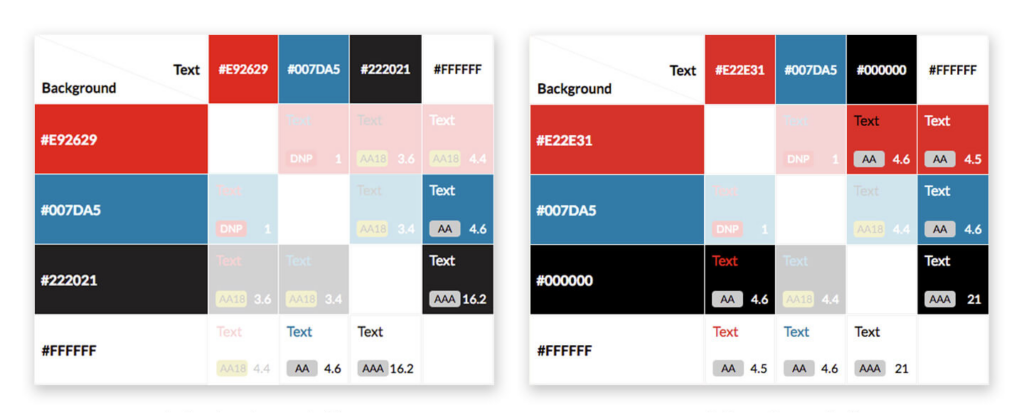
For this Tower client, minor adjustments to their existing red and black tones gave us twice the AA and AAA-compliant background and text color combinations.

A Tower client's original and updated color palettes


Luckily, these are minor tweaks that can make a website fully accessible. Even slight alterations to a color palette can give you more viable background and text color combinations, making for a more dynamic and engaging site.

Why We Create Stylish & Functional Designs

Designing through the new lens of accessibility can be frustrating at times, especially when working within an existing brand’s color scheme. It can be easy to get excited about a new design, but we need to remember that websites need to be both usable and beautiful.

Having an accessible color scheme might seem like a small detail, but the contrast between the text and the background on your website can significantly impact how people perceive and interact with your content. When we use accessible color palettes, it makes the Internet a more accessible place and a positive experience for everyone. At Tower, we consider visual accessibility, specifically accessible color palettes, essential for every site we build. 

If you need to redesign or update your website color palette accessibility, our team of designers and developers is ready to help.

Wondering how to get started using AI (artificial intelligence) for content creation in a way that’s safe, legal, and beneficial for your business? This guide will help you navigate when to use AI for content creation and provide helpful tips for getting started.

And I know what you’re thinking. You’ve probably heard advice about AI from content creators. “It’s nothing but bad, generic writing. It’s great for SEO. It’s bad for SEO.” The debate goes on…

Personally, I don’t think it’s a tool we need to ignore or fear. Avoiding it would be like ignoring helpful accounting software and choosing to do all your bookwork on paper. However, just because you have the software, it doesn’t mean there won’t be times when you need an actual accountant.

I’m a big proponent of offloading unimportant manual tasks and spending more time on technical work that matters. So if you’re looking for advice on using it to compliment your business content, you’ve come to the right place.

Get To Know Your AI Tools

What Is The MMLU Test?

MMLU scores are a benchmark being used to test different AI models. As you get started, this score is a great way to assess which model is the best tool for your task. 

This test covers 57 topics around humanities, social sciences, and a range of other specialized areas, with questions ranging from elementary through advanced levels. Similar to ways we evaluate ourselves, the test tests knowledge and problem-solving capacities. Its depth and breadth also help identify an AI model’s weaknesses.

Find the latest MMLU scores for AI tools here

Note: For many paid tools available right now, you won’t be able to find MMLU scores for those proprietary platforms as easily. To assess a paid tool, you’ll need to research documentation about their model. Now let’s get into which free and paid options are great if you’re looking into AI tools for content creators.

Free AI Tools For Content Creation

ChatGPT 4.0GeminiClaude 3.5Grok 3DeepSeek V3
Prompt Limits5-10 every 5-6 hoursUnavailable*40 messages a dayUnavailable*None
Multimodal SupportText, image, videoText, image, videoText, image, videoText, image, videoText, image, video
Massive Multitask Language Understanding (MMLU) Score84%87%86%Unavailable87%
Better To Use For•Generalists •Casual users• Google users & workspaces •Multimedia projects•Technical document analysis •Enterprises• Developers
• Data analysis
• Technical reasoning
•Developers •Logical work •Non-English tasks
*Google and Grok don’t provide exact information around limits. The free versions likely have soft caps that reset hourly or daily. During peak traffic, paid users will also get priority and free users may experience slower response times.

Paid AI Tools For Content Creation

Assessing paid tools is a bit different, since these are from smaller companies and there’s a paywall involved. As I mentioned, it’s likely you won’t be able to find the MMLU score for them. Instead, let’s look at these paid tools through a practical lens by sharing their strengths and weaknesses from firsthand trials.

ContentShake AI (Semrush)

JasperAI

Other Helpful AI Tools For Content

Here are some other neat tools worth exploring that can help make your content better. All of these are tools our team at Tower enjoys using! Just be sure to properly vet the security of any free AI tool you find, including any website plugins.

  • Photoshop Generative Fill (Paid): uses AI to fill in your images.
  • TextFX (Free): a content creator’s dream for creative brainstorming around content.
  • CoSchedule Headline Studio (Free/Paid): brainstorm strong headlines for all types of content.
  • ChatGPT GPTs (Free): access specific GPTs built by the community for niche tasks (researching, writing, productivity, etc.)
  • Grammarly (Free/Paid): easy for editing content on the fly, although it’s not always grammatically correct and accurate.
  • Language Tool (Free): another AI-built language editor.

The Pros & Cons Of Using AI

Figuring out when you want to use AI starts with understanding its pros and cons. And then figuring out how using AI aligns with your business values

For us, AI is a tool that can assist our content creators and speed up less critical tasks or facilitate parts of the creative process. But it’s not strong enough to use on its own for full content creation or unique ideas. (Yet.) 

How To Use AI In Marketing?

Pros Of AI Content Creation:

  • It can speed up mundane and unimportant tasks
  • It’s great for brainstorming and starting a task
  • It’s easy to personalize content and messaging for users (particularly with digital ad tools)
  • It’s easier to produce certain types of work faster

Cons Of AI Content Creation:

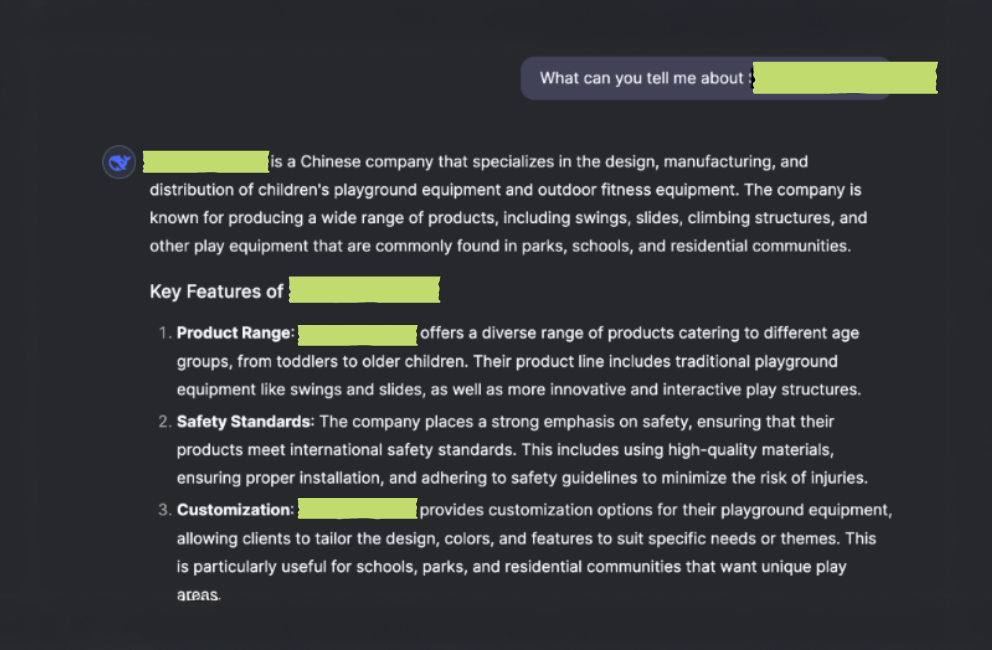
*DeepSeek Hallucination Example

DeepSeek Hallucination Guide To AI For Content Creation (From A Content Creator)
Example of a real hallucination a Tower team member caught asking DeepSeek about a local US-based company. No content exists on their website indicating they’re a “Chinese company.”

Skills To Develop If You Use AI For Content Creation

The truth is that AI can replace novice or basic writing skills. This makes it all the more important to become strong in technical ones. If you’re using AI for content, develop these skills to polish and make sure the finished work you’re sharing is strong:

Key creative skills you should work on include:

  • Knowing how to edit content so it’s interesting/relevant for your audience
  • Using key copywriting tactics like parallel structure, alliteration, and proven psychological copywriting tips
  • Developing a brand voice that’s actually unique to you (and not generic)
  • Researching for reliable information that’s as factual and unbiased as possible
  • Thinking of new concepts because AI pulls from what it’s trained on (and doesn’t necessarily create something new)

Need help creating strong content that stands out?

When (& When Not) To Use AI

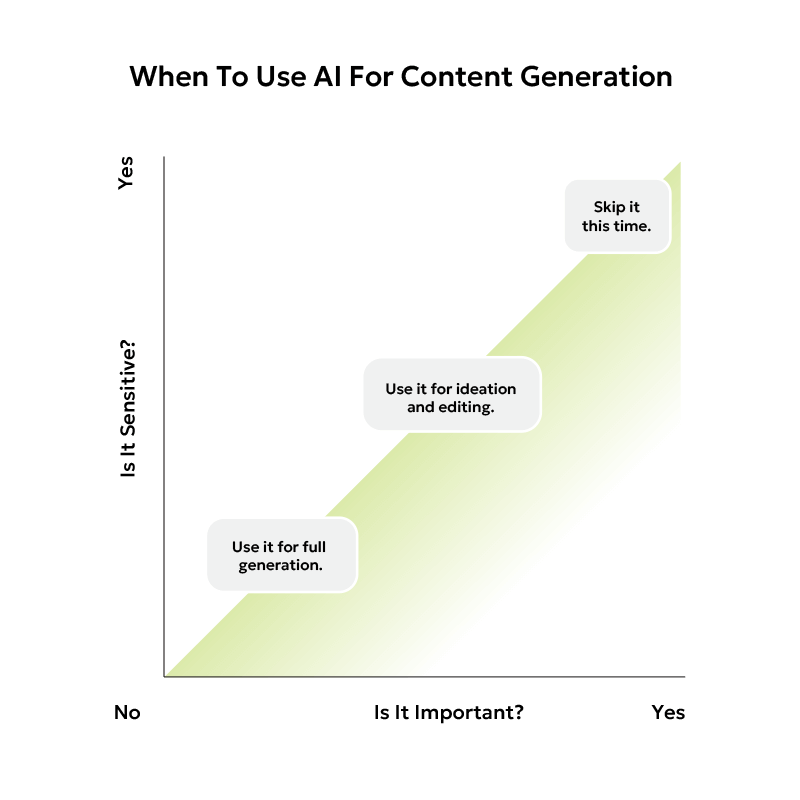
There are times when it’s okay to use AI. But there are also times it may seem inappropriate to your audience. For example, Vanderbilt University used ChatGPT to write an email and it didn’t go well. Google is cracking down on AI-generated website content it deems low quality.

Here’s my own personal compass I’ve created to decide when it’s okay to use AI for content creation. Until we as a society decide on clearer standards, this is a quick way to ensure you’re using it responsibly and ethically.

AI Content Generation Decision Making Chart 1 Guide To AI For Content Creation (From A Content Creator)

Tips For AI Creation Prompts

The quality of the output you get relies on what you put in. After using various tools for the last two years, here’s my advice. (Some of it will not be record-breaking. But if you’re newer to using AI, it’s what you need to know.)

  • Be as specific as possible 
  • Add context about your request
  • Break apart complex prompts to be as simple as possible
  • Add in directions about tone (eg. confident) and style (eg. conversational)
  • Review different drafts (usually you can view 2-3 different answers)
  • Provide feedback on the response, especially if it’s inaccurate

For example, say you want to draft a business bio. Instead of simply asking for one, here’s a prompt that puts some of those tips into practice. (See highlighted parts.)

If you’re interested in getting better at prompting and digging further into this area, I highly recommend exploring Snack Prompt. It’s a library collection of user-generated AI content creation prompts.

What’s The Future Of AI, Content, & SEO Online?

Is Google dead? Is writing dead? Is SEO as we know it over?” The questions are different, but the underlying novelty and fear reminds me a lot of how humans have responded to every unique invention. 

Books? Plato feared they’d ruin our memories. Cars? Loud and noisy contraptions leading to job loss. The list goes on.

The truth is, each new invention is a chance for us to reinvent ourselves. Carriage makers turned into car makers. And I believe the same will happen with marketers. We’ll adapt. Content creation and SEO are always prone to change, whether we have AI tools in the equation or not. 

Traditionally, SEO has focused on figuring out which keywords help you get found in search engines. AI is just a different sort of “search” tool.

AI goes through a series of complicated probabilities to arrive at its output, so it’s feasible to imagine a world where we figure out how to use keywords in the right context to appear more frequently in those chats too. (We’re already seeing that long-form content with a depth of helpful information and proof you’re a real expert can help you get found.)

And this year, many large AI companies are struggling to make it profitable. There’s still an incredible amount of work and research to be done at a high cost with no guarantee of an ROI. Although disrupters like DeepSeek are showing notable progress in lowering the costs of R&D.

If we’ve learned anything from social media sites in the 2000s, it’s that often tech companies offer a service for “free” to users, but they’ll use the data they gain to drive revenue from advertising. So it wouldn’t be a surprise in the future to see companies figure out how to do that within AI. 

Want to continue keeping up with the latest trends in marketing? Join the conversation over at our podcast.

So you want to build a website, but your one online course in HTML isn’t going to cut it. What do you do? The answer is Gutenberg blocks. Today we’re going to cover everything you need to know about the WordPress block editor—what it is, how to use it, and our top design tips (from people who’ve actually done it before). 

Skip To The Good Stuff

If you’re short on time, you can jump ahead to download our free cheat sheet.

What Are Gutenberg Blocks?

Gutenberg blocks are pieces of content that you can use to build a webpage. WordPress comes with default block options that are the foundation for all the pages of your site. They include elements like: 

  • Heading
  • Paragraph 
  • Image 
  • Video 
  • List 
  • Column
  • Gallery
  • File 
  • And more 

By mixing and matching these blocks, you can build custom pages for your website without any developer or coding experience. And for even more specialization, you can install plugins with advanced block options. 

Gutenberg Block Benefits

These Gutenberg block benefits make this editor a top choice for designing your website. 

  1. No design or development experience needed. This editor makes creating professional websites accessible to everyone, regardless of your skill level. 
  1. Saves time in content creation. The easy-to-use interface allows you to quickly drop elements onto a page, saving you time in design.
  1. You can see the design as you go. Because it’s a visual editor, you can see what the page looks like as you build it and adjust accordingly. 
  1. Access to reusable block templates. Have a layout you like? You can create a template and reuse those blocks over and over. 
  1. Looks good on any screen size. The Gutenberg block editor can adjust to any device, whether you’re on desktop, mobile, or tablet. 
  1. Less dependent on plugins and HTML. With Gutenberg blocks, you don’t need to rely as heavily on WordPress plugins or custom code. 
  1. Flexibility in design. The drag-and-drop elements make it simple to customize every page for flexible design options. 
  1. Developer-friendly choice. Developers can create custom Gutenberg blocks for your website’s specific needs. 
Working at a marketing agency A Step-By-Step Guide to Mastering Gutenberg Blocks

Are you ready to upgrade your website to the Gutenberg block editor? Reach out to our team for a little help.

Gutenberg Editor Tutorial

We recommend WordPress for all of our clients, and since Gutenberg is the default editor, knowing how to use it is essential. 

Gutenberg’s drag-and-drop interface makes it perfect for someone with limited technical experience. And it’s easy to use because its “what you see is what you get” (WYSIWYG) editors look similar to the final product, so you don’t have to guess what the page looks like as you’re building. 

You can also choose pre-made patterns from WordPress that help you organize the blocks in a visually appealing way, so all you have to do is customize them to your brand. Lastly, you can install plugins to get access to more advanced blocks like pop-up windows, testimonials, and more. 

New to WordPress blocks? Here’s our quick and simple Gutenberg editor tutorial. 

Step 1: Add Your Blocks

A screenshot of the WordPress Gutenberg blocks editor that shows a red square marking the plus button where you can add new blocks

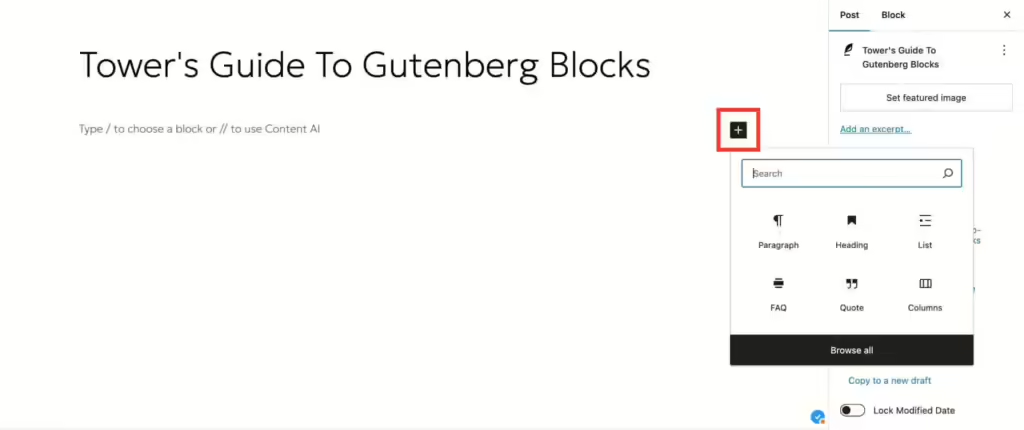
When you’re creating a page using the Gutenberg editor, always start by giving it a title. Then you can begin by clicking on the + button on the right-hand side. This will open a menu where you can choose from over 50 different elements. The paragraph block is the default option, since that makes up the majority of copy on every page. 

Tower tip: want a shortcut for adding blocks? Just type “/” followed by the block name and press return. For example, you can add a heading by writing “/heading” and hitting enter. 


The most popular elements are organized into six Gutenberg block types.

Step 2: Customize Your Blocks

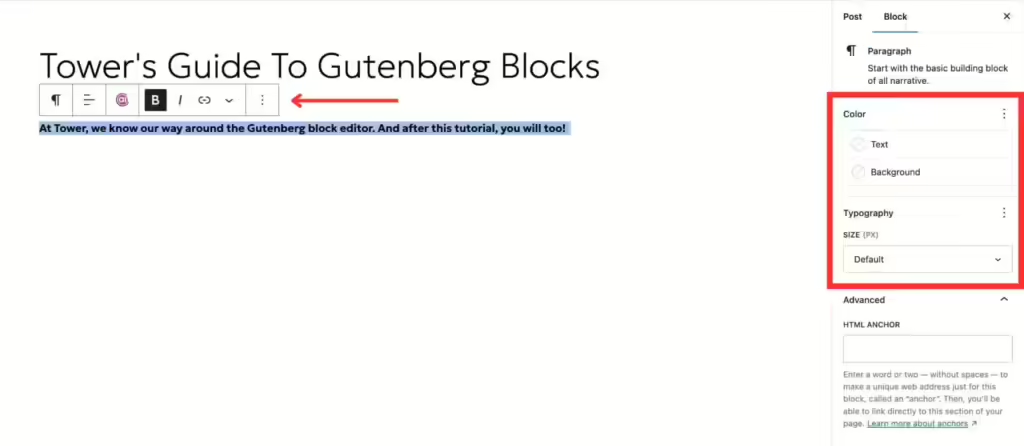
A screenshot of the WordPress editor that shows a red arrow pointing to the editing tools for Gutenberg blocks

Every block has its own unique editing options, and any changes you make will appear on the left-hand side instantly. That’s WYSIWYG in action. 

Let’s start with the most common block—text.  You can adjust the style using the options that float above your text or the sidebar on the right. Just like in a Word or Google doc, you can make your text bold, italic, underlined, or hyperlinked. In the sidebar, you can adjust the text and background color, or add an HTML anchor to create jump links. 

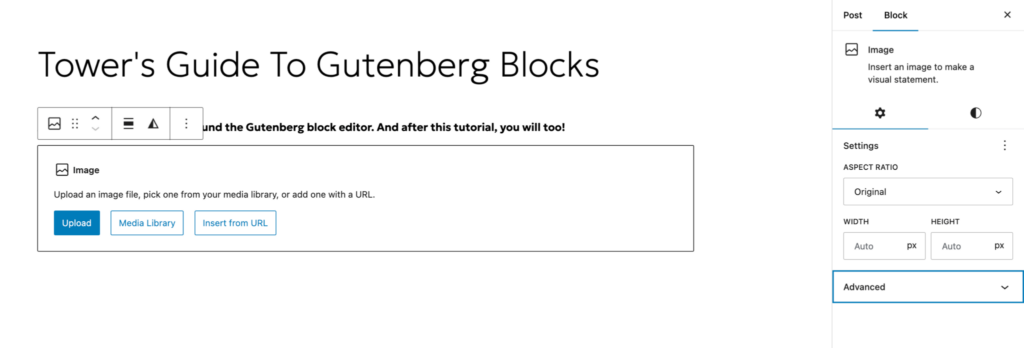
Now, let’s add an image. 

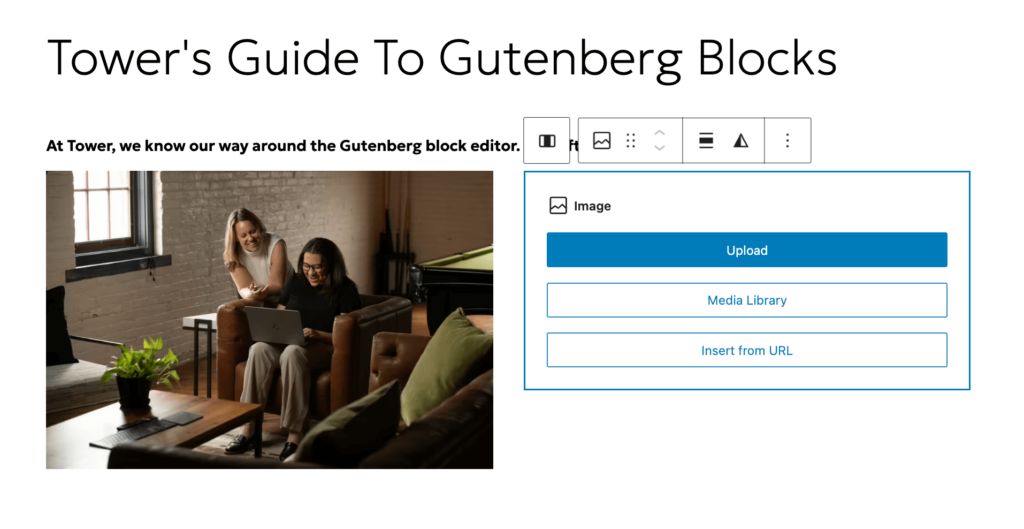
A screenshot of the WordPress Gutenberg blocks editor that shows how to add an image

You can upload a photo from your computer, or choose one from the media library. It will automatically insert at full size, but you can adjust how big you want it to display. From there, you can also crop the image, apply filters, write alt text, change the alignment, and even add a caption. 

But what if you want to add two different photos next to each other? That’s where columns come in. Just pick your column layout, add image blocks to each section, and voilà! 

A screenshot of the WordPress Gutenberg blocks editor that shows how to add a column block
A screenshot of the WordPress Gutenberg blocks editor that shows one of two photos added to a column block

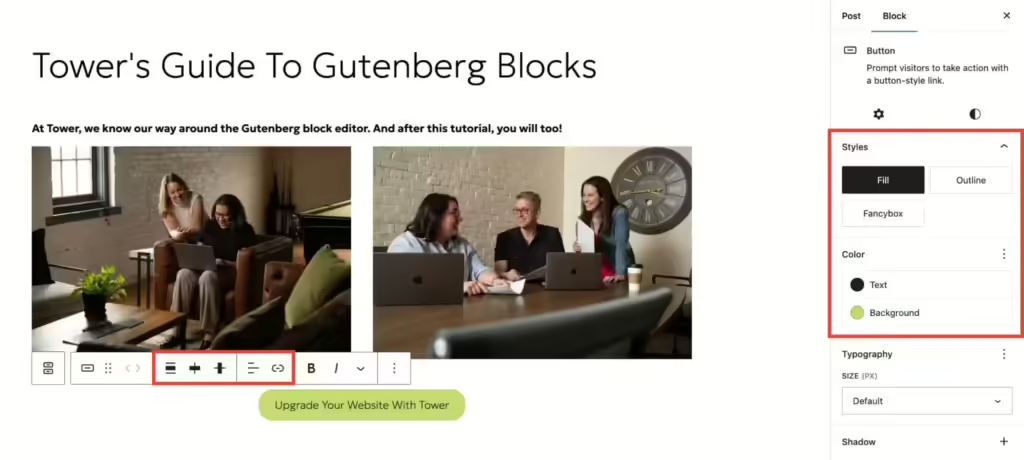
But that’s not all. There are some advanced Gutenberg blocks that would be helpful to know. Let’s add a call-to-action button at the bottom of your page. To start, just type “/button” and hit enter. From there, you can fill in the button text, add your link, and adjust the size, alignment, and style. 

A screenshot of the WordPress Gutenberg blocks editor that shows two photos with a button underneath. Red squares mark where the editing tools are located for Gutenberg blocks

With text, image, column, and button blocks under your belt, you have all the tools necessary to create engaging web pages. And with the countless customization options available, you can easily craft content that’s cutting-edge and on-brand. 

Tower tip: Copy and paste entire blocks into a post, so you don’t have to insert and customize them every time. 

Step 3: Adjust The Layout

The last step in our Gutenberg editor tutorial is finalizing the details. You can easily change the order of your blocks by dragging them with the six dots, or utilizing the up and down arrows. You can also remove blocks by clicking on the three dots and selecting “delete” at the bottom of the list. Or just hit the delete key! 

A screenshot of the WordPress Gutenberg blocks editor that highlights where to move and delete blocks

There are so many ways to get creative with the Gutenberg blocks layout. Use Stack to arrange items on top of each other, and use Row to align them side-by-side. For a little more white space, just add Spacer anywhere on the page and let your content breathe. You can also use the Quote block to make text stand out. 

Tower tip: Test out all the available blocks before you start laying out your first page. This way, you know all the options available to you. 

When you’re ready to publish, look to the right-hand sidebar. There you’ll see details for the page itself. Update items like: 

  • Author
  • Featured image
  • Category
  • Tags 

And before you hit publish, always preview your work to make sure everything looks good to go. 

Gutenberg Design Tips

Now that you have a feel for the available blocks and how to add them, it’s time to dive into our top Gutenberg design tips to make building your site a breeze. 

  1. Lock blocks. For sections that you are done editing, you can lock them in place so they cannot be changed. 
  1. Create reusable block patterns. If there’s a layout you want to use throughout your site to maintain consistency, you can add it as a synced pattern. For example, you can design a call to action banner and add it to any page with the click of a button. Here’s how to do it: 
  1. Select all blocks you want to include 
  2. Click the three dots
  3. Select “Create Pattern”
  4. Give it a name and add it to your site 
  5. Reuse it on other pages*

*NOTE: any edits you make to the pattern will show up on all pages where it’s present.

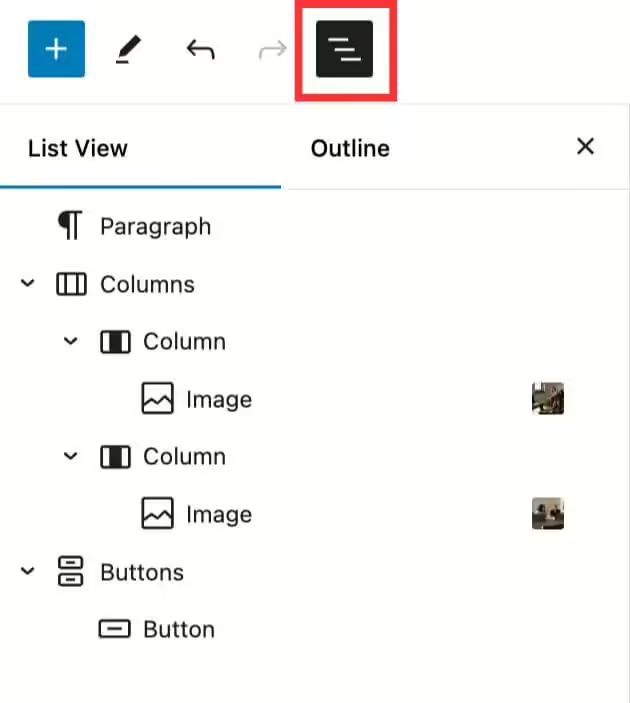
  1. Utilize the “Outline” tab. In the top left corner, you will see three stacked lines. This opens a small tab that shows you the layout of your entire page. Click on each section to jump to that block in the editor. 
A screenshot of the WordPress Gutenberg blocks editor that shows the outline tab
  1. Group blocks together. Sometimes it’s easier to move and edit items as a unit. Select all relevant blocks, hit the three dots, and choose “group.” 
  1. Install plugins for advanced block options. If there’s a specific block your website needs, there are dozens of plugins out there to fill the gap. 
  1. Rely on the WordPress community to solve common problems. If you’re facing an issue with the Gutenberg block editor, you’re not alone. There is a whole community of developers that share their insights to provide solutions to users like you. 

Struggling to keep all these tips straight? Download our free Gutenberg blocks cheat sheet to use as a reference in your next web project

HubSpot offers a comprehensive platform that promises to streamline your workflows, enhance your marketing efforts, and boost overall engagement. But is it the perfect fit for your business?

Join me as we explore both the benefits and drawbacks of HubSpot, from its ease of use and powerful features to its escalating costs and limitations. We’ll delve into its pricing tiers, add-ons, and how it compares to other providers — helping you decide if HubSpot will be your marketing hero or a budget-straining villain.

The Pros Of HubSpot: Why It Could Be Your Marketing Hero

HubSpot has earned its reputation as a leader in the marketing industry. From its all-in-one capabilities to its user-friendly interface, the functionality it provides can significantly improve efficiency and drive growth. Let’s examine the key upsides of HubSpot and why it might just be the resource your organization needs.

It’s An All-In-One Platform

One of HubSpot’s most significant advantages is its versatility. It consolidates a wide range of products, allowing professionals to combine and monitor their:

  • Marketing tools
  • Sales tools
  • Service tools
  • Content tools
  • Operations tools
  • Commerce tools

The ability to manage all these pillars without needing to juggle multiple third-party solutions can be a strong incentive for those who prioritize efficiency.

It Boasts A User-Friendly Interface

Whether you’re a seasoned professional or a brand new to marketing, HubSpot’s streamlined design minimizes the learning curve and allows teams and individuals to get up and running quickly.

This ease of use is especially important for small-to-medium businesses that may not have the time and money to invest in the training needed to maintain more complex systems.

It Provides A Wealth Of Educational Resources

HubSpot Academy, their educational library, offers a plethora of courses and certifications on topics ranging from inbound marketing to sales automation.

These resources are also routinely updated, empowering companies to maximize the product’s value without having to rely on external consultants. 

It’s Highly Scalable

Various tier levels are available through HubSpot, from free accounts to advanced Enterprise plans — allowing customers to expand their services as they grow. 

A free plan provides access to their CRM, email marketing, forms, live chat, ad management, integrations, and reporting. However, there are notable drawbacks, including:

  • Limited customization (their branding can’t be removed from emails, forms, or live chats)
  • No marketing automation
  • No A/B testing
  • No advanced analytics
  • No custom sales pipelines
  • No custom dashboards
  • No phone or email support
  • Integration limits

Moving to higher-tier plans unlocks more advanced tools, and when comparing the free vs paid HubSpot options, it becomes clear there are significant benefits to upgrading.

It Offers Automation And Personalization

Automating repetitive tasks and personalizing customer interactions can lead to higher levels of engagement, better user experiences, and increased conversions. These valuable features enable organizations to create precise and targeted marketing campaigns that resonate with individual customers.

Examples of these advanced offerings from HubSpot include: 

  • Workflows
  • Lead scoring and segmentation
  • Email personalization
  • Smart content
  • Behavioral triggers
  • Multi-Channel marketing

It Has Robust Integration Capabilities

With over 1,600 integrations as of 2024, companies that use other specialized applications can still benefit from HubSpot’s central CRM. Some of the most popular connections include Gmail, WordPress, Outlook, and Facebook.

Plus, new products and connections are continuously added, ensuring the list stays current.

The Cons Of HubSpot: Why It Might Be Your Marketing Villain

While HubSpot offers a host of complementary services, it also presents its fair share of obstacles, from stacking fees to platform limitations and difficulty exiting the system. 

It Can Be Prohibitively Expensive

How much does HubSpot cost per month? Unfortunately, for those attempting to plan a marketing budget, the answer can vary greatly based on your number of contacts and required functionality.

The price of higher-tier plans, particularly at the Professional and Enterprise levels, can be exorbitant for small businesses. For example, the Marketing Hub Professional plan starts at $890 per month, while the Enterprise plan starts at $3,600 per month. 

Additionally, there are supplemental costs associated with add-ons, which may make HubSpot more expensive than it initially appears. Some of their most common upgrades include:

  • API limit increase: $500/month
  • Ads limit increase: $100/month
  • Custom SSL: $100/month
  • Dedicated IP: $300/month
  • Transactional email: $600/month

It’s A Jack Of All Trades (But Master Of None)

While HubSpot is praised for its all-in-one approach, this versatility means it also doesn’t excel in any single area to the extent that other, more specialized products do.

Here are some HubSpot alternatives to consider, based on your marketing needs:

CRM Functionality: Salesforce

For companies with complex sales processes, a service like Salesforce offers deeper customization, robust reporting, and nuanced sales automation.

Email Marketing: ActiveCampaign

Dedicated email senders like ActiveCampaign provide advanced list segmentation, more automation triggers/actions, and a sophisticated campaign builder.

Content Management: WordPress

Those that require custom web design or multifaceted content strategies would benefit from a more flexible platform like WordPress.

SEO: SEMrush

Online visibility tools like SEMrush provide detailed analytics, competitive analysis, and keyword research capabilities. 

Reporting & Analytics: Google Analytics 

The depth of insights provided by Google Analytics 4, the industry-standard software for tracking conversions and engagement, can’t be replicated in HubSpot.

It Locks You Into The HubSpot Ecosystem

The integrated nature of HubSpot can become a double-edged sword if consumers decide to leave and transition to another solution. 

Migrating data, adjusting workflows, and retraining staff can be time-consuming and costly, as opposed to the effort required to adopt a new channel-specific technology.

Is HubSpot The Right Fit For You?

Ultimately, the decision to invest in HubSpot will come down to your individual needs, budget, and long-term objectives.

If you’re a small to medium-sized business looking for a comprehensive product with numerous integrations and extensive resources, HubSpot could be a viable choice. 

However, if your organization requires advanced customization, has a complex dataset to manage, or operates on a tight budget, you may need to explore more specialized options.

Need more help deciding what marketing platform(s) to pursue? 

If you’ve ever Googled something before, you’ve probably noticed how popular brands are ranked higher on your search page. 

You may ask yourself, “Where do I start?” Or, “How can I get users to see my page on top of search results?” 

We’ll guide you through our 10-step keyword research checklist to help answer those questions and create a solid foundation for your SEO content strategy. 

What Is Organic Keyword Research & Why Is It Important?

Organic keyword research is the process of analyzing data on user search queries and determining what phrases are key to use in your content. Doing this helps enhance your site’s Search Engine Optimization (SEO), naturally boosting it higher on search results without paying a cent. 

It’s important because people are constantly searching for words or phrases to find what they’re looking for. That’s essentially your job when doing organic keyword research – to give people the information they’re looking for. 

You can also rank higher on paid search results, but for this blog, our focus is on your organic keyword strategy. 

Benefits Of Organic Keyword Research

  1. Increase Organic Traffic 

Organic keyword research will help you rank higher in the Search Engine Results Pages (SERPs) for relevant keywords. When you rank higher, you’ll likely see an increase in organic traffic to your site. 

  1. Increase Conversion Rate

After an increase in organic traffic, you’ll likely see an increase in conversion rates because your keywords will be specific to your user’s needs. They’ll find what they’re looking for on your site and will be more likely to take an action, such as purchasing your product or service. 

  1. Stay Up-To-Date With User Behavior  

After following our keyword research checklist, you’ll be able to keep up with your target audience’s current search behaviors. By analyzing keywords your users are actively searching for, you’ll gain valuable insights into your audience’s current interests or needs to create effective marketing strategies.

shutterstock 695980678 1 Keyword Research Checklist: 10 Easy Steps to Boost Your SEO

Need a simple summary of our keyword research checklist?

10-Step Keyword Research Checklist

Want to learn how to do keyword research? Follow these 10 steps to build a foundation for your SEO content strategy. 

Step #1: Brainstorm Topics Or “Seed Keywords”

To start your keyword research process, think about your business goals. You understand your business the best, so make a list of potential topics to target. 

Seed keywords are broad topics related to your business. Put together a list of words or phrases you think users will search to find your website.  

How To Start Brainstorming Seed Keywords: 

  • Use Google SERP features by typing in one of your seed keywords. You’ll see what ranks high or low based on your search term. 

You can also scroll down to the bottom of the search page to see what “People also search for…” 

Google Search Engine Results Page feature showing what people also search for when searching Olympics
  • Google Autocomplete shows you what users are searching based on the word or phrase you’re using.
Google Autocomplete showing what people might search when looking for bird feeders
  • Browse your seed keywords in an incognito window. 

We do not recommend relying on ChatGPT to give you a finalized set of keywords because it can give you misinformation. It also limits you on keyword relevance because AI can’t give you search volume. Use ChatGPT as a guide to help brainstorm ideas, and remember to fact-check answers. 

Brainstorming is the starting point – keep following our keyword research checklist to reach the finish line. 

Step #2: Understand Keyword Intent

After brainstorming topics to rank you higher on SERPs, it’s time to understand your user’s keyword intent. 

Keyword intent helps you know where your user is in their decision-making process. Determine the purpose behind your user’s search using the 4 different types of keyword intent.

  1. Informational 
  2. Navigational
  3. Commercial
  4. Transactional

You can narrow this down by further understanding the different marketing funnel stages. Are they showing awareness, consideration, conversion, loyalty, or advocacy? 

Ask yourself “Who exactly am I writing to, and why are they searching for x, y, z…?”

Understanding your user’s keyword intent helps you target keywords to meet their needs and improve your website visibility. 

Step #3: Use Long-Tail Keywords 

Long-tail keywords are specific phrases or questions targeting more unique and detailed searches. 

They have less volume and less competition because they’re more precise and less commonly searched. This makes visitors searching for these terms more likely to make conversions because they’re interested in what you have to offer. 

Once you know your user’s keyword intent, prepare a list of long-tail keywords they might search to find an answer. 

Step #4: Understand What Search Engines Are Ranking 

Google ranks websites based on relevance, authority, and volume. There are also some other ranking factors to take into consideration. 

Your keywords and phrases must be relevant to your business, but most importantly to your target audience. Focus on what the user wants, not the search engine. Use keyword intent to impress Google with relevant content. 

Use internal and external links to boost your topical authority and expertise. Have your external links going to reputable sources, and create concise content that’s easy to read. 

Focus on the search volume for keywords you want to use in your content. Knowing the volume for keywords helps you gauge the relevance and demand for your topic. 

Person looking at marketing metrics on a computer

Step #5: Take Note Of The Metrics For Each Keyword Or Phrase

Now we must measure the metrics for Google ranking factors. 

Focus On Monthly Search Volume (MSV) And Keyword Difficulty. 

MSV is the average number of searches per month. Keyword difficulty shows how competitive it is to rank for a specific keyword or phrase. 

Websites like Nike and Apple rank higher on SERPs because their brand is well-known to users and Google. Their topical authority is strong, and they most likely use keywords with high volumes and higher difficulty percentages. 

If you know your topical authority isn’t as strong as Nike’s or Apple’s, prioritize long-tail keywords. 

*General rule: choose keywords with a high volume and low difficulty. 

Step #6: Compare With Competitor Keyword Research

Find what your competitors are ranking for with competitor keyword research. Search for terms you want to use in your content and compare them with current keywords competitors are using. This will help you compete for keywords and identify keyword gaps

Step #7: Finalize Your Keyword List 

After completing steps #1-6 of our keyword research checklist, you’ll have a strong list of keywords and phrases to use in your content. 

Tips to finalize your keyword list:

  • Have 1 primary keyword with high volume and low competition.
  • Have a longer list of secondary keywords to use throughout your content.

Secondary keywords must be relevant to your primary keyword and should help you create sections within your content. They can have higher difficulty percentages since your focus is ranking for your primary keyword. 

Step #8: Incorporate Keywords Into Your Website 

Want to learn how to incorporate your list of keywords and phrases into your website? Use strategies like keyword clustering and writing for featured snippets. 

Keyword Clustering 

Cluster your keywords by grouping them together into similar categories. Your primary keyword is the main topic you want to rank for, while secondary keywords are meant to complement and enhance your primary. 

For example, if your primary keyword is “home workouts,” secondary keywords might be “cardio workouts at home” or “work out equipment for home.” You can take those keywords and organize them into clusters to build your content and rank for multiple search terms at once. 

Avoid Keyword Cannibalization 

Although keyword clustering is beneficial, you want to avoid keyword cannibalization. 

Keyword cannibalization is when multiple pages on a website target the same keywords. This confuses search engines because they won’t know which page to show in SERPs, leading to reduced rankings. To avoid this, create unique and individualized pages with separate keywords.

Write For Featured Snippets

A featured snippet is another Google SERP feature used to boost ranking. For a chance to have Google highlight your page as a featured snippet, include simple bullet points, numbered lists, short concise paragraphs, and of course, your primary keyword.

Featured snippet giving users a bulleted list for the best cat foods in 2024

Step #9: Use Free Keyword Research Tools 

Resources are available to help complete your keyword research checklist. Many of these have both free and paid plans.

Step #10: Track Your Positioning 

After publishing your website page, we recommend tracking your progress to see any changes in current marketing trends. 

Ask yourself:

  • Are your keywords still effective? 
  • Are they relevant? 
  • Are they still ranking high on SERPs?
  • Do they enable you to show up for any SERP features?

Tracking allows you to improve future SEO efforts. We recommend using Google Search Console to monitor this.

Need help using our keyword research checklist to master your SEO content strategy?


One of the phrases most often heard in advertising is “print is dead.” However, that’s not the case. Print ads are a valuable way to catch your audience’s eye by creating eye-catching artwork combined with strong copy

But in this digital age with everything web-based, can you still use print advertising to your advantage? 

To help answer this question, we’ll explain how you can use print advertising KPIs to measure your campaign’s success and gain valuable insights into your audience. 

KPIs You Can Use For Your Print Marketing Campaign

First, before you decide what KPIs to track, you need to determine what the goal of your campaign is. Your KPIs provide the measurable data you need to make informed decisions about your marketing strategy. You can’t know what to track if you don’t figure out what outcome you want to achieve. Some different goals you can have are:

  • Brand Awareness
  • Lead Generation
  • Sales
  • Brand Consideration
  • Website Traffic

Once you’ve determined your goals, then it’s time to assess which KPIs support them. Below we’ll explore common ones that are useful for measuring print campaigns.

Reach

When you decide to publish your print ad, you want to make sure the publication you’re using has a large enough circulation so you can reach as many people as possible. Another tip is to see where your ad is placed. 

Front, back, and inside covers are ideal placements as well as being located on a right-hand page. Or if you’re using brochures or rack cards as your advertising methods, you want to leave brochures in a high-traffic area where people are more likely to find and pick them up. 

Frequency

Frequency is the number of times a person is exposed to an ad or how many times the ad is repeated in a specific medium over a period of time. It’s often paired with reach since they are complementary. When you place a print ad, you want to know how many people (reach) are going to see your ad and how many times (frequency) they’ll see it. 

Cost Per Result

A print ad is a good investment when it works. Once you know what your reach and frequency are, you can do some basic math to find a rough cost per result. To do this, you take the cost of the campaign divided by the result, whether that is views, leads, or site visits. Your result depends on your campaign goal. This will give you an idea of whether the ad will be profitable or if it will just cost you money in the long run. 

Brand Recall

As a business, you want people to remember your brand when prompted. For example, if you own an Italian restaurant, you want someone to remember you when asked “Who has the best meatballs in the area?”.  

Engagement

Tracking engagement shows how many people interacted with your ad. By using tactics like QR codes or specific coupon codes, more on that below, you can see how many people were directed to your site from your print ad. 

Response & Conversion Rate

Another figure to track along with your engagement rate, is your conversion rate. This shows how many people completed their journey through the funnel and became customers based on your ad. You can track this figure using tactics like special forms for landing pages or specific phone numbers with call tracking on them. 

Tower KPI Blog 2024 image 3 min How to Use Print Advertising KPIs to Your Advantage

Ways To Track Your Print Advertising

Once you’ve decided on your goal and what KPIs to track, it’s time to select the correct tactic for your campaign. You need to think about what works best for your business. If it’s more call-based, a QR code might not work as well as phone calls. 

Special Phone Numbers

Another method to track where your leads are coming from is using a special phone number or vanity phone number in your print marketing. Everyone has heard the J.J. Wentworth commercials telling people to call “877-Cash-Now!” (Bonus points if you just sang that). That’s a vanity phone number—it contains a phrase that’s specific to your business and catches people’s attention.

Now if that doesn’t fit with your business style, you can create occasion-specific phone numbers through services like:

These companies allow you to create several temporary numbers you can use in your advertising. In particular, CallRail has phone call tracking, so you know where your leads are coming from and if your advert was successful.

QR Codes

Quick response (QR) codes are an easy way to access a website without typing a URL. They’ve become popular again in recent years since more public places have gone touch-free. 

Customers can scan a QR code in print ads using their phone’s camera to reach a specific landing page. When you create this page you’ll want to add a “noindex” tag, meaning that it won’t appear in search engine results. So the only way you can access the page is by the QR code. This gives you an accurate way to measure the effectiveness of your campaign material. 

Another way to attribute traffic from your campaign’s QR code is to direct traffic to a specific page via a URL that has UTM parameters applied to it. The five UTM parameters are source, medium, campaign, term, and content. The first three are required for tracking in Google Analytics and the last two are optional. 

Here’s an example of a URL from a campaign Strasburg Rail Road ran in June 2024 for their event “A Great Train Robbery: The Bonnie & Clyde Experience”

Tower KIP Blog 2024 image 4 min How to Use Print Advertising KPIs to Your Advantage

You can see the source (where they are running their campaign) is Penn Live, the medium is referral, which indicates what type of channel it is (referral from an ad, paid social, organic social, or cost-per-click ads). Finally, the campaign name is bonnie_clyde_june_2024.

Another benefit of using QR codes in print ads is that they generally do not expire. Once created, they can be used indefinitely unless the linked information is changed or removed.

Custom Landing Page Links

Custom landing pages are another tactic you can use in your print ads. For example, if you’re offering a free quote for work you offer, you can set up a landing page with a contact form.

Then you’ll want to add a “noindex” tag so this special landing page isn’t visible in search engines. You’ll also want to make sure it’s not added to your site navigation. That way no one can see the page unless they have the link you shared in your print ad. Doing this makes it easier to isolate traffic and only track activity from your print ad.

When it comes to creating a URL for this custom landing page, make sure you don’t create something that’s too long. You want to keep it short and easy so it looks good in the ad and is easy for users to input into their browser.

If you use Google Analytics for tracking, make sure to set up the custom landing page with a tag for the ad source (like a magazine name or brochure) so you can track your print campaign easily. This will also allow you to analyze it in GA4 alongside your other traffic sources.

Branded Hastags

A tactic that can increase your brand awareness is hashtags. Creating a branded hashtag can be an effective way to promote your business and drive conversations and can be as simple as using your company name or tagline in the hashtag. 

Hashtags can help you categorize your content so it becomes easily searchable. Including them in your ads allows you to join ongoing conversations on social media and allows your ads to be visible in those conversations.

This can lead to greater engagement, boosting your brand’s social media engagement through likes, shares, comments, and new followers.

A great example of a hashtag is Coca-Cola’s #ShareaCoke. Launched in Australia first, Coke removed the traditional Coke logo, replacing “Coca-Cola” from one side of a bottle with the phrase “Share a Coke with” followed by a person’s name. The goal was to find the personalized bottles and share them with friends. The hashtag was found on billboards and print ads as well. 

Specific Coupon Codes

Another method is to create specific codes for ads to entice people to visit your website and become customers. These codes can include the publication or ad name so you can easily track sales that result from them. 

An example of this could be if you owned a company and printed an ad in Clipper Magazine you could tell people to use code “CLIPPERMay2024” to get free shipping on your order or for a half price on a specific item. Or if you have a brick-and-mortar business, you can have someone bring in the ad, which acts as a valid in-store-only coupon. 

These codes can be customized to whatever objective you have for your campaign and you can run several at the same time. Just make sure you create custom coupons that don’t overlap with similar ones. 

Tower KPI Blog 2024 image 1 min How to Use Print Advertising KPIs to Your Advantage

Marketing Software

You can set up all the landing pages and coupons but if you don’t have a system in place, you’re spending money without getting your ROI. There are several programs that can help you with this task. 

One of the more popular tools is Google Analytics, which helps you build a complete picture of your audience while connecting key insights and traffic results. It also works with other Google products like Google Optimize. Plus, it’s a free tool, which is good from a cost standpoint. Also if you already have Google Analytics, make sure you’ve updated from Universal Analytics to GA4

Another popular tool is Semrush, which offers website traffic analysis for not only your website but for your competitor’s site as well. This can help you adjust your marketing strategy by seeing what’s worked and what hasn’t worked for the competition.

Hotjar is a similar tool to Google Analytics and Semrush in that it tracks who visits your site. However, Hotjar tries to give you the “why” behind their behavior. It allows you to visualize and map your audience’s actions while looking at recordings of their sessions. 

There are other tools on the market so do your research and see which one will work best for your business. 

Looking to improve your print advertising KPIs? Our content specialists can create authentic content that resonates with your audience.