0

Impressions are rising, but clicks are decreasing. Year over year, your site performance looks like it’s declining. Meanwhile, Google is adding new AI features to Chrome. In fact, every search engine is right now. 

Right now, our clients want to know how AI overviews are impacting their marketing. Is SEO dead? Is Google dead? Should you even produce content?

So let’s dive into the most frequently asked questions around AI overviews, SEO, and what that means for your content marketing.

First, Let’s Define AI Language
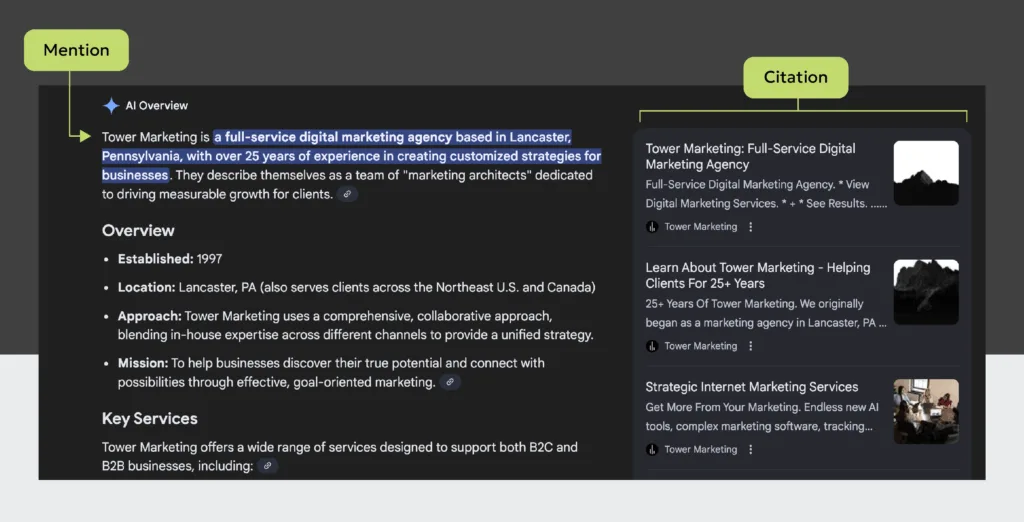
An example showing an AI mention vs an AI citation

FAQs About AI Overviews Impact On SEO & Marketing

1. Are traditional search engines (like Google) still important?

The best way to answer this question is to regularly evaluate your traffic in Google Analytics, or whatever tool you use. Study where your traffic is coming from. Note changes or shifts. 

Focus your efforts on the channels you already see users coming from, because that tells you where your audience spends their time.

Recently, I looked at 2024 vs 2025 data for a client. While they’re seeing more traffic from AI referrals, the majority of traffic to their site is still coming from search engines. For example, 11K sessions to blogs came from a traditional search, while 300 came from an AI referral.

That said, are search behaviors changing? Absolutely. My message this year has been that the places and ways we can search are fracturing.

For example, more people are searching Reddit because they want insights from real people. ChatGPT released Atlas. Pinterest is more of a search engine than it is a social platform. Instagram posts now show in search results.

That’s why it’s important to use real data to evaluate which platforms you need to focus on in your SEO strategy. And build your strategy across all channels, not just one.

2. Can I see where I’m showing up?

There are a few tools right now. One of the more trustworthy ones is Semrush’s AI Toolkit. I’ve also had hit-or-miss experiences with SpyFu’s SpyGPT tool. (If your brand has a more local reach, you may have a harder time getting results.)

Another workaround is to isolate referral traffic in your GA4 reporting from popular AI sites. This will measure visits from citations, but it still can’t offer you insights into brand mentions. 

Specifically for Google, AI mode counts toward any totals you see in your Search Console reporting. That said, there’s nothing in place yet to filter and only see AI mode impressions, clicks, and other data. 

Some of this is likely due to the extreme personalization AI search accommodates. And the way it’s integrated into the search experience. The setup makes isolating and collecting data complex. Some of these companies may also be viewing AI overviews as an evolution of search, making them hesitant to start treating AI like its own channel/source.

Want to make sure you’re showing up where your audience is online?

3. How can I tell if AI overviews are affecting my traffic?

Zero-click marketing. If you notice your site content is getting more impressions and fewer clicks, it’s a sign you’ve been impacted. AI overviews are contributing to that.

Here’s an example of what our SEO team has been calling the “alligator mouth.” In their AI overview analysis, they noticed this trend starting across all our clients when features in Google search become more integrated during April 2025.

AI Overview SEO Reporting 1 AI Overviews, SEO, & Your Content: What’s Happening With Organic Search Right Now?

4. Is content even relevant anymore?

Content is always relevant. It’s currency! However, what that content looks like should evolve. Match what people enjoy consuming. (Remember how early Facebook used to be all text posts? Content changes.) 

Plus, content provides context on what you do. And context is key for increasing your chances of ranking in AI overviews.

A regular search engine ranks pages primarily on keywords and link authority. (With a few other mysterious ingredients in the mix that we’re not privy to.)

But AI ranks based on contextual information, expertise, entity authority, and also its understanding of the user and what they’re searching for. Its goal is to deliver a personalized answer and results can look wildly different between users, even with the same prompt.

It’s time we reframe our thinking in marketing content.

Blogs are a piece of the puzzle. We don’t expect users to read the whole article anymore. They’re great because they feed AI context, which can help with getting an AI citation. 


But other content that’s equally important now includes:

  • Case studies or project examples
  • PDFs and rich multimodal resources
  • Video
  • Infographics
  • Real photography (not stock)
  • Specialized landing pages outside your core site pages
  • Resource hubs and collections

Also, sometimes businesses look at content with a narrow perspective, only focusing on its value in search. This misses its potential. A good content strategy helps your brand by:

  • Helping prospective clients discover you
  • Supporting the selling process
  • Providing something valuable to your email subscribers
  • Engaging your current clients to foster loyalty
  • Making it easy for others to recommend your brand
  • Creating a memorable experience around receiving a product or service

5. How can I rank and appear in AI overviews?

The path forward here is less certain than SEO. AI search is changing rapidly right now, making it hard to answer. But in 2025, Google gave us some hints

I’ve also been recommending the following tips. In my experience, the clients who were already doing this are the ones who are getting marketing results from AI overviews.

  • Keep content fresh. Update top-performing content around 6-12 months.
  • Create a lot of context with diverse types of content. 
  • Produce a lot of content to build up that context around who you are.
  • Craft longer pieces (like blogs) and answer a lot of niche questions.
  • Boost your authority and recognition with reviews, social signals, etc.
  • Show proof of what you do with real-world examples.
  • Execute SEO best practices, like making sure crawlers can find your content and having structured data that matches it.

Want to scale your content production, but make sure you’re still creating pieces that have value?

The Takeaway: All LLMs Are Not Equal

Semrush has been collecting data on the differences between LLMs. They’ve related the era we’re in now to the early days of Google and Yahoo when they had different algorithms.

For example, their team has noted that Perplexity is more likely to pull a summary from citations and share the source. Gemini often gives sources in its AI overviews and in initial answers. However, ChatGPT doesn’t typically give links until the 3rd or 4th prompt. 

It’s still too early to optimize for each LLM. We don’t know all the factors yet, and the LLMs themselves are still developing. The best choice right now is to focus on what’s a smart marketing strategy to begin with. Because of all the changes happening in search, we’ll have to rethink how we measure marketing attribution in the years to come.

But for now, the way to win with AI overviews, SEO, and content is to focus on what’s best for the person who is using it. If you pursue that instead of focusing on gaming the system, you’ll stay ahead of the changes just fine.


If you read this title and thought this was going to be a blog about tracking engagements in your friend group, you might hit the back button once you realize it’s actually about website statistics—specifically, how to measure engagement rate on your website. Ironically, that quick exit perfectly illustrates the bounce rate concept we’re covering here!

But here’s the twist: in Google Analytics 4 (GA4), bounce rate isn’t the main focus anymore. GA4 puts the spotlight on a more meaningful metric.

While bounce rate measures who left quickly, engagement rate shows who stayed and interacted with your content. In this blog, we’ll break down how to calculate engagement rate, why it matters more than bounce rate in GA4, and what a good engagement rate website looks like.

What Is Bounce Rate?

Back in the old days (aka before GA4 was released in 2023), Universal Analytics used the bounce rate metric to measure user engagement. Bounce rate is the percentage of users on a site who only view one page before leaving.

However, it was very misleading. 

Pages that were the most helpful for users (think: contact pages) had the highest bounce rates. 

The reason? Users got the address, email, or phone number they were looking for and left (bounced) quickly. 

Universal Analytics would say that’s not a success. But you and I know that helping the user contact a business is actually a huge success! The website did its job — and so did we for helping connect the business with a user who’s interested in buying.

And so, Google changed things (typical).

During the migration to GA4, the bounce rate fiasco was resolved with a new metric — engagement rate.

What Is Engagement Rate On Websites?

Engagement rate helps measure user engagement more in depth by tracking whether users took action through a key event, spent longer than 10 seconds on a page, or viewed more than two pages in a single session. Those who fall into any of those categories are considered an “engaged session.”

You can see this data reflected in the columns of your GA4 account, including:

  • Engaged sessions
  • Average engagement time per session
  • Engaged sessions per active user
  • Engagement rate
  • Bounce rate
Screenshot 2025 07 18 at 3.58.32 PM How To Calculate Engagement Rate On Your Website

How To Calculate Engagement Rate

The engagement rate is the opposite of the bounce rate. So, if you have a 95% engagement rate, you’ll have a 5% bounce rate. If you have a 40% bounce rate, you have a 60% engagement rate, and so on.

GA4 calculates your engagement rate by taking the number of engaged sessions, dividing it by the total number of sessions, and multiplying by 100.

EngagementRateFormula How To Calculate Engagement Rate On Your Website

What Is A Good Engagement Rate On My Website?

If you’re wondering what a good engagement rate is vs an average engagement rate, it gets the classic SEO answer: it depends.

Why the mystery? Factors like channel, industry, and type of content all impact a page’s engagement rate. Let’s break these down:

How Channel Grouping Affects Engagement Rate

Let’s say you wrote a blog on new environmental legislation. You’ve shared the blog on social media, structured it well, built a link on an environmental nonprofit site, and created a great meta title and description for the page.

Most of your traffic to the page appears to be coming from social media, but you have a low engagement rate. What does this tell you?

It’s likely that those types of content don’t translate well for social media. Maybe your followers were hoping for different types of content, like an infographic rather than a lengthy article. Visuals are especially important on social media, as visual content is 40 times more likely to get shared than any other type of content.

This brings up an important point: always look at engagement rates from a holistic point of view. 

Understanding where your traffic is coming from and what the audience is searching for is a direct correlation to user engagement.

If most of your traffic is being driven through organic search, consider what kind of content would work best. For example, are people searching for quick facts or more in-depth, research-driven pieces? 

With the introduction of AI, users (and AI chatbots) are looking for reliable content that reflects expertise. Make sure you cover the topic thoroughly, have well-researched specialists writing your content, and keep your content direct yet accurate.

As with all SEO content, focus on user satisfaction, not the search engines’ satisfaction.

Need some help creating AI-friendly content?

How Industry Affects Engagement Rate

If you’re wondering what an average engagement rate is, you’re going to have to calculate it objectively by which industry your business is in. For example, a business in the consulting and professional services industry can get away with an average engagement rate of 52%. However, ecommerce businesses typically have an average engagement rate of almost 64%.

How Types Of Content Affect Engagement Rate

If the type of content in question is a blog, the engagement rate might be higher than other pages on your site for one simple reason: blogs are designed to answer questions the user might have, and they’ll stay on that page longer to read it all.

Other pages on your site, like an About Us page, might be helpful for credibility, but users might not take the time to read every detail. They might leave quicker, giving you a lower engagement rate. 

Similarly, if your page contains many key event actions, there’s a greater chance the user will convert on that page rather than going to another page. That page might then have a higher engagement rate than a page without many opportunities for key events.

How Engagement Rate And Bounce Rate Affect Website SEO

While it’s a topic many SEOs have mixed opinions on, most agree that bounce rate and engagement rate have an indirect effect on a website’s SEO. 

A high engagement rate can indicate the content is recent and relevant, and likely will be ranked higher. Similarly, one with a high bounce rate could indicate that the content is outdated or irrelevant, and will be ranked lower.

You may have heard of a related term, pogosticking, which, in terms of SEO, is when the user bounces back to the SERPs and chooses another result. This is a very strong signal to Google that the content they visited did not satisfy their needs. This type of interaction does influence rankings, as it subsequently affects user engagement.

In fact, even major sources like Semrush have published studies that confirm the ranking impact of bounce rates.

Follow the steps below to ensure your content attracts and holds the interest of your users.

Strategies To Increase Engagement Rates on Your Website

1. Include internal links to other pages of your site

Internal linking helps keep users on your site, showing Google that you are a relevant result to what they are searching for.

2. Avoid content that is hard to read

If your content is in a unique font or uses a color that is difficult to see, your users might leave. Avoid crazy colors and font types, and make sure the font is large enough to see easily, especially on mobile devices.

3. Increase page speed

If your site takes a while to load, users might get impatient and leave. Use the page speed insights test to make sure your site loads appropriately. 

Add a lazy load to images, and ensure all images have alt text as a backup.

4. Add a table of contents

To help users easily scan your content, add a table of contents. That way, if they don’t scroll down far enough to find what they’re looking for right away, they can see it in the table of contents and click the link to jump to that section.

5. Make sure your page title matches (or is very similar to) your meta title

Keeping the page title the same as the meta title can prevent users from thinking they clicked on the wrong site. This can also decrease the chance that your meta title will be rewritten by Google.

6. Add call-to-actions

Call-to-actions (CTAs) can encourage users to complete key events, which increase your engagement rate.

7. Include images to increase scrolling

Adding images is a great way to encourage more scrolling and keep people reading. It also improves the look of your blog and captures attention. Visual content is proven to increase average engagement time and engaged sessions for blog content.

8. Include comprehensive content

Answer all of the users’ questions thoroughly so they don’t have to look for answers to their follow-up questions elsewhere. If they don’t find what they’re looking for on your site, they’ll bounce over to another site. Keep them engaged so you don’t lose them!

Need help understanding and calculating your engagement rate? Our GA4 specialists can dig into the data and find ways to maximize user engagement.

“Back in my day, we just had 10 blue links!”

Feeling old when you think back to how simple things used to be when you’d Google something? With AI overviews, image packs, knowledge panels, video carousels, and more, the SERP (Search Engine Results Pages) are now a whole different playground.

But, different doesn’t always mean worse. In fact, users can find information easier and faster than ever! 

In many cases, the user doesn’t even have to click onto a website to find the information they need. That’s great for the user, but not so great for companies trying to drive traffic to their sites.

Google is no stranger to change. Since its launch in 1998, the SERPs have transformed entirely. If you want to keep up, you have to adapt, too.

Below, we’ll break down 9 types of SERP features you might encounter, along with tips on using these rich results to get noticed online. Here’s a quick list of SERP features covered in this blog:

  1. AI Overviews
  2. Featured snippets
  3. Local Pack
  4. Knowledge Panel
  5. Paid Ads
  6. Image Packs
  7. Video Carousels
  8. People Also Ask Boxes
  9. Shopping Results – Popular Products

AI Overviews

AI overviews are a new SERP feature that pulls information from many different websites to create a comprehensive and organized answer to your search query. Some of them include bulleted lists, links, and videos.

In the example below, you can see the query “what supplies do I need to paint a room” generated bulleted lists separated by category, links to the recommended supplies, and a how-to video.

Screenshot 2025 06 23 at 4.01.29 PM New SERP Features You Can’t Ignore (And How To Win More Space In Search)
Screenshot 2025 06 23 at 4.11.35 PM New SERP Features You Can’t Ignore (And How To Win More Space In Search)

How to Optimize for AI Overviews

While users might get their answer through the AI overview and not actually click-through to your site, it’s still worthwhile to try to get your articles in SERP features. This can help raise your site to the top of the Search Engine Results Pages and take up more SERP real estate.

Here are some tips to help you optimize for AI overviews:

  • Use short, concise answers
  • Use bulleted or numbered lists
  • Ensure your content is recent and accurate
  • Use question-based headings such as “What is” “how to” or “why is” (especially with the increased popularity of voice searches)
  • Add in schema to help search engines understand the type of content

AI Overviews vs Featured Snippets

These optimizations can also help you rank in featured snippets, a similar feature to AI Overviews. Featured snippets are answer boxes at the top of the page that provide direct answers to questions. 

The main difference between AI overviews vs featured snippets is that featured snippets pull text directly from one website, whereas AI overviews combine information from multiple sites to generate a combined response.

Local Listing

While a local listing is not a new SERP feature, it is extremely important, especially with the rise of “near me” searches (such as “ice cream near me”). Local listings include local directories and features like the Local Pack. 

The Local Pack, also known as the Google Local 3-Pack or the Map Pack, are the three businesses near you that Google has deemed most relevant to your search. They show up next to Google Maps, as seen in the example below.

Screenshot 2025 06 24 at 8.36.53 AM New SERP Features You Can’t Ignore (And How To Win More Space In Search)

One of the local listings you might be familiar with is Google Business Profile. Its information shows up in the Knowledge Graph, or Knowledge Panel, on the right side of the Search Engine Results Page. It includes business information such as hours, reviews, address, phone number, etc. This mostly shows up for branded searches, as in the example below.

Screenshot 2025 06 24 at 8.51.44 AM New SERP Features You Can’t Ignore (And How To Win More Space In Search)

How to Optimize for Google Local 3-Pack and Knowledge Graph

1. Claim Your Google Business Profile Listing

To claim your Google Business Profile listing, search for your business on Google or Google Maps and click “Claim this Business,” or “Manage Now.” In the image example above, you could also click on “Own this business?” at the bottom of the Knowledge Panel. Follow the prompts to verify your business.

2. Add All Business Information Into Google Business Profile

Make sure your Google Business Profile listing is fully optimized and all information is added. Ensure your NAP (Name, Address, and Phone Number) are consistent for your Business Profile and your site. 

If your address uses “Hwy” in its Business Profile, make sure your site doesn’t say “Highway.” Keep everything consistent.

If you need help monitoring your Local Listings, we have Local SEO specialists who are ready to help you navigate it.

3. Monitor Reviews

We all look at reviews when considering whether or not to go somewhere. Encourage your customers to write reviews, and be sure to stay on top of replying to them. Replying to reviews in a timely manner will positively influence your online reputation. 

Google takes into consideration the number of reviews you reply to, but also the number of negative reviews you don’t reply to. Reply to the negative reviews to address the problem, show you’re actively involved, and be proactive.

4. Create Location-Based Content on Key Pages

Include location terminology on your homepage, about page, and other popular landing pages throughout your site to increase your chances for ranking locally.

Paid Ads

A quick way to get your ads to show at the top of the Search Engine Results Pages is to invest in Google Ads. This allows you to choose your budget, start and stop ads whenever you want, and customize your ad copy and which keywords to rank for.

Paid ads can be helpful in gaining web traffic for newly launched websites, peak seasons, big sales, or major events.

A helpful strategy for increasing your SERP real estate is to include assets like sitelinks, call out extensions, images, and more in your paid ads to take up more space.

Need someone to set up and manage your paid ads? Our PPC specialists can help with that.

Image Pack SERP Feature

Optimizing your images with keyword-driven alt text and file names will give you a better chance of appearing in Google Images, which are often highlighted on a search results page.

Screenshot 2025 07 02 at 8.47.25 AM New SERP Features You Can’t Ignore (And How To Win More Space In Search)

Video Carousel

Videos also now show up as a SERP feature in a scrollable list, similar to images. You can optimize for video SERP features by adding relevant, keyword-driven metadata and schema, adding thumbnail images, and keeping the videos short.

Screenshot 2025 06 24 at 10.03.50 AM 2 New SERP Features You Can’t Ignore (And How To Win More Space In Search)

To entice users to click your video, Google will add a video thumbnail to the top YouTube results for a particular search.

Screenshot 2025 06 24 at 10.04.18 AM 1 New SERP Features You Can’t Ignore (And How To Win More Space In Search)

People Also Ask Boxes

If you’ve asked a question on Google, you probably recognize these “People Also Ask” Boxes. These can help you quickly get answers to other popular questions related to your search query. 

Screenshot 2025 06 24 at 10.41.31 AM New SERP Features You Can’t Ignore (And How To Win More Space In Search)

How To Optimize For People Also Ask Boxes

To optimize for people also ask boxes, try using question-based headings, followed by short, concise responses. You can also add in FAQ schema, incorporate bulleted or numbered lists, and use Google Autocomplete to find additional questions to include on your page.

Popular Products

If you’re an eCommerce business, you can optimize your products using Google Merchant Center, and they will show up in the Popular Products section. These listings are free, but you can also run paid Shopping Ads on Google Ads to show up higher in the list.

Screenshot 2025 06 24 at 10.58.04 AM 1 New SERP Features You Can’t Ignore (And How To Win More Space In Search)

How To Track SERP Features

An easy way to track SERP features is to use a tool like Semrush. You can use the Organic Search tool, plug in your URL, and then filter by SERP features to see which pages and keywords your site is ranking for.

Screenshot 2025 06 24 at 11.21.59 AM New SERP Features You Can’t Ignore (And How To Win More Space In Search)

Importance of Tracking SERPS

Tracking SERP features is an important part of your SEO strategy. It helps you understand what your customers are searching for and adapt to changes accordingly. It also helps you track how much SERP real estate you’re occupying, and give you ideas of what type of content to add (images, videos, etc.). The more space you can take up in the SERPs, the greater chance you have of drawing traffic to your website, outranking your competitors, and closing sales.

Need help making sense of all these SERP features? Our SEM specialists can guide you through optimization, tracking, and performance strategy so you’re not just showing up, but standing out.

Wondering how to get started using AI (artificial intelligence) for content creation in a way that’s safe, legal, and beneficial for your business? This guide will help you navigate when to use AI for content creation and provide helpful tips for getting started.

And I know what you’re thinking. You’ve probably heard advice about AI from content creators. “It’s nothing but bad, generic writing. It’s great for SEO. It’s bad for SEO.” The debate goes on…

Personally, I don’t think it’s a tool we need to ignore or fear. Avoiding it would be like ignoring helpful accounting software and choosing to do all your bookwork on paper. However, just because you have the software, it doesn’t mean there won’t be times when you need an actual accountant.

I’m a big proponent of offloading unimportant manual tasks and spending more time on technical work that matters. So if you’re looking for advice on using it to compliment your business content, you’ve come to the right place.

Get To Know Your AI Tools

What Is The MMLU Test?

MMLU scores are a benchmark being used to test different AI models. As you get started, this score is a great way to assess which model is the best tool for your task. 

This test covers 57 topics around humanities, social sciences, and a range of other specialized areas, with questions ranging from elementary through advanced levels. Similar to ways we evaluate ourselves, the test tests knowledge and problem-solving capacities. Its depth and breadth also help identify an AI model’s weaknesses.

Find the latest MMLU scores for AI tools here

Note: For many paid tools available right now, you won’t be able to find MMLU scores for those proprietary platforms as easily. To assess a paid tool, you’ll need to research documentation about their model. Now let’s get into which free and paid options are great if you’re looking into AI tools for content creators.

Free AI Tools For Content Creation

ChatGPT 4.0GeminiClaude 3.5Grok 3DeepSeek V3
Prompt Limits5-10 every 5-6 hoursUnavailable*40 messages a dayUnavailable*None
Multimodal SupportText, image, videoText, image, videoText, image, videoText, image, videoText, image, video
Massive Multitask Language Understanding (MMLU) Score84%87%86%Unavailable87%
Better To Use For•Generalists •Casual users• Google users & workspaces •Multimedia projects•Technical document analysis •Enterprises• Developers
• Data analysis
• Technical reasoning
•Developers •Logical work •Non-English tasks
*Google and Grok don’t provide exact information around limits. The free versions likely have soft caps that reset hourly or daily. During peak traffic, paid users will also get priority and free users may experience slower response times.

Paid AI Tools For Content Creation

Assessing paid tools is a bit different, since these are from smaller companies and there’s a paywall involved. As I mentioned, it’s likely you won’t be able to find the MMLU score for them. Instead, let’s look at these paid tools through a practical lens by sharing their strengths and weaknesses from firsthand trials.

ContentShake AI (Semrush)

JasperAI

Other Helpful AI Tools For Content

Here are some other neat tools worth exploring that can help make your content better. All of these are tools our team at Tower enjoys using! Just be sure to properly vet the security of any free AI tool you find, including any website plugins.

  • Photoshop Generative Fill (Paid): uses AI to fill in your images.
  • TextFX (Free): a content creator’s dream for creative brainstorming around content.
  • CoSchedule Headline Studio (Free/Paid): brainstorm strong headlines for all types of content.
  • ChatGPT GPTs (Free): access specific GPTs built by the community for niche tasks (researching, writing, productivity, etc.)
  • Grammarly (Free/Paid): easy for editing content on the fly, although it’s not always grammatically correct and accurate.
  • Language Tool (Free): another AI-built language editor.

The Pros & Cons Of Using AI

Figuring out when you want to use AI starts with understanding its pros and cons. And then figuring out how using AI aligns with your business values

For us, AI is a tool that can assist our content creators and speed up less critical tasks or facilitate parts of the creative process. But it’s not strong enough to use on its own for full content creation or unique ideas. (Yet.) 

How To Use AI In Marketing?

Pros Of AI Content Creation:

  • It can speed up mundane and unimportant tasks
  • It’s great for brainstorming and starting a task
  • It’s easy to personalize content and messaging for users (particularly with digital ad tools)
  • It’s easier to produce certain types of work faster

Cons Of AI Content Creation:

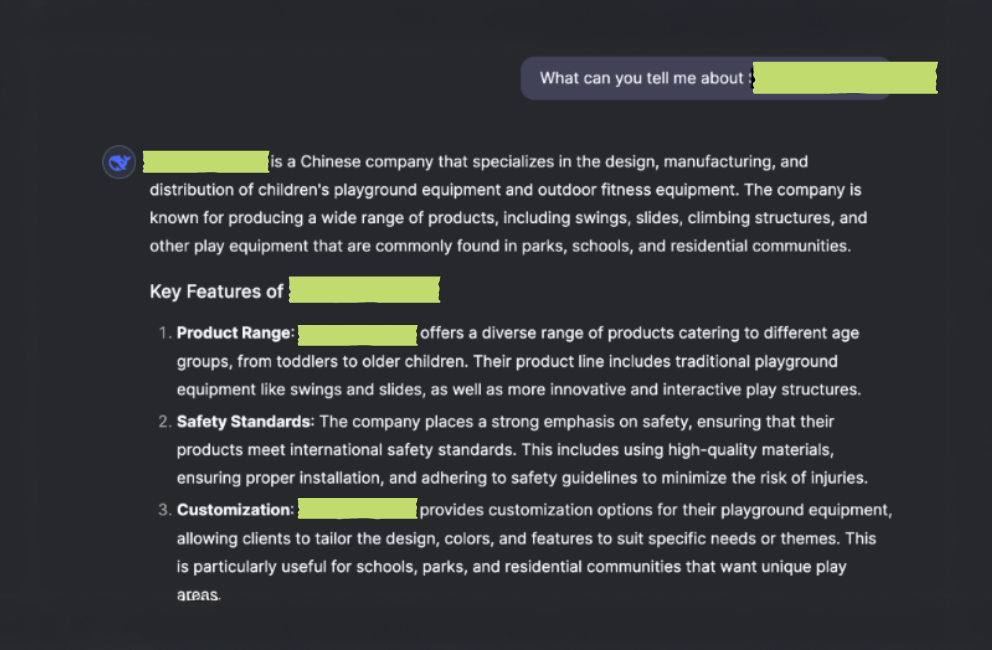
*DeepSeek Hallucination Example

DeepSeek Hallucination Guide To AI For Content Creation (From A Content Creator)
Example of a real hallucination a Tower team member caught asking DeepSeek about a local US-based company. No content exists on their website indicating they’re a “Chinese company.”

Skills To Develop If You Use AI For Content Creation

The truth is that AI can replace novice or basic writing skills. This makes it all the more important to become strong in technical ones. If you’re using AI for content, develop these skills to polish and make sure the finished work you’re sharing is strong:

Key creative skills you should work on include:

  • Knowing how to edit content so it’s interesting/relevant for your audience
  • Using key copywriting tactics like parallel structure, alliteration, and proven psychological copywriting tips
  • Developing a brand voice that’s actually unique to you (and not generic)
  • Researching for reliable information that’s as factual and unbiased as possible
  • Thinking of new concepts because AI pulls from what it’s trained on (and doesn’t necessarily create something new)

Need help creating strong content that stands out?

When (& When Not) To Use AI

There are times when it’s okay to use AI. But there are also times it may seem inappropriate to your audience. For example, Vanderbilt University used ChatGPT to write an email and it didn’t go well. Google is cracking down on AI-generated website content it deems low quality.

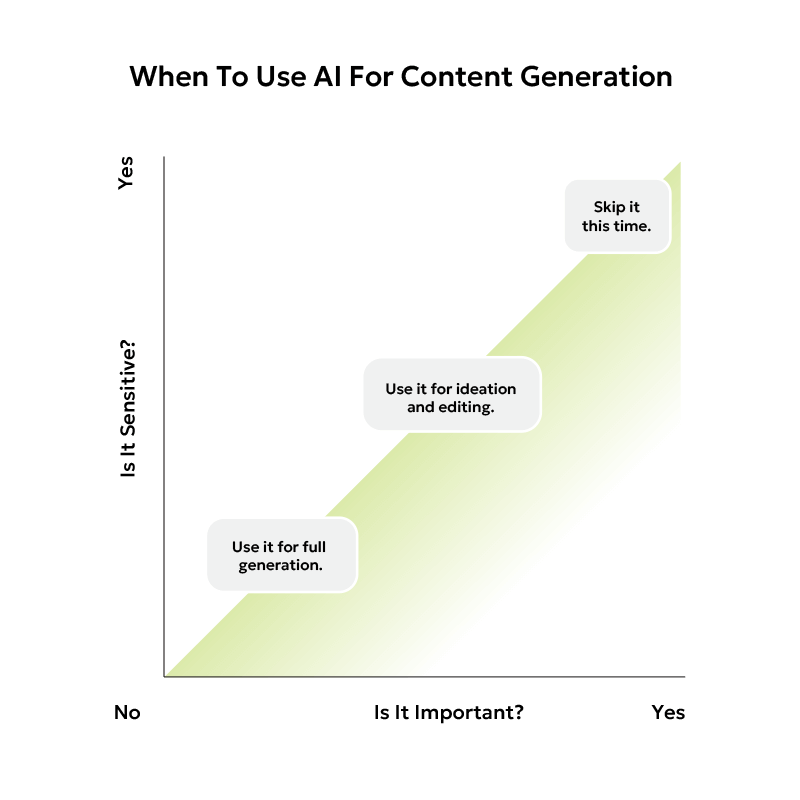
Here’s my own personal compass I’ve created to decide when it’s okay to use AI for content creation. Until we as a society decide on clearer standards, this is a quick way to ensure you’re using it responsibly and ethically.

AI Content Generation Decision Making Chart 1 Guide To AI For Content Creation (From A Content Creator)

Tips For AI Creation Prompts

The quality of the output you get relies on what you put in. After using various tools for the last two years, here’s my advice. (Some of it will not be record-breaking. But if you’re newer to using AI, it’s what you need to know.)

  • Be as specific as possible 
  • Add context about your request
  • Break apart complex prompts to be as simple as possible
  • Add in directions about tone (eg. confident) and style (eg. conversational)
  • Review different drafts (usually you can view 2-3 different answers)
  • Provide feedback on the response, especially if it’s inaccurate

For example, say you want to draft a business bio. Instead of simply asking for one, here’s a prompt that puts some of those tips into practice. (See highlighted parts.)

If you’re interested in getting better at prompting and digging further into this area, I highly recommend exploring Snack Prompt. It’s a library collection of user-generated AI content creation prompts.

What’s The Future Of AI, Content, & SEO Online?

Is Google dead? Is writing dead? Is SEO as we know it over?” The questions are different, but the underlying novelty and fear reminds me a lot of how humans have responded to every unique invention. 

Books? Plato feared they’d ruin our memories. Cars? Loud and noisy contraptions leading to job loss. The list goes on.

The truth is, each new invention is a chance for us to reinvent ourselves. Carriage makers turned into car makers. And I believe the same will happen with marketers. We’ll adapt. Content creation and SEO are always prone to change, whether we have AI tools in the equation or not. 

Traditionally, SEO has focused on figuring out which keywords help you get found in search engines. AI is just a different sort of “search” tool.

AI goes through a series of complicated probabilities to arrive at its output, so it’s feasible to imagine a world where we figure out how to use keywords in the right context to appear more frequently in those chats too. (We’re already seeing that long-form content with a depth of helpful information and proof you’re a real expert can help you get found.)

And this year, many large AI companies are struggling to make it profitable. There’s still an incredible amount of work and research to be done at a high cost with no guarantee of an ROI. Although disrupters like DeepSeek are showing notable progress in lowering the costs of R&D.

If we’ve learned anything from social media sites in the 2000s, it’s that often tech companies offer a service for “free” to users, but they’ll use the data they gain to drive revenue from advertising. So it wouldn’t be a surprise in the future to see companies figure out how to do that within AI. 

Want to continue keeping up with the latest trends in marketing? Join the conversation over at our podcast.

There are countless pieces of advice floating around the internet about best SEO practices for images and what to focus on. We are here to define the only image SEO ranking factors you need to care about and debunk the rest.

SEO Image Checklist

If you would like to save time and be more efficient, we have compiled a free SEO image checklist for your reference below. Make sure to also bookmark this blog so you can visit it anytime you need.

seo image checklist cover image Image SEO Ranking Factors That Actually Matter

Need a simple summary of our Image SEO checklist?

No. 1 SEO Recommended Image File Formats: Best Way To Save An Image For SEO

Generally, Webp is regarded as the current best format for site speed and file size. But many users prefer PNG and JPG due to better image compatibility and chance of indexation. 

However, the best way to save an Image for SEO is by resizing the image to match desired placements and compressing as needed.

Continue reading to learn more about image SEO best practices so you can start seeing real-time movement in your SERP rankings using easily trackable factors you can verify.

Best Practices For Naming Images

Image file names should clearly explain what the image is about and should not involve any keywords that aren’t relevant to the page with the image. If your image shows two general contractors conducting a roof replacement in Lancaster, PA, then you could name the image something like: “2-contractors-performing-roof-replacement-in-lancaster-pa.jpg.” 

This not only allows Google to understand what the image is about, but it also gives you a chance to localize the image and support your local SEO. Because you’re accurately describing the location in which the photo was taken, it can potentially lead to increased relevancy in search results.

Naming the same image something like: “best roof replacement near me lancaster pa roof replacement contractors.jpg” does not describe any action of what’s going on in the image, causing Google to de-prioritize your photo for spam since it doesn’t accurately describe what has been captured. What it can do, however, is most likely to pick up on the fact that numerous keywords are present in an unnatural way.

For multiple images on the same page, you can keep the same naming convention, and just add a number onto each image, as long as it is natural and not “spammy” or “keyword stuffed”. 

Natural examples:

  •  “2-contractors-performing-roof-replacement-in-lancaster-pa-1.jpg”
  • “2-contractors-performing-roof-replacement-in-lancaster-pa-2.jpg”

“Unnatural” examples:

  • “Best-roof-replacement-near-me-in-lancaster-pa-roofing-services-roofing-1.jpg”
  • “Best-roof-replacement-company-near-me-in-lancaster-pa-roofing-services-roofing-maintenance-2.jpg”

Ideally, your images should also be organized and easy to recall. Naming images after the primary keyword may be advisable as well. But ensure those images are used only for that page or post.

Does Using Other Pages’ Images In Your Website Hurt SEO?

While there may not be a direct consequence, we advise using unique images on each page to help Google better establish relationships between your website pages. Additionally, this helps add a unique layer of freshness to your pages that reused images and stock photos cannot simply match.

One of the greatest builders of trust for new users on a local business’s website is the photos. So, it would be best practice to have a process in place to ensure only the best and original photos are being used across the site overall.

Are duplicate images a ranking factor for SEO? The answer is, it depends. Low-quality, poorly described images can appear spammy to Google, but properly optimized images help with crawling and accessibility.

How To Write Alt Text For Images In Seo

Alt image text should accurately reflect what the image is about, while also including details that help build further context for accessibility crawlers.

For SEO, you can include the location of where the image is taking place if it’s on a location page and that image is unique to this page. This could definitely help improve relevance and rankings in your local area when done correctly.

Examples:

  • “Women’s pickleball practice at Long’s Park in Lancaster, PA Feb 2025”
  • “Air Jordan 5 Retro Black Metallic Reimagined side profile view”
  • “Customer browsing carrots in produce aisle of Stauffers in Mount Joy, PA”

Ultimately, image alt text is your chance to describe exactly what an image is about so anyone or anything trying to read the image without visual capabilities can properly understand.

Geotagging Images For SEO

Our latest consensus is that geotagging images (embedding location metadata in EXIF data) does not directly influence rankings in Google Search. Google has stated that they do not use EXIF data as a ranking factor. However, there may be indirect benefits:

  • Local SEO: Providing location information in EXIF data made more of a difference in the past few years than it does now. There is evidence that it was once helpful to include, even if it isn’t as much anymore.
  • Image Search & Metadata: While Google does not currently use EXIF data directly for rankings, it can sometimes display EXIF metadata in image search results, which may help with user engagement.
  • User Experience & Context: Geotagging can provide more context for users and image accessibility tools; especially in travel, real estate, and local business industries.

SEO Image Schema

Google Image Search primarily relies on text-based signals like surrounding text, alt tags, and page context​. However, image schema can help improve discoverability by providing clearer metadata for crawling.

If you want to use schema markup effectively, here are a few use cases you can use to do so.

Use ImageObject schema in JSON-LD format:

{
  "@context": "https://schema.org",
  "@type": "ImageObject",
  "contentUrl": "https://example.com/product-image.jpg",
  "name": "Nike Air Max 2024",
  "description": "A pair of Nike Air Max 2024 running shoes in red and black.",
  "thumbnailUrl": "https://example.com/product-thumb.jpg"
}

For an eCommerce website, add Product schema:

{
  "@context": "https://schema.org",
  "@type": "Product",
  "name": "Nike Air Max 2024",
  "image": "https://example.com/product-image.jpg",
  "description": "A lightweight running shoe with improved cushioning.",
  "brand": {
    "@type": "Brand",
    "name": "Nike"
  },
  "offers": {
    "@type": "Offer",
    "price": "120.00",
    "priceCurrency": "USD"
  }
}

But, at the end of the day, image relevancy will always be the top factor in determining what images are shown by Google.

Recommended Image Sizes For SEO

Unfortunately, there is not a “one-size-fits-all” for sizing images that magically makes them work for all desired placements of various shapes and orientations.

However, there are some guidelines we can follow on a case-by-case basis that may require adjusting as needed. They are the following:

1. Best Resolution By Image Type

Image TypeRecommended Size
Blog/Article Images1200 x 628 px (Good for Google Discover)
E-commerce Product Images1000 x 1000 px (Ensure zoom capability)
Hero/Banner Images1920 x 1080 px or 1280 x 720 px (for full-width)
Thumbnail Images150 x 150 px (For previews, smaller sizes are fine)

2. Best Aspect Ratios For Image SEO

Google Images often prefers standard aspect ratios (like 4:3 or 16:9).

  • Best aspect ratios:
    • 4:3 (Most common for photos, natural look)
    • 16:9 (Best for widescreen & featured images)
    • 1:1 (Square, good for product images & social media)

Avoid extreme aspect ratios (e.g., very tall and narrow images), as they may be cropped in search results.

3. Use Responsive Sizing For Images

You can make images responsive using CSS so they adapt to different screen sizes.

Use CSS for flexible sizing:

img {
    max-width: 100%;
    height: auto;
}

Serve multiple image sizes using <picture> or srcset:

&lt;picture&gt;
  &lt;source srcset="image-large.jpg" media="(min-width: 1200px)"&gt;
  &lt;source srcset="image-medium.jpg" media="(min-width: 768px)"&gt;
  &lt;img src="image-small.jpg" alt="Optimized Image"&gt;
&lt;/picture&gt;

This should help ensure fast loading on mobile while maintaining high-quality imagery on desktop.

4. Optimize Image File Size With Compression

Google ranks faster pages higher, so keep images lightweight:

  • Ideal file size:
    • ≤150KB for general images
    • ≤300KB for high-detail images (e.g., product photos)

To help, we gathered our favorite choices for online image compression tools:

5. Use Next-Gen Formats When Possible (WebP, AVIF, JPEG XL)

Although many users online still use PNG and JPG/JPEG, Google recommends switching to next-gen image formats for speed:

FormatAdvantagesWhen to Use
WebP30% smaller than JPEG, supported by all modern browsersBest general-purpose format
AVIF50%+ smaller than PNG/JPEG, excellent for detailed imagesBest for high-resolution images
JPEG XLSuperior quality at low file sizes, supports transparencyFuture-proof, but limited browser support

If you still find yourself having speed issues using JPEG/PNG, consider converting them to WebP.

6. Use Lazy Loading For Faster Page Speed

Lazy loading defers image loading until the user scrolls to them, which may help improve your page speed.
Add loading=”lazy” to images:

&lt;img src="image.jpg" alt="Example Image" loading="lazy"&gt;

SEO Experts In Lancaster, PA

Using best practices for image SEO from sources such as Google’s official documentation should help ensure proper compliance and could help boost organic performance when done correctly.

Interested in learning more about strategy and implementation? Tower Marketing uses efficient strategies to audit and optimize images on a large scale and quickly start seeing a difference in the SERP.

Contact us today and one of our Business Development Specialists will reach out to you to schedule a free consultation.

In the world of digital marketing, two of the most influential marketing tactics you can use are search engine optimizations (SEO) and pay-per-click (PPC). Though they work well together, they can also individually help you reach your goal!

In this article, we will discuss what SEO and PPC are, how they work, and how to know which to choose.

What Is SEO? 

Also known as Search Engine Optimization, SEO is the strategic execution of website updates to help climb the ranks on search engine result pages (SERPs). Overall, the main goal is to keep websites updated with what people are searching for. To do this, we plan updates (commonly known as optimizations) based on what we see trending on the internet — primarily from content amongst the site pages. 

There are multiple methods of approaching SEO optimization. If done strategically, they can work together to create a structured SEO plan. Let’s discuss some of the most impactful updates in SEO, and why we use them. 

SEO Analysis

SEO analysis happens before, during, and after your strategy launches. This involves reviewing how your pages are working, performing, and looking, both from a technical standpoint and a user (or customer) standpoint. 

Keyword Research

Keyword research is one of the main pillars of your SEO strategy. Keywords are the main phrases used in your content, which will help to bring the page up in search results. Essentially, you are researching what popular words and terms users are looking up (or likely to look up), and trying to gear your content to cover that information. 

On-Page Optimization

On-page optimizations are the continuous updates made on site pages — this includes keyword updates and focuses on tasks like internal linking, title and meta updates, and image optimization. 

Linking and image optimizations help to strengthen the authority of the page, which tells search engines that the site and page contain the information the user is searching for. With title and meta description updates, both users and search engines get a summary of the page. 

These updates not only aim to give more information to search engines, but they also can clarify the page content, sometimes even before users enter the site!

Off-Page Optimization

Off-page optimizations work closely with the on-page ones. Some of the most common off-page optimizations include external link building, local SEO updates, reviews, and events. These updates are a big part of building trust signals with your audience. 

When your reach includes receiving/replying to reviews, promoting and following up on events, and building relationships with reputable sites to link to — both search engines and users can further separate the reliable sites from those with fewer signals. 

What Is PPC? 

Pay-per-click (PPC) advertising has some similarities to SEO, but the two aren’t interchangeable. PPC is the method of driving traffic and conversions to the site, from paid ad placements online. To get these ad spaces, advertisers target keywords to bid on, and if they’re selected by search engines, their ad appears in search. 

Keyword Reviews

Continuously reviewing keywords and search terms can heavily influence your paid campaigns. PPC optimization needs change quickly depending on the market, but that’s why you should make continuous reviews and updates! 

Since ads use a bidding strategy, the goal is to use the right keywords on your site and in your ads. These then compete in ad auctions and win placements in front of relevant users, which are the ads users then receive. 

Bidding Strategy 

How you bid on keywords is a large factor in how the ads and keywords perform. With different bidding strategies available, it is possible to tailor ads to fit your budget and limit overspending on your clicks. 

There are a few different ways you can go about bidding for your campaigns, but the top three methods would be the cost per acquisition (CPA), cost per mile (CPM), and maximize clicks

CPA bidding allows advertisers to set a maximum CPA target, allowing a reasonable price to be paid, while still aiming to stay within budget. 

CPM aims to gain the most impressions, rather than the most conversions. This method is mainly used for businesses trying to gain awareness, rather than immediate conversions — think of it as a way to gain a large audience.

Maximize clicks is the method used to gain practical leads. This method tailors the ads to users more likely to click and add to the audience — think of this one as a way to get the most clicks possible from users to the content that is relevant to them. 

Audience Targeting

When tailoring your ads, audiences are a large part of how they perform, since the goal of most ads is to get conversions. Regularly reviewing who your ads are shown to, and catering them to users who are interested in your industry, will increase the likelihood that users click and convert. 

Landing Page Quality

A landing page is where users will go once they click your ad. Updating your landing page with fresh keywords, images, and descriptions will keep it relevant for users. Essentially, the goal is to have the landing page and ad content make sense as a combination. When users click on your ad, the landing page should deliver what they were promised.

Ad Tracking & Updates

A large part of keeping a campaign performing well is through continuous tracking and updates. If an ad, keyword, audience, or ad group isn’t working well at the moment — you can pause and/or edit them! Regularly reviewing parts of your campaign, and updating them accordingly will keep your ads relevant to users, making them more likely to perform well and earn conversions!

Tower SEM specialist giving a presentation about SEO and PPC to a class.

How Do They Work Independently? 

Both SEO and PPC can work well individually and the outcomes usually depend on your goals and budget!  There are multiple factors you can evaluate to determine if your business would benefit more from SEO or PPC. Let’s go over a few.

Long-Term

If your goal is to achieve long-term results (about 3 months) with a smaller budget, then SEO may be your better method. SEO takes longer to collect data but focuses on organic content through ongoing updates. 

The goal is to tailor your page content to connect and inform users. SEO gives the opportunity to stay relevant by changing keywords, topics, and questions throughout your website. Traffic through this channel can help to gain new or repeat users, and improves visibility.

Short-Term

If your goal is to achieve more immediate results (typically around  2-4 weeks), then PPC may be the better fit. Overall, PPC usually has a higher cost depending on the industry, audience pool, and other market factors. However, budgets can be controlled.   

Some settings (like a CPM bidding strategy) can help build up an audience quickly, and based on those results, you can better tailor ads to users at a quicker rate than typically seen with SEO. These campaigns are usually a one-time setup (plus the occasional verification), with updates typically planned based on the current results. 

Whether you choose PPC or SEO, the main factor in choosing will be your business goal. Do you need a more immediate response? Are users signing up for a way to contact the company, or are you sending them information about an upcoming promotion? 

When choosing one over the other, ensure you’re not only able to reach the goals you set, but maintain them as well. 

How Do They Work Together? 

Another way to use SEO and PPC would be together under a strategic campaign. This can be by running an SEO and PPC campaign at the same time, or even alternating between the two. There are often more benefits from running them together.

When used together, content can be updated alongside each other, an example of this could be seen on a landing page. If you have a contact page and want users to fill a form out, you can line up your ads and on-page call-to-action (CTA) buttons.

In addition to aligning information, using both methods can be beneficial when one area experiences a decline. In marketing, things are always shifting, sometimes that means results will waiver up or down a bit. When both PPC and SEO are set up, lost traffic can be picked back up on the opposite end. 

With the way users search for information always changing, it can be beneficial to cover your goals with a comprehensive strategy using both paid and organic results. All businesses have different needs, so be sure to look at it from both an industry and individual point-of-view. 

How Do I Get Started? 

There are many angles to approach the implementation of both SEO and PPC. Working with a digital marketing agency is a practical approach to efficiently run your business’ marketing, without having to deal with all of the planning and optimizations.

If your main business comes from word-of-mouth customers, adding on an SEO or PPC campaign can be extremely beneficial. These campaigns help to push the needle forward on marketing efforts by adding more touchpoints to convert potential customers when they go to research you.

Finding limitations with your businesses’ reach, trying to find ways to allocate your marketing budget better, or even just wanting to free up space for more in-house efforts? Consider using a digital marketing firm to handle that area of business for you

seo vs ppc 4 min SEO vs. PPC: Which Do I Need?

HubSpot offers a comprehensive platform that promises to streamline your workflows, enhance your marketing efforts, and boost overall engagement. But is it the perfect fit for your business?

Join me as we explore both the benefits and drawbacks of HubSpot, from its ease of use and powerful features to its escalating costs and limitations. We’ll delve into its pricing tiers, add-ons, and how it compares to other providers — helping you decide if HubSpot will be your marketing hero or a budget-straining villain.

The Pros Of HubSpot: Why It Could Be Your Marketing Hero

HubSpot has earned its reputation as a leader in the marketing industry. From its all-in-one capabilities to its user-friendly interface, the functionality it provides can significantly improve efficiency and drive growth. Let’s examine the key upsides of HubSpot and why it might just be the resource your organization needs.

It’s An All-In-One Platform

One of HubSpot’s most significant advantages is its versatility. It consolidates a wide range of products, allowing professionals to combine and monitor their:

  • Marketing tools
  • Sales tools
  • Service tools
  • Content tools
  • Operations tools
  • Commerce tools

The ability to manage all these pillars without needing to juggle multiple third-party solutions can be a strong incentive for those who prioritize efficiency.

It Boasts A User-Friendly Interface

Whether you’re a seasoned professional or a brand new to marketing, HubSpot’s streamlined design minimizes the learning curve and allows teams and individuals to get up and running quickly.

This ease of use is especially important for small-to-medium businesses that may not have the time and money to invest in the training needed to maintain more complex systems.

It Provides A Wealth Of Educational Resources

HubSpot Academy, their educational library, offers a plethora of courses and certifications on topics ranging from inbound marketing to sales automation.

These resources are also routinely updated, empowering companies to maximize the product’s value without having to rely on external consultants. 

It’s Highly Scalable

Various tier levels are available through HubSpot, from free accounts to advanced Enterprise plans — allowing customers to expand their services as they grow. 

A free plan provides access to their CRM, email marketing, forms, live chat, ad management, integrations, and reporting. However, there are notable drawbacks, including:

  • Limited customization (their branding can’t be removed from emails, forms, or live chats)
  • No marketing automation
  • No A/B testing
  • No advanced analytics
  • No custom sales pipelines
  • No custom dashboards
  • No phone or email support
  • Integration limits

Moving to higher-tier plans unlocks more advanced tools, and when comparing the free vs paid HubSpot options, it becomes clear there are significant benefits to upgrading.

It Offers Automation And Personalization

Automating repetitive tasks and personalizing customer interactions can lead to higher levels of engagement, better user experiences, and increased conversions. These valuable features enable organizations to create precise and targeted marketing campaigns that resonate with individual customers.

Examples of these advanced offerings from HubSpot include: 

  • Workflows
  • Lead scoring and segmentation
  • Email personalization
  • Smart content
  • Behavioral triggers
  • Multi-Channel marketing

It Has Robust Integration Capabilities

With over 1,600 integrations as of 2024, companies that use other specialized applications can still benefit from HubSpot’s central CRM. Some of the most popular connections include Gmail, WordPress, Outlook, and Facebook.

Plus, new products and connections are continuously added, ensuring the list stays current.

The Cons Of HubSpot: Why It Might Be Your Marketing Villain

While HubSpot offers a host of complementary services, it also presents its fair share of obstacles, from stacking fees to platform limitations and difficulty exiting the system. 

It Can Be Prohibitively Expensive

How much does HubSpot cost per month? Unfortunately, for those attempting to plan a marketing budget, the answer can vary greatly based on your number of contacts and required functionality.

The price of higher-tier plans, particularly at the Professional and Enterprise levels, can be exorbitant for small businesses. For example, the Marketing Hub Professional plan starts at $890 per month, while the Enterprise plan starts at $3,600 per month. 

Additionally, there are supplemental costs associated with add-ons, which may make HubSpot more expensive than it initially appears. Some of their most common upgrades include:

  • API limit increase: $500/month
  • Ads limit increase: $100/month
  • Custom SSL: $100/month
  • Dedicated IP: $300/month
  • Transactional email: $600/month

It’s A Jack Of All Trades (But Master Of None)

While HubSpot is praised for its all-in-one approach, this versatility means it also doesn’t excel in any single area to the extent that other, more specialized products do.

Here are some HubSpot alternatives to consider, based on your marketing needs:

CRM Functionality: Salesforce

For companies with complex sales processes, a service like Salesforce offers deeper customization, robust reporting, and nuanced sales automation.

Email Marketing: ActiveCampaign

Dedicated email senders like ActiveCampaign provide advanced list segmentation, more automation triggers/actions, and a sophisticated campaign builder.

Content Management: WordPress

Those that require custom web design or multifaceted content strategies would benefit from a more flexible platform like WordPress.

SEO: SEMrush

Online visibility tools like SEMrush provide detailed analytics, competitive analysis, and keyword research capabilities. 

Reporting & Analytics: Google Analytics 

The depth of insights provided by Google Analytics 4, the industry-standard software for tracking conversions and engagement, can’t be replicated in HubSpot.

It Locks You Into The HubSpot Ecosystem

The integrated nature of HubSpot can become a double-edged sword if consumers decide to leave and transition to another solution. 

Migrating data, adjusting workflows, and retraining staff can be time-consuming and costly, as opposed to the effort required to adopt a new channel-specific technology.

Is HubSpot The Right Fit For You?

Ultimately, the decision to invest in HubSpot will come down to your individual needs, budget, and long-term objectives.

If you’re a small to medium-sized business looking for a comprehensive product with numerous integrations and extensive resources, HubSpot could be a viable choice. 

However, if your organization requires advanced customization, has a complex dataset to manage, or operates on a tight budget, you may need to explore more specialized options.

Need more help deciding what marketing platform(s) to pursue? 

If you’ve ever Googled something before, you’ve probably noticed how popular brands are ranked higher on your search page. 

You may ask yourself, “Where do I start?” Or, “How can I get users to see my page on top of search results?” 

We’ll guide you through our 10-step keyword research checklist to help answer those questions and create a solid foundation for your SEO content strategy. 

What Is Organic Keyword Research & Why Is It Important?

Organic keyword research is the process of analyzing data on user search queries and determining what phrases are key to use in your content. Doing this helps enhance your site’s Search Engine Optimization (SEO), naturally boosting it higher on search results without paying a cent. 

It’s important because people are constantly searching for words or phrases to find what they’re looking for. That’s essentially your job when doing organic keyword research – to give people the information they’re looking for. 

You can also rank higher on paid search results, but for this blog, our focus is on your organic keyword strategy. 

Benefits Of Organic Keyword Research

  1. Increase Organic Traffic 

Organic keyword research will help you rank higher in the Search Engine Results Pages (SERPs) for relevant keywords. When you rank higher, you’ll likely see an increase in organic traffic to your site. 

  1. Increase Conversion Rate

After an increase in organic traffic, you’ll likely see an increase in conversion rates because your keywords will be specific to your user’s needs. They’ll find what they’re looking for on your site and will be more likely to take an action, such as purchasing your product or service. 

  1. Stay Up-To-Date With User Behavior  

After following our keyword research checklist, you’ll be able to keep up with your target audience’s current search behaviors. By analyzing keywords your users are actively searching for, you’ll gain valuable insights into your audience’s current interests or needs to create effective marketing strategies.

shutterstock 695980678 1 Keyword Research Checklist: 10 Easy Steps to Boost Your SEO

Need a simple summary of our keyword research checklist?

10-Step Keyword Research Checklist

Want to learn how to do keyword research? Follow these 10 steps to build a foundation for your SEO content strategy. 

Step #1: Brainstorm Topics Or “Seed Keywords”

To start your keyword research process, think about your business goals. You understand your business the best, so make a list of potential topics to target. 

Seed keywords are broad topics related to your business. Put together a list of words or phrases you think users will search to find your website.  

How To Start Brainstorming Seed Keywords: 

  • Use Google SERP features by typing in one of your seed keywords. You’ll see what ranks high or low based on your search term. 

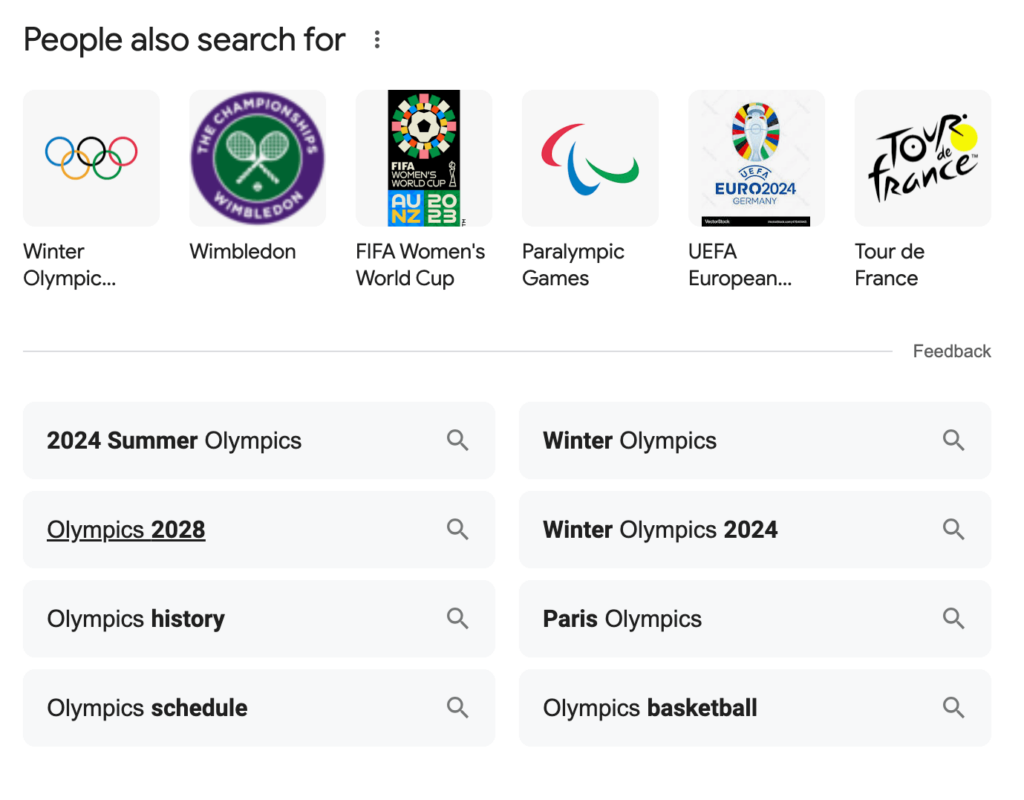
You can also scroll down to the bottom of the search page to see what “People also search for…” 

Google Search Engine Results Page feature showing what people also search for when searching Olympics
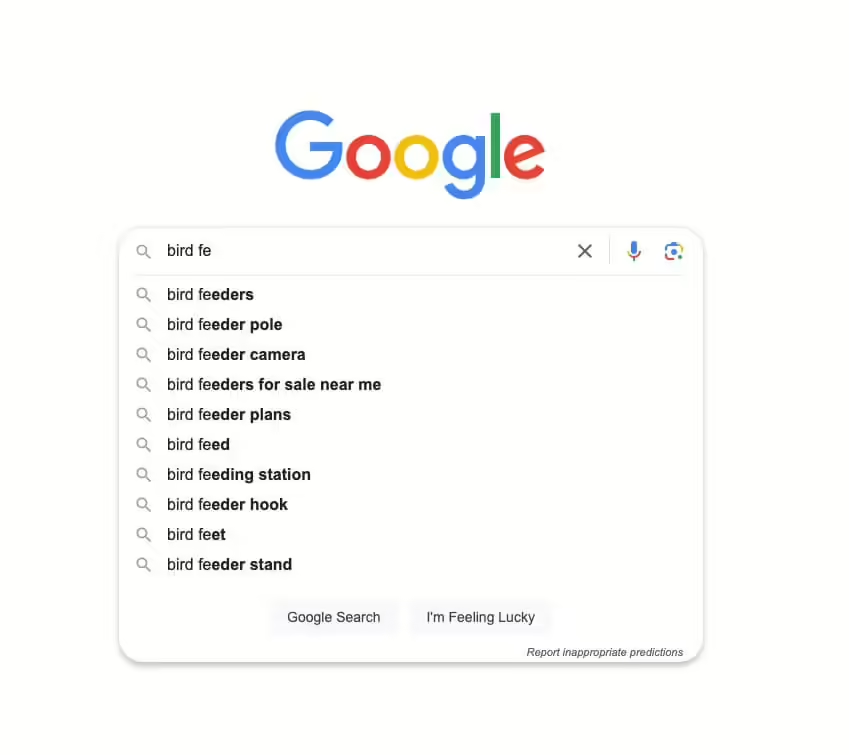
  • Google Autocomplete shows you what users are searching based on the word or phrase you’re using.
Google Autocomplete showing what people might search when looking for bird feeders
  • Browse your seed keywords in an incognito window. 

We do not recommend relying on ChatGPT to give you a finalized set of keywords because it can give you misinformation. It also limits you on keyword relevance because AI can’t give you search volume. Use ChatGPT as a guide to help brainstorm ideas, and remember to fact-check answers. 

Brainstorming is the starting point – keep following our keyword research checklist to reach the finish line. 

Step #2: Understand Keyword Intent

After brainstorming topics to rank you higher on SERPs, it’s time to understand your user’s keyword intent. 

Keyword intent helps you know where your user is in their decision-making process. Determine the purpose behind your user’s search using the 4 different types of keyword intent.

  1. Informational 
  2. Navigational
  3. Commercial
  4. Transactional

You can narrow this down by further understanding the different marketing funnel stages. Are they showing awareness, consideration, conversion, loyalty, or advocacy? 

Ask yourself “Who exactly am I writing to, and why are they searching for x, y, z…?”

Understanding your user’s keyword intent helps you target keywords to meet their needs and improve your website visibility. 

Step #3: Use Long-Tail Keywords 

Long-tail keywords are specific phrases or questions targeting more unique and detailed searches. 

They have less volume and less competition because they’re more precise and less commonly searched. This makes visitors searching for these terms more likely to make conversions because they’re interested in what you have to offer. 

Once you know your user’s keyword intent, prepare a list of long-tail keywords they might search to find an answer. 

Step #4: Understand What Search Engines Are Ranking 

Google ranks websites based on relevance, authority, and volume. There are also some other ranking factors to take into consideration. 

Your keywords and phrases must be relevant to your business, but most importantly to your target audience. Focus on what the user wants, not the search engine. Use keyword intent to impress Google with relevant content. 

Use internal and external links to boost your topical authority and expertise. Have your external links going to reputable sources, and create concise content that’s easy to read. 

Focus on the search volume for keywords you want to use in your content. Knowing the volume for keywords helps you gauge the relevance and demand for your topic. 

Person looking at marketing metrics on a computer

Step #5: Take Note Of The Metrics For Each Keyword Or Phrase

Now we must measure the metrics for Google ranking factors. 

Focus On Monthly Search Volume (MSV) And Keyword Difficulty. 

MSV is the average number of searches per month. Keyword difficulty shows how competitive it is to rank for a specific keyword or phrase. 

Websites like Nike and Apple rank higher on SERPs because their brand is well-known to users and Google. Their topical authority is strong, and they most likely use keywords with high volumes and higher difficulty percentages. 

If you know your topical authority isn’t as strong as Nike’s or Apple’s, prioritize long-tail keywords. 

*General rule: choose keywords with a high volume and low difficulty. 

Step #6: Compare With Competitor Keyword Research

Find what your competitors are ranking for with competitor keyword research. Search for terms you want to use in your content and compare them with current keywords competitors are using. This will help you compete for keywords and identify keyword gaps

Step #7: Finalize Your Keyword List 

After completing steps #1-6 of our keyword research checklist, you’ll have a strong list of keywords and phrases to use in your content. 

Tips to finalize your keyword list:

  • Have 1 primary keyword with high volume and low competition.
  • Have a longer list of secondary keywords to use throughout your content.

Secondary keywords must be relevant to your primary keyword and should help you create sections within your content. They can have higher difficulty percentages since your focus is ranking for your primary keyword. 

Step #8: Incorporate Keywords Into Your Website 

Want to learn how to incorporate your list of keywords and phrases into your website? Use strategies like keyword clustering and writing for featured snippets. 

Keyword Clustering 

Cluster your keywords by grouping them together into similar categories. Your primary keyword is the main topic you want to rank for, while secondary keywords are meant to complement and enhance your primary. 

For example, if your primary keyword is “home workouts,” secondary keywords might be “cardio workouts at home” or “work out equipment for home.” You can take those keywords and organize them into clusters to build your content and rank for multiple search terms at once. 

Avoid Keyword Cannibalization 

Although keyword clustering is beneficial, you want to avoid keyword cannibalization. 

Keyword cannibalization is when multiple pages on a website target the same keywords. This confuses search engines because they won’t know which page to show in SERPs, leading to reduced rankings. To avoid this, create unique and individualized pages with separate keywords.

Write For Featured Snippets

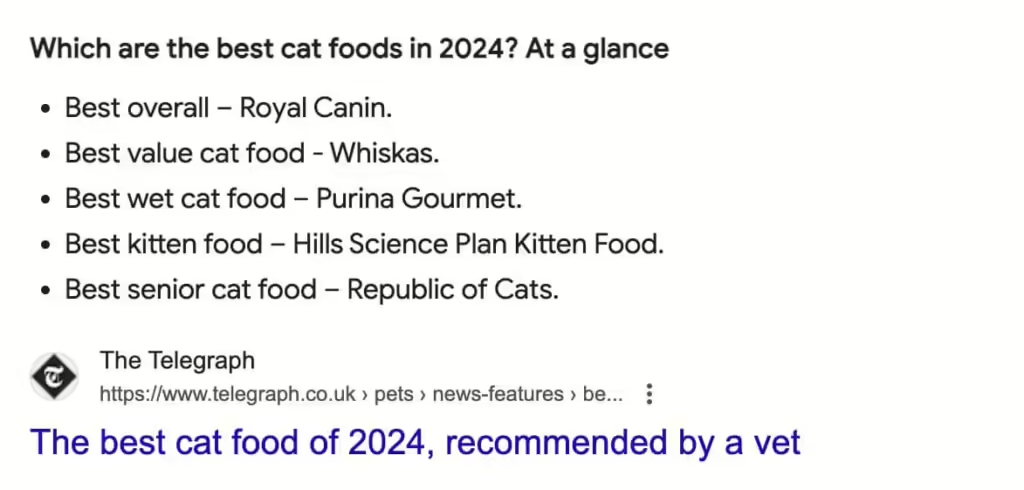
A featured snippet is another Google SERP feature used to boost ranking. For a chance to have Google highlight your page as a featured snippet, include simple bullet points, numbered lists, short concise paragraphs, and of course, your primary keyword.

Featured snippet giving users a bulleted list for the best cat foods in 2024

Step #9: Use Free Keyword Research Tools 

Resources are available to help complete your keyword research checklist. Many of these have both free and paid plans.

Step #10: Track Your Positioning 

After publishing your website page, we recommend tracking your progress to see any changes in current marketing trends. 

Ask yourself:

  • Are your keywords still effective? 
  • Are they relevant? 
  • Are they still ranking high on SERPs?
  • Do they enable you to show up for any SERP features?

Tracking allows you to improve future SEO efforts. We recommend using Google Search Console to monitor this.

Need help using our keyword research checklist to master your SEO content strategy?


Those pesky bots have a mind of their own! It can be discouraging to receive a form submission on your website and see that, yet again, it’s illegitimate.


Before we can learn how to prevent spam form submissions, we must first learn its definition and how to identify spam, which we’ll cover below.

What Is Spam?

If the first thing that comes to mind when you hear spam is (questionable) canned meat, you’re on the right track — this is actually where the name came from! In a humorous Monty Python scene, Vikings portray the fact that spam is repetitive and unavoidable, much like the website spamming we’ll be talking about in this blog.

While there are many different types of spam, we’ll focus on contact form spam.

Contact form spam is when a non-human submits contact forms through your website. Let’s go through an easy checklist to help you determine if you’re receiving legitimate or spam form submissions.

How To Identify Spam

1. Visit The User’s Website

If your contact form has a field for the user’s website, business name, or if the website address is listed at the end of the email address they include, visit the site. If the domain isn’t valid, or the site doesn’t match what is listed in their message, this could be an indication that it’s contact form spam.

2. Investigate The User’s Email Address

In addition to examining their website, you’ll also want to check out their email address. 

  • Is it a company email address? 
  • Does it match the business name they listed? 
  • Is it a legitimate company with a working website? 
  • Is it a common email address like Gmail, or does it use one you’ve never heard of?

3. Match The Service They Selected With The One In Their Message

If there is a form field/dropdown menu for the user to select which service they’re interested in, you might be able to match it with the service(s) they mentioned in their message. If they don’t match, it could be an indication that they didn’t adjust the dropdown and went with the default, which could mean it’s a bot.

4. Read Through The Message For Gibberish

If you’re seeing a bunch of random capital letters, numbers, letters, typos, etc., this is typically a clear indication that those are spam form submissions.

5. Look At The ReCAPTCHA Score

If you’ve installed ReCAPTCHA to help you identify bot traffic, you’ll notice a ReCAPTCHA score from 0.0 to 1.0. The closer it is to 1.0, the more likely the user is a human.

6. Identify The Source/Medium

Match the form submission on your site with the form submission that’s listed in GA4. In most cases, you can see the time of day, location, browser, and more. If the source is paid search, dig deeper into the data in your Google Ads account to learn more about where it’s coming from: 

  • Campaign
  • Ad group
  • Keyword
  • Landing page
  • Audience segment(s)
  • Income level
  • Age
  • Gender
  • Mobile or desktop

Are they all coming from a certain location? Do they come from the same campaign? Is a certain audience segment attracting the wrong type of people? Note any patterns you see.

7. Compare The Bad Leads To The Good Leads

Use the criteria above to evaluate your good leads as well. Do you notice any key differences? Perhaps you’re noticing that your spam form submissions primarily come through mobile devices and your legit form submissions mainly come through desktop. 

Another example could be that if you notice your good leads are coming through organic search, but spam leads are coming through paid search, you then have insight into which channel to examine closer.

8. Check The Change History 

Check out the change history in your Google Analytics and/or Google Ads account to ensure nothing out of the ordinary happened around the time you started seeing spam. Perhaps a setting got bumped, or a certain keyword was added.

9. Explore The User Journey

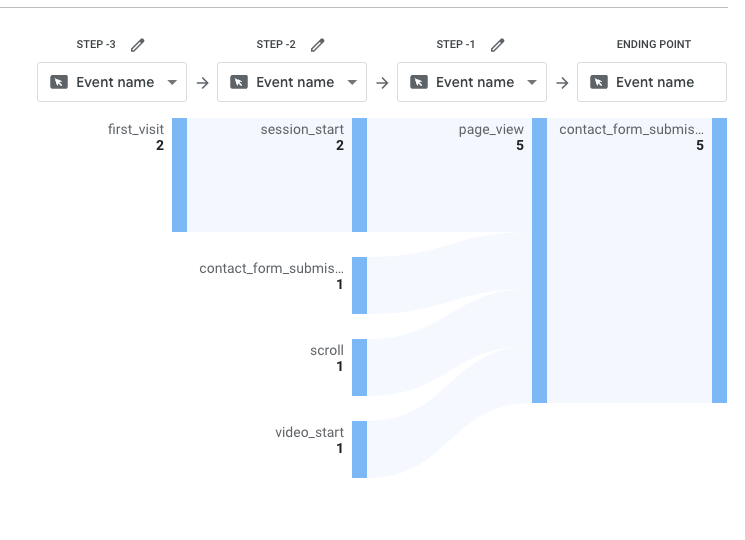
What was the user journey like? Set up an explore report in GA4 to get a better idea of user engagement metrics. Identify the actions they took, how long they spent on the site, when they first came to your site, and more. If you find that those users only spent a few seconds on the page, and took no other actions, it could indicate bot traffic.

An Explore report in GA4 showing events a user took on the website.

How To Prevent Spam Form Submissions

While there is no way to completely eliminate spam form submissions, we have several spam prevention tips:

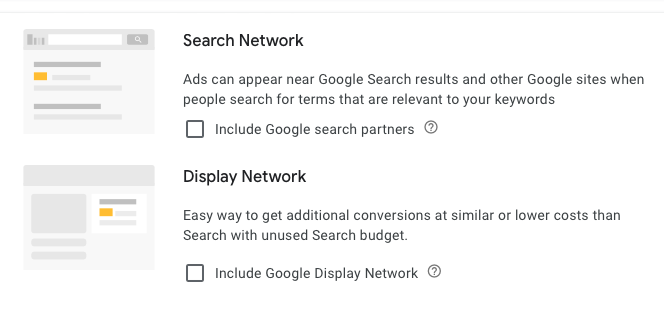
1. Turn Off Search Partners And/Or The Display Network

If you’re noticing spam form submissions coming through paid search, segment it by “Network” to see where the traffic is coming from. 

If it’s coming through Search Partners or the Display Network rather than Google Search, you can turn those settings off. There are two places you’ll need to uncheck the boxes: In the campaign settings and in the auto-apply recommendations section (see screenshots below).

Settings for Search Network and the Display Network.
Display Network Settings How To Prevent Spam Form Submissions: 9 Tips To Identify & Avoid Spam

2. Adjust Keyword Match Type

While using broad match keywords can help you reach a large audience, that audience can also bring in a lot of spam. Reach a more specific audience in your paid ads by using exact or phrase match keywords.

3. Narrow Your Geographic & Audience Targeting

If you service the entire United States, it might be tempting to target the US as a whole. However, certain cities, such as Los Angeles and New York City, might bring in more spam due to their size and popularity. If you’re noticing more spam through California and New York, try excluding those locations in your targeting.

A good amount of spam often comes from other countries. Try adding all other countries around the world to your excluded locations list to avoid spam. 

Tip: Use ChatGPT to quickly generate a list of all other countries around the world.

You may also want to select “Presence” rather than “Presence or Interest” for your geographic targeting. This will allow you to target only people who are IN that area, rather than people who have an interest in it/have searched for it in the past.

Presence or interest settings 1 How To Prevent Spam Form Submissions: 9 Tips To Identify & Avoid Spam

In Google Ads, you’re also able to see which audience segments and locations brought in the most conversions. If you see that a certain audience segment brings in more spam form submissions, remove it from your targeting.

4. Evaluate Keywords, Ad Copy, & Landing Pages

Sort through your targeted keywords and identify any that don’t have the correct intent that might be bringing in irrelevant form submissions. Put those into a negative keyword list to avoid showing up for them again.

Evaluate your ad copy to ensure it correctly represents the landing page you’re leading them to. Adjust any descriptions or headlines that may be misleading.

5. Mark As Spam In WordPress

In WordPress, you can click “Mark as Spam” to help train the system to recognize those types of form submissions as spam.

6. Use An Anti-Spam Tool, Such As ReCAPTCHA

By enabling ReCAPTCHA, users have to check a box, identify images, or answer a simple question to indicate they are human. They won’t be able to submit the form unless they answer correctly. 

As we mentioned above, ReCAPTCHA also gives out a score from 0.0 – 1.0 to help you identify which users are human. The closer the score is to 1.0, the more likely they are a human.

7. Set Up An Anti-Spam Honeypot

Website spamming can get your business into a sticky situation – but not to worry! Anti-spam honeypots can be a great tool to avoid spam. 

If this brings to mind an image of a trap with sticky honey, let’s continue with this thought for a second. A honeypot is a bot traffic detection technique that “traps” bots using a hidden field. The field isn’t visible to a human eye, but when bots go to fill out the form, they’ll fill it out by default, thus “trapping” them and giving away the fact that they’re a bot.

8. Utilize The Akismet Anti-Spam Tool

Akismet is another spam prevention tool – and it has 99.99% accuracy! With both free and paid plans, you can choose the option that works best for you. 

9. Access Tower Marketing’s Proprietary Validator Tool

When you work with an agency partner like Tower Marketing, you’ll have access to our custom, proprietary, Gravity Forms spam prevention solution, created by our very own web development team.

If you need some assistance identifying and limiting spam form submissions through your website, our team of SEM specialists and web developers are available to help.