0

This post was originally published in October 2016. It was updated in November 2019.

Eight seconds. A website user’s attention span lies somewhere around eight seconds. In the time it’s taken you to read these opening lines, you’ve probably picked up your phone at least twice, were distracted by something in your peripheral vision, or started mentally making a to-do list.

There’s a lot of competition for users’ attention online (and offline), so here are a few ways you can fight against short attention spans and entice users to stay on your website for longer than a goldfish can concentrate on something (which, for the record, is nine seconds).

Shorter Attention Leads to Higher Bounce Rates

Bounce rates reflect whether your website visitors click through to the second page of your site, or if they leave after viewing just a single page. These are called single interaction visits. They can often be a sign that your website is too difficult to use, information is not easily found, or the information within is uninteresting/unappealing to your users.

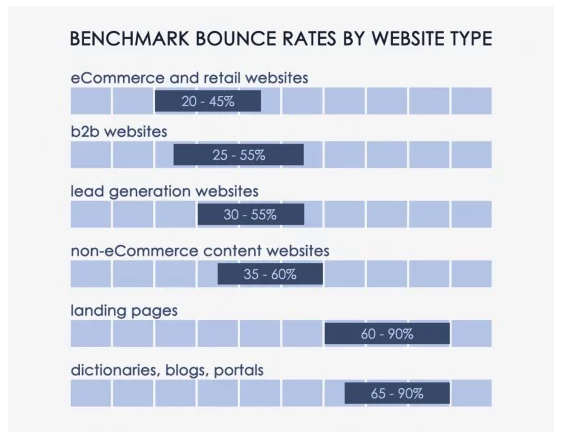
Average bounce rates can vary between 20 – 90% depending on the type of website you operate or even the type of page users are viewing. The chart below, created by Conversion XL, shows that eCommerce websites average a 20 – 45% bounce rate, while blogs and special landing pages average a bounce rate of 60 – 90%.

bar graph showing bounce rate of different types of websites

Online shoppers typically spend a longer average time on a website as they browse multiple products.  However, blog posts or landing pages can have a considerably higher bounce rate, especially if they are not designed, written, or formatted to grab visitors’ attention.

But, also consider that a high bounce rate doesn’t always mean your website is in trouble. A visitor looking for your address or telephone number can quickly visit a locations page, contact page, or even the homepage and find the information they need very quickly. While it may result in an average bounce rate of 70-90%, it also results in satisfied users.

How to Keep Visitors on Your Site Longer

The Faster the Better

The very first way you can lose a website user’s attention is by keeping him or her waiting.  The speed at which your site loads can make or break you in terms of keeping a user on your site. And users have the need for speed.

You can test a page’s load speed by using Google PageSpeed Insights or Varvy. If your results come in higher than user expectations, you may want to pay attention to the following elements of your site:

  • Reduce server response times
  • Condense images and media
  • Prioritize visible content
  • Enable browser caching
  • Optimize CSS, HTML, and JavaScript
  • Minimize redirects

Know Their Habits

One of the best ways to keep web users’ attention is to build your site and present your content to mirror the way they read (or, more than likely, skim) through your site. There’s no shortage of research on how people interact with websites, but here are some of the highlights we pulled to help you harness your readers’ attention.

Readers Follow An F-Pattern

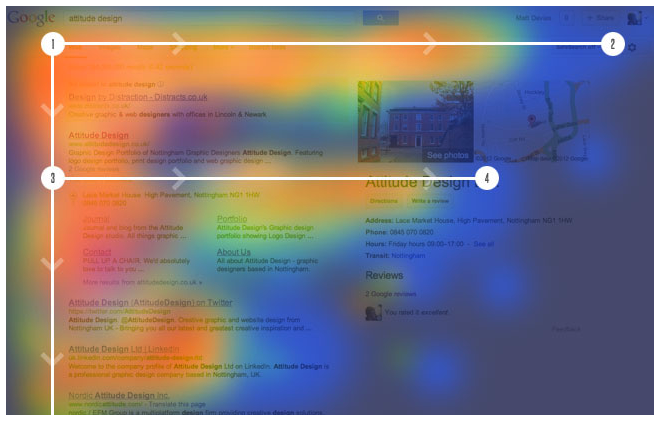
When researchers conducted an eye-tracking study, looking at how users viewed thousands of web pages, a dominant reading pattern emerged. The F-shaped pattern showed that readers typically scan three main areas of a web page.

  • A horizontal movement along the top of your content area.
  • A second, but shorter, horizontal movement further down the page.
  • A vertical movement, which researchers called a “slow and systematic scan” down the left side of the content.
example of f-pattern website tracking

They Go Beyond the “Digital Fold”

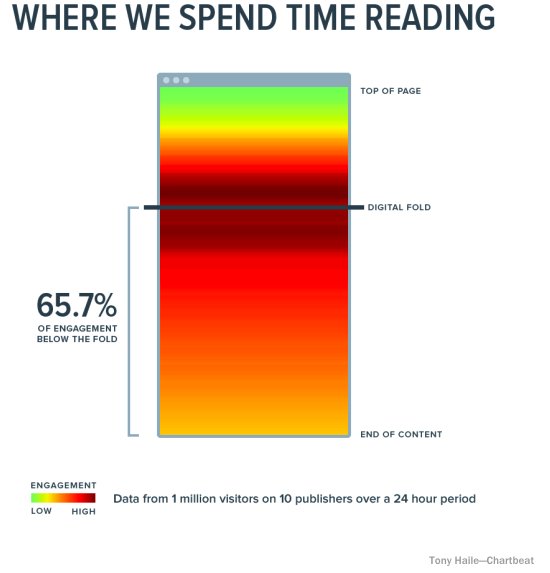
Because of a website user’s short attention span, marketers often feel they need to cram as much information as possible into the top part of their website, which is often referred to as “above the fold.”  And yes, it is important to provide key information to your readers as quickly as you can, but the main point here is “key,” not “all.” Smart web users know they need to scroll down a web page, and they will happily do it. In fact, analysis from over a billion web visits shows that 66% of attention on a normal media page is spent “below the fold.”

website users read below the fold

Users also know that the call-to-action and suggested next steps are found at the bottom of the page, which is why the bottom is the second most-viewed section of a web page. Give them what they’re looking for with a strong call-to-action to round out each web page.

Engage With Video Content

There are many good reasons to incorporate video into your website. Video allows you to tell the stories that help users learn about and trust your brand. Video also provides users with short attention spans with an option beyond reading through pages of long-form content. Videos are quick and colorful and keep users engaged longer.

Don’t be intimidated by video. Not everything you create needs to be splashy, high-production content.  Here are a few ideas for video content to include on your website:

  • Homepage video
  • Product demonstrations
  • How-to videos
  • Brand story/history video
  • Client testimonials
  • User-generated video

Grab Visitors’ Attention with a Friendly Reminder

How many browser tabs do you have open right now? Is the article you started reading with your morning coffee still there? You may have already forgotten why you went to those sites in the first place. A multi-tasking audience with a short attention span can be hard to overcome, but we discovered a fun way to make your site’s browser tab stand out from the rest and encourage visitors to return to their session.  Just take a look at these two browser screen grabs…

Snip20161018 6 Winning the Fight Against a Website User's Attention Span
Snip20161018 9 Winning the Fight Against a Website User's Attention Span

Did you catch the difference?  The “Thoughts on Users” tab changed to “Don’t Forget to Read This…” when I clicked over to another tab.  A small touch, sure, but in that eight-second span, it may be just enough to bring back an attention-challenged user.

P.S.

I’ve hidden eighteen typos in this post to ensure that you were paying attention. Just kidding, I didn’t.

If you need help creating the written, visual, or video content that grabs visitors’ attention, contact our digital marketing specialists!

Research shows 91% of B2B marketers use content marketing to reach customers, and 86% of B2C marketers say content is key to their overall marketing strategy. But less than 50% of marketers are creating content that aligns with the buyer’s journey.

So, why is this the case? It starts with the confusion surrounding the buyer’s journey. How many stages are there? Is it a funnel, an infinite loop, or something else entirely? And perhaps most importantly, how is it relevant to you as a content marketer?

I understand that the buyer’s journey can be complicated. To make it more digestible, I’m breaking it down into a series of four blogs: one for each stage of the buyer’s journey. I want to make this topic as easy to understand as possible. In turn, you’ll be able to take what you learn and apply it to your own marketing strategy.

Before getting too far into awareness-stage content marketing, I’ll lay the necessary groundwork. Let’s start by discussing the buyer’s journey, buyer personas, and the crucial role content marketing plays in the awareness stage of the buyer’s journey.

What is the Buyer’s Journey?

The customer buying journey is the steps a prospect goes through on their way to purchasing a product or service. While there are several models of the buyer’s journey, I’ve broken it down into four main stages.

Awareness Stage

This is the first step in a buyer’s journey. At this point, the prospect becomes aware they have a problem or something missing from their lives. After coming to this realization, they start doing research to pinpoint their problem.

Consideration Stage

In this stage, the prospect has defined their problem and is ready to find a solution. They’re continuing to do research because they want to understand all of their options.

Decision Stage

The prospect has chosen how to solve their problem and created a list of companies that can help them. They’ll eventually narrow this list down and make their purchasing decision.

Post-Decision Stage

The buyer’s journey doesn’t end after the decision stage. At this point, customers are reflecting on their decision and evaluating their choice. If they’re pleased with your product or service, you have the opportunity to bring them back through the buyer cycle again.

What are Buyer Personas?

Buyer personas are an integral part of the buyer’s journey stages. Buyer personas aren’t actual people, but they’re based on the real market research you’ve collected about current customers. It’s important to be as detailed as possible when building your personas, since they play a big role in attracting qualified leads and winning new business.

Buyer Personas and the Buyer’s Journey

You might be wondering just how buyer personas relate to the buyer’s journey. Start by creating buyer personas for each stage of the buyer’s journey I outlined above. When creating your personas, determine what prospects are looking for and how they go about solving their problems. What questions should you be asking about them? Prospects are learning about you, and you should always be learning about them.

Understanding your audience also helps you demonstrate empathy because they’re more likely to trust you and consider your products or services. Think about Google and the trust they’ve built with their users. By providing free services (i.e. Google Drive, Gmail, Google Flights, Google My Business, etc.), they’ve established their value in the minds of consumers. They’ve also kept themselves top-of-mind and clearly aren’t going anywhere any time soon.

You now understand the buyer’s journey and the role buyer personas play in guiding customers through that process. But how does content marketing fit into the customer acquisition process and the buyer’s journey?

What Role Does Content Marketing Play in the Buyer’s Journey?

Content marketing plays a key role during all stages of the buyer’s journey, but don’t take a one-size-fits-all approach when creating your content. Instead, produce and share buyer’s journey content that provides the most value for prospects in that specific stage.

As I said above, in the awareness stage, prospects realize they have a problem and are trying to pinpoint it. If you want them to seriously consider you, it’s crucial that you provide upper-level educational content to help them.

Never go for the hard sell with your top of funnel content marketing. Prospects don’t want to hear about why you think your company is the best thing ever. They want impartial, expert knowledge and advice on the problem they’re trying to identify (and eventually solve).

Another way to think about this is by reflecting on your logic when it comes to choosing a digital marketing agency. You probably aren’t ready to partner with us at this point, and your prospects probably aren’t ready to sign on with you either.

Ultimately, you want to subtly nurture awareness stage prospects towards conversion. Providing them with comprehensive, useful content builds trust and increases the chances they’ll move towards a purchase decision involving your company.

How Do You Create Content for the Awareness Stage of the Buyer’s Journey?

We’ve reviewed the buyer’s journey, buyer personas, and how content maps onto the buyer’s journey. You already know the awareness stage of the buyer’s journey is the point where prospects realize they have a problem or something missing from their lives. Their next step is doing research and looking for top-level educational content and thought leadership.

Most of your prospects use Google to gather information and do research. That means it’s important to understand what their search queries look like. The prospect doesn’t know a lot about their problem at this point, so their questions are usually more open-ended. For example, they’ll probably search for “new shoes,” not “Sperry women’s striped loafers size 8.”

So, you know people are asking broad questions. To capture that traffic, anticipate their queries and address them in your content. Don’t get too detailed, though. Instead, provide quick takeaways that aren’t buried in long walls of text. Think like your user. They want to develop their understanding of their problem so they can move towards pinpointing it and preparing to find potential solutions.

Google Autocomplete

google autocomplete serp How to Create Effective Content for the Awareness Stage of the Buyer’s Journey

One way to think like your prospects is by utilizing Google Autocomplete. As users type questions into the search bar, Google Autocomplete suggests queries it thinks are relevant.

Google Related Searches

google related searches serp How to Create Effective Content for the Awareness Stage of the Buyer’s Journey

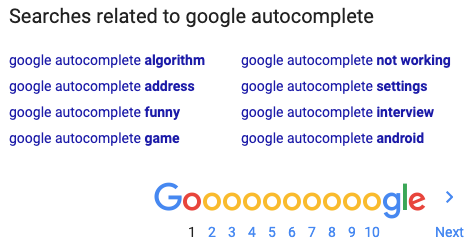
Google Related Searches also gives you insight into what users are thinking. Related searches show up at the bottom of every search engine results page (SERP) and have queries Google thinks are similar to the users.

What Content is Most Effective During the Awareness Stage of the Buyer’s Journey?

Awareness stage content marketing can come in a variety of forms. Here are some examples:

Always remember that providing engaging, useful content during the awareness stage of the buyer’s journey helps nurture prospects towards the consideration stage.

What Are Some Examples of Awareness Stage Marketing Campaigns?

Along with particular pieces that work well during the awareness stage, there are several awareness stage campaign types that can yield great results. Here are just a few:

  • Awareness campaigns are the perfect opportunity to provide prospects with valuable content that shows empathy for their situation. Demonstrate expertise and authority without being salesy, and you’ll start to gain their trust. End with a soft closing CTA and link to a piece of educational content so users can learn more if they want to.
  • Grand opening campaigns are great for prospects who haven’t heard of your business yet. If you’re opening a new location (and most of your customers are local), consider a grand opening campaign.
    Invite prospects in for a free seminar, educational course, or webinar about your company that provides helpful information without being pushy.
  • Birthday and new mover marketing campaigns are perfect for businesses who know their prospects’ birthdays or have access to data on new movers. Try targeting these people with free offers and discounts on the informational events we mentioned above. Again, don’t be pushy or try to advertise your brand too heavily in this stage.

Want help with your content marketing efforts? Our team of digital marketing specialists is here to help!

If you’re an email marketer, you might as well add the title “Warrior” to your email signature and resume. You are constantly fighting for higher open and click rates, changing up tactics and strategies, and defending your email campaigns from bounces and unsubscribes.

Unfortunately, no matter how mighty your sword or how hard you fight, you may find that your bounce rate is continuing to increase. Don’t surrender just yet, warrior! We have the tools you need to become an email marketing champion. Take a look at the reasons your emails have bounced back, discover whether they are hard or soft bounces, and learn how to fix them with our tips and tricks.

Your Email Bounced Back Because…

1. There Are Deliverability Problems

Bounce Type: Soft (Temporary Issue)

If your email bounced back, it could be due to a variety of temporary issues. These issues tend to resolve themselves automatically. The issues are often caused by the following:

  • Recipient’s inbox is full
  • Recipient’s server timed out and is unavailable to receive the email
  • Recipient has a vacation or auto-reply set up

2. Your Email is Too Big

Bounce Type: Soft (Temporary Issue)

If you’ve sent a large email and the recipient’s inbox restricts incoming email sizes, the email may bounce back. Be sure to double check your email size. Are you using large photos? If so, decreasing image sizes can help.

3. The Email Address is Invalid or Non-Existent

Bounce Type: Hard (Permanent Issue)

Did you buy an email list from a third-party source (say it isn’t so!)? Are you using an old email list that you created years ago? If either of these are the case, it’s possible your bounce rate is high due to invalid and non-existent email addresses. Whether email addresses have typos or just aren’t used anymore, your email will bounce back.

4. Spam Filters Blocked It

Bounce Type: Hard (Permanent Issue)

Take a look at your personal or work email inbox. See that spam folder? Go ahead. Open it and see how many emails have collected there without your knowledge.

Spam filters have been set up in most inboxes and have become more aggressive over time due to the continued increase of spam email sending/receiving. While the folder may save you the personal headache from receiving those pesky, annoying emails from unknown senders, it will increase your campaign bounce rate professionally. You guessed it — when your email lands in a spam folder, it’s considered a bounced email.

5. You’re Sending Emails to High-Security Servers

Bounce Type: Hard (Permanent Issue)

It’s possible your email bounced back because a recipient is located on a high-security server. Similar to the previous reason, spam filters are also partly to blame for emails bouncing back after being sent to addresses on high-security servers. High-security servers have super spam filters that make it even harder to land in recipient inboxes.

How can you tell if the email address is associated with a high-security server? Look at the domain. High-security servers tend to be associated with corporate, government, and institutional email addresses.

6. Your Sender Reputation is Low

Bounce Type: Hard (Permanent Issue)

IRL, your reputation is weighed against you. Email marketing is no different. If your sender reputation is low, internet service providers may reject your emails, making them bounce back.

Examine your email history. If your bounce rate and spam rate are too high, they may have inadvertently damaged your sending reputation.

7. You Are Sending From a Blacklisted IP Address

Bounce Type: Hard (Permanent Issue)

Taking it a step further, if your sender reputation is extremely low, your IP address could be blacklisted. When you’re blacklisted by an internet service provider, all recipients that utilize the provider will not receive your emails. This could be detrimental to your email marketing efforts.

Email Bounce Rate Basics

As you can probably tell already, bounce rates are a vital component of email marketing success. By neglecting your bounce rate, all of your hard work could crumble. In fact, some Email Service Providers (ESPs) will even suspend your account if your bounce rate is too high.

mobile device receives email message

What is a Good Email Bounce Rate?

The industry standards for email bounce rates are set by Internet Service Providers (ISPs). Each ISP has the right to set its own standard and those limits are not shared publicly. To ensure your bounce rate doesn’t increase too much, ESPs monitor rates closely. Generally speaking, if you have a hard bounce rate of 5% or more, you should be concerned. A good email bounce rate would be anything lower than 5%. The closer you are to 0%, the better.

How to Fix an Email Bounce Back

If you see that your email bounced back after sending, be sure to take the following actions:

  1. Determine whether the email bounces were soft or hard bounces.
  2. Remove any hard bounce email addresses from your mailing list.
  3. Make note of the soft bounced email addresses. If they bounce repeatedly after sending multiple email marketing campaigns, remove them from your mailing list.

Tips for Reducing Email Bounces in Email Marketing

As a marketing agency, it’s our duty to provide you with information that will benefit your marketing strategies. Try some of these tips for reducing email bounces and let us know what worked best for you!

Stay Up-To-Date on Email Marketing Best Practices

There is a standard called the Domain-based Message Authentication, Reporting, and Conformance (DMARC) that helps ensure email senders and recipients are protected from spam. The standard was set and is continually updated by a large group of organizations and businesses that work together to promote better email marketing. Make sure you’re aware of the best practices to reduce email bounces and improve your email marketing tactics.

Clean Up Your Mailing Lists

Time to tidy up! Pull out your mailing list and closely analyze the data you have. Depending on how large your lists are, this may take some time. However, the effort will be worth it! By cleaning up your list, you’ll minimize the number of bounces and spam reports your future campaigns to receive.

Clean up your lists in sections by looking at the following elements one at a time:

  • Typos or syntax errors
  • Addresses that have been flagged due to bouncing repeatedly (more than 3-5 times)
  • Recipients that haven’t engaged at all (no opens, no clicks)

Monitor Your Bounce Rate Closely

Ensure your mailing list is maintained over time by monitoring your bounce rate consistently. Set reminders on your calendar to check each email’s analytics after the campaign is sent. If there are any bounces, fix them as soon as possible to keep your bounce rate low.

Use the Double Opt-In Method

Double opt-in email subscriptions ensure that your email subscribers are actually interested in receiving information from you regularly. It also validates the email address provided to help eliminate any potential mailing list typos or syntax errors in the future.

Conduct Spam Tests

Try spam testing your emails prior to sending them to see whether or not they’ll end up in subscribers’ spam folders. This will give you an idea of how deliverable your emails are. There are even some tests that will tell you what to change in order to stay out of the spam folder!

Have you evaluated your email format recently? Work with our team to optimize your email marketing strategy.

It’s here. The day has come, the plot has been dug out, and net neutrality has been laid to rest. That’s right — net neutrality is officially a thing of the past. On June 11, 2018, net neutrality rules were repealed despite the fact that 83% of Americans didn’t approve of it.

So…now what? What is net neutrality and why did we have it in the first place? What makes it so important and how does the end of net neutrality affect the general population and the world of digital marketing? We’re taking a deep dive into net neutrality to get a better picture of what this big change means for our future.

What is Net Neutrality?

Also known as “open internet,” net neutrality is the standard that Internet Service Providers (ISPs) follow by providing consumers with access and free range to all content, apps, and websites on the internet. Net neutrality prohibits the favoring and/or blocking of one website or product over another.

There’s no denying that technology rules a majority of our lives. Have a question? Google it. Want to buy a product? Ask Siri or Alexa to search for it for you and add it to your shopping cart. The internet has been free for all to use. All websites were accessible and you could easily look up or navigate to any page. But now? Net neutrality is dead and the internet will have more regulations.

Why is Net Neutrality Dead?

The Federal Communications Commission (FCC) has been against net neutrality for some time now. Despite reluctance from many politicians and the general public, the FCC repealed net neutrality in order to get rid of “unnecessary regulations” that were previously set in the Open Internet Order of 2015 Act during the Obama-era. In its place, the Restoring Internet Freedom Order was initiated.

The Restoring Internet Freedom Order was designed by the FCC to protect the open internet while promoting a better, faster, and cheaper internet for consumers. However, contrary to its name, the order has ended public utility regulation and handed it over to large, money-driven corporations.

Net Neutrality vs. Non-Neutrality

Let’s get into the thick of it, shall we? Every story has two sides and we wouldn’t be giving this subject justice if we didn’t map out what net neutrality has done for us up until now, and what will be different without it.

With Net Neutrality

Versions of net neutrality have existed since the conception of the internet. Looking back, we can identify how net neutrality has affected the way our country works.

  • High Competition — Internet neutrality created competition between all types of businesses, both big and small.
  • Business Equality — Net neutrality promoted an equal marketplace so small businesses had a fighting chance against bigger businesses.
  • More Innovation —There was always the urge to produce the next best thing, so companies of all sizes and types worked as hard as they could, helping to amplify innovation and growth.
  • Minimal Start-Up Costs — Neutrality helped to keep prices low for both start-up businesses and consumers. If you were a new business owner looking to create an online store, you didn’t have much standing in your way.
  • Low Consumer Pricing — Customers reaped the benefit of companies competing for business since each company would try to provide the lowest prices for products or services. Some companies would even offer free information, resources, and items to generate traffic and pull in leads.

Without Net Neutrality

We aren’t psychics and we can’t predict exactly what will happen now that net neutrality is gone. However, we can speculate on some of the situations that may arise now that the internet is more regulated.

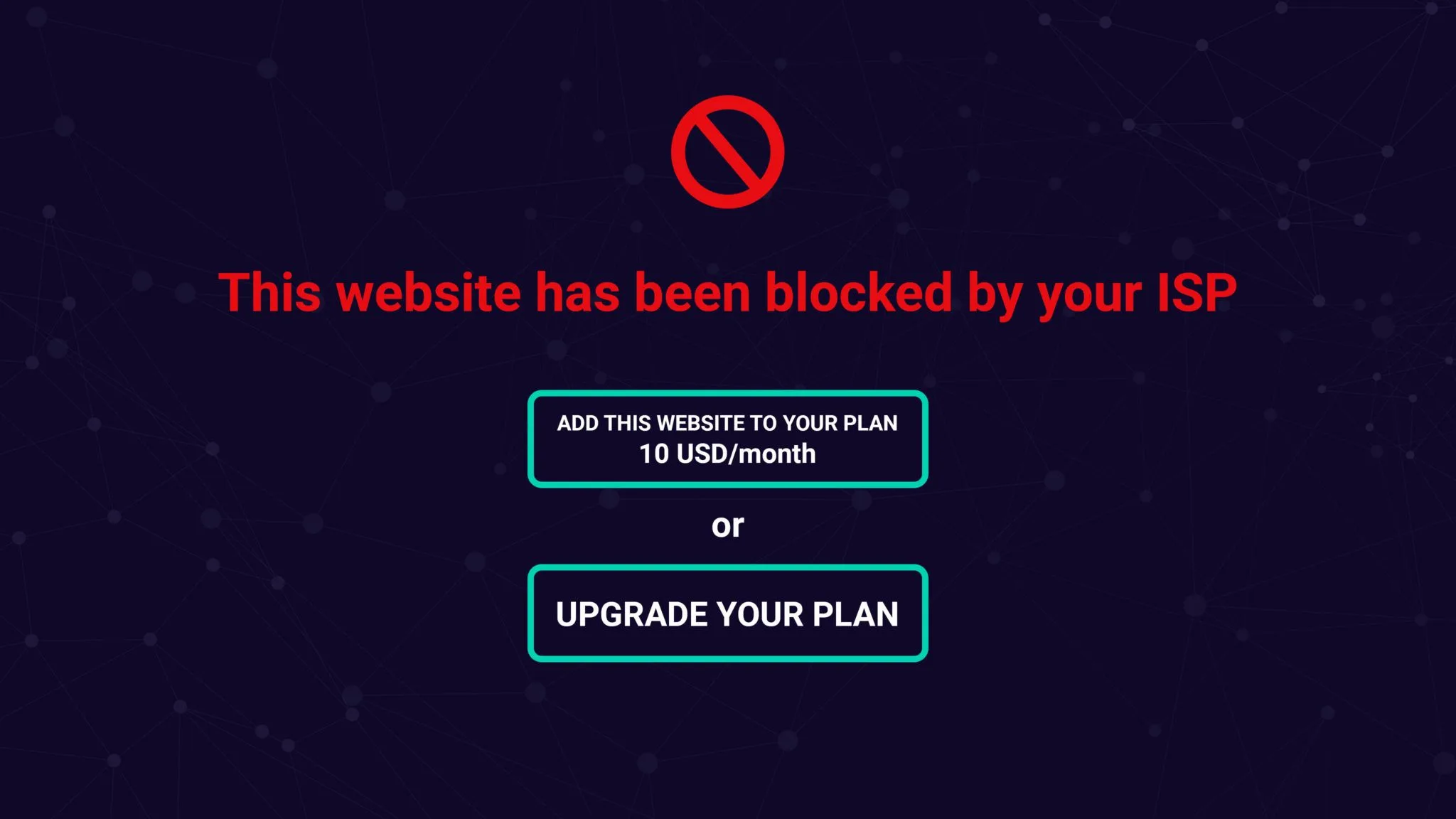
blocked webpage due to non-neutrality internet regulations
  • Required Payments— ISPs will be able to take control over the internet by requiring a payment from website owners and users looking to receive high internet speeds.
  • Bandwidth Throttling — ISPs will be able to throttle bandwidth (purposely slow down and speed up internet services) and favor large companies that pay high premiums over smaller, competitive companies with small budgets. The high speeds, also called “fast lanes,” will allow certain websites to load faster than others. That’s extremely important since it’s been reported that just about half of consumers expect pages to load within 2 seconds, and 40% will leave a website if it takes longer than 3 seconds to load.
  • Website Blocking — ISPs may begin blocking smaller or competitive sites from users just because they favor one over the other.
  • Less Competition — With net neutrality no longer helping to push for competitive pricing, the cost of goods and services will increase. If websites are being required to pay high premiums to have their site found, they will need to gain that revenue from another source, such as their profits from selling to consumers.
  • High Consumer Pricing — ISPs may require the general public to pay for higher-quality apps, large data plans, and fast streaming speeds. And don’t forget about pesky fees and taxes! They’ll increase as well.

How Non-Neutrality Will Change the Marketing Game

So, what does the end of net neutrality mean for marketers? Originally, net neutrality created a high demand for internet marketing services because they focused on increasing organic traffic. Without net neutrality, competition between businesses may be uneven. This means the use of high-quality digital marketing services will be more important than ever before.

If ISPs favor large companies that pay high premiums and the internet is flooded with those websites, superior internet marketing efforts will be necessary to keep other business websites relevant. Marketers will need to invest more time, energy, and money into the channels they can control or manipulate. In addition, marketing companies might have to charge more for their services if they want to guarantee that clients will be placed in the fast lane.

With all of that said, non-neutrality will not change how search engines such as Google or Bing display results. For example, if someone is searching for a burger joint, Search Engine Results Pages (SERPs) will still show smaller restaurants that serve burgers first because they’re local.

Non-Neutrality & Content Marketing

Content marketers will have a harder time getting their content seen by their targeted audience. Unfortunately, if a website isn’t paying premium fees, it may be subject to slower load times and page blocking, which would keep users from visiting the site.

With that in mind, creating good, helpful, and insightful content will be vital for websites to be successful. If you want a shot at bringing in customers and keeping them coming back, you need to grab them from the get-go. Entice them with your content and make sure they know that your website is one they’ll want to keep coming back to for information.

Non-Neutrality & SEO

Net neutrality allowed websites to be ranked by content, keywords, and effective use of linking. With non-neutrality, SEO will be affected by content marketing struggles. Traffic may be limited at times due to ISPs blocking specific sites from potential users. Website blocking could also affect external linking since some of your users may not be able to access external websites.

The more satisfied users that visit your site, the higher your search ranking will be. Site speed, design, and ease of navigation also play a significant role in overall success. With the help of SEO tactics and strategies, you can ensure your website is found by more users despite any difficulties that may arise due to non-neutrality.

Non-Neutrality & Social Media

While most social platforms don’t currently charge you to use their services, ISPs may charge you to access them on devices or restrict the use of competitive apps. For instance, in Portugal, a country without net neutrality, users have to buy packages in order to access social media platforms.

Since users may be charged to view their own social accounts, some may stray away from social media altogether. Account followings could shrink and the cost to advertise on social media platforms would increase. However, with the aid of social media experts, your social media accounts can stay afloat and relevant to users that do stick with social platforms.

What Will Happen Now?

It will take a bit of time for the effects of non-neutrality to be felt across the U.S. However, the fight for net neutrality is far from over. Many Americans are still outraged by the prospect of being stripped of their internet freedom. In hopes of changing the final outcome, individuals opposed to non-neutrality are encouraged to make their voice heard by visiting Battle For The Net’s web page. There, you can easily write to Congress and find other resources to help in the fight to save net neutrality.

Do I Still Need Digital Marketing?

Yes! Actually, you need it more now than you did when net neutrality was alive. Impeccable content marketing, SEO, and social media skills will be necessary to ensure your website is the best it can possibly be. Digital marketing will push your business to the top, making your website the one users want to click on and navigate to. Become as successful as possible by placing content marketing, SEO, and social media specialists in the driver’s seat when it comes to your online presence.

What’s your take on net neutrality and the FCC’s Restoring Internet Freedom Order? Let us know your thoughts.

To carry on the theme of spring cleaning, I am going to talk about cleaning up your site and how to get rid of the bloat that may be costing you visits and leads. If you publish content on a regular basis, such as blog posts, podcasts, or videos, your site will inevitably grow over time. Too much content can clog up the system making it difficult for search engines to know which piece of content to deliver to the user. As your site grows, it is highly suggested that you identify the content that is not performing well or that is not helping your visitors. The main emphasis here is keeping the quality content and removing the junk.

A Real World Example

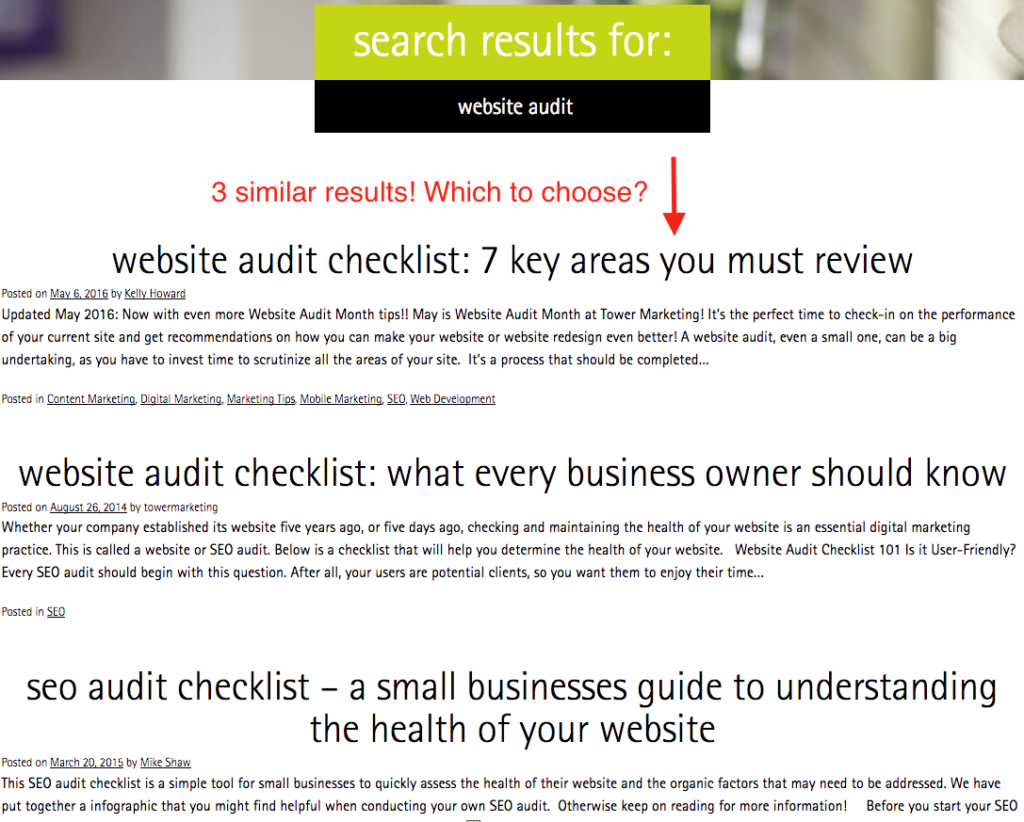
Website search results

In Tower’s case, we have covered the topic of website audits three times over the last three years. In all honesty, we don’t need three blog posts about website audits, just one will do. Therefore it was my task to find the website audit pages and compare them in terms of content value, usefulness, the amount of traffic they drive, their page authority, and links back to those pages. Once I found the page that I believed to be of the most value I had a couple of options, either:

  • no-index the pages that don’t perform as well
  • 301 redirect the lesser quality pages to the more valuable page
  • Create a new “super” page and redirect the other website audit pages to the new URL

In this case, I chose to 301 redirected the under-performing pages so that their equity would be passed onto the main website audit blog post that we wanted to promote. Let’s dig into more detail about how to do this.

Is There Such a Thing as Too Much Content?

Yes, websites can become very bloated with low-quality content that is not performing as well as other similar content pieces. When users came to the Tower website and searched for “website audit” they found at least three different results, all of which are very similar. This meant the users needed to choose which post to view, guessing at which one was most applicable to their needs. This can negatively affect the user experience. It is far better to have one result for the website audit topic. Users no longer need to make a choice, allowing them to click through more confidently

When to Delete

In some cases, when reviewing your content, it may be best to simply to delete older pages that have been added over the years. Content like old event pages, coupons that have expired, or blog posts that are outdated, incorrect or no longer apply are low-hanging fruit. Ultimately you only want pages that are applicable and offer value to the user. If a page no longer does that, you may want to consider deleting it. Note: When you delete pages, you need to 301 redirect the users to an appropriate page, otherwise it will cause your site to have broken links.

When to Consolidate

In some cases, as with the Tower Marketing example where we had three similar blog posts, it may be worthwhile creating a new page that has all the best elements of each individual page, called a “super page.” The goal here is to create a unique, high-quality piece of content that does not outdate itself and can be easily updated. Note: Doing this would require a 301 redirect to point the three older pages to the new super page.

When to Noindex

If you don’t know which pages to delete and redirect, another option would be to noindex the pages. While this does not help with duplicate content issues on your site, it can help search engine to not index a group of similar pages on the web. Tags and Categories are examples of URL extensions that we at Tower noindex because they can bloat the search results and cannibalize the rankings of pages that are more relevant. Note: Noindex still allows the bots to visit that page, they will however not be added to the SERPs.

Benefits of Cleaning Up Your Site

Cleaning up your site has several advantages, one of which is making the articles that are most important to users easy to find. Web designers and SEO’s need to work together to make sure that UX (user experience) is maintained. As mentioned earlier, having multiple search results for the same query can hinder the user journey and UX. When you clean up your site it also allows for better search results. A clean site makes it easier for search engines to index and categorize which page best represents a user’s search query. As noted above, having one super page instead of three can help rankings.

Ready to slim down your website? Contact our specialists today to start the cleanup process.

This blog was updated March 2017.

Who loves stats??? I love stats! And there is no topic with more abundant stats than the impact of videos on potential customers. Here’s data-driven confirmation showing why you need to start exploring the different elements of video in your content marketing strategy:

  • 87% of online marketers use video content
  • 90% of users say product videos are helpful in the decision process
  • 1/3 of all online activity is spent watching video
  • 80% of users recall a video they viewed in the past 30 days
  • 22% of small businesses plan to post a video in the next 12 months

Making the decision to create video content opens you up to a lot of avenues so we’re recommending five elements of video that you should include in your video content strategy.

recording video on a iPhone, DIY videos, elements of videos

1. Mini Videos

Until recently, Vine was the king of mini videos, with its looping 6-second videos that were perfect for social media consumption. Now the king is dead, but that’s fine. There are plenty of ways to add a video to your social content strategy without Vine. The newest way to get quick videos into your social feeds is with the use of Boomerang. If you’re not familiar with Boomerang, it’s part hyper-lapse, part GIF, and lots of fun! With the use of the Boomerang app and the click of a button, you can create a 1-second looping video that can have a big impact. Even in such a quick burst, using Boomerang video you have the opportunity to:

  • highlight a product feature
  • show off your personality
  • tease something new

2. DIY Videos

Some companies may be reluctant to get started with video content because they mistakenly think they need big budgets and professional resources to create a successful video. That’s not necessarily the case. So grab your iPhone and don’t be afraid to get a little down and dirty. Even though a DIY video is meant to have a grassroots feel you still want to take care to create a quality product, so take the necessary steps to stabilize your phone with a tripod, use proper lighting, and ensure good sound quality. Use DIY video production to create:

  • a tips or advice video series
  • instructional or how-to videos
  • a “day in the life” video

3. Splashy Production Videos

While we advocate for giving DIY video a try, we also realize that there are circumstances when you’ll need the services of a professional videographer and big-time production value. Hiring a videographer will give you a more polished end product because he or she will expertly fine-tune all aspects of the production process, including lighting, sound quality, framing, and editing. Add a budget line item for professional video production when you want to create:

  • product launch videos
  • branding videos
  • company culture videos

4. Animated Videos

Animated videos may be the trickiest addition to our elements of video list, as it not only requires professional video production but also a talented illustrator. That being said animated videos can play a special role in your content marketing strategy and have been given the nickname “explainer animation.” Animation’s strength is that it can break down complex information and present it in a format that simply and visually presents information to the viewer. Here are a few examples of explainer animation videos that consistently top the “best of” lists:

5. User-Generated Videos

Some brands have uncovered the secret of creating loads of video content – letting their customers do the work for them! User-generated content (UGC) is a photo, a tweet, or in this case, a video that features a user or fan promoting a product or brand, instead of the brand promoting itself. User-generated content is a fantastic tool to address the trend that consumers, especially those in the millennial demographic, trust personal recommendations and endorsements over traditional advertising messages. Use these examples of successful user-generated videos to inspire your own UGC campaign:

Are you ready to put these elements of video to work in your content marketing strategy?

It’s not always easy brainstorming new content ideas; especially when you’ve been blogging since Day One, and you feel as though you’ve covered every topic under the sun within your industry. Trust us, we’ve been there, staring at the blank piece of paper labeled “Amazing Content Topics for XYZ Month.” So what to do when you’ve got a serious case of brainstorm block? Below we’ve outlined some creative ideas to get outside your own head when brainstorming new content ideas. Some we’ve tackled, others we can’t wait to try ourselves. Let’s dive.

The Magic of Generalized Topic Ideas

If you work with SEOs, then you know that the more niche and long-tail the focus keyword is for a content piece the better. I agree (as I AM an SEO myself). However, sometimes looking for that perfect, specific, unicorn keyword isn’t realistic. Focus, instead, on generalized topics and narrow it down from there.

For example, let’s say you work at Pets-R-Us. You feel as though you’ve beaten pet care, pet emergencies and adopting pet topics into the ground. You’ve focused on heartworm in dogs, dental care in cats, things your audience may not have known about guienea pigs, and why certain fish can’t be together in a fishbowl. You’re feeling stuck.

Instead of looking for a granular keyword, pull out your focus and pick something basic…like birds! Now, you may have written 100 blogs on birds. That’s cool; keep in mind what ones you have already written, but start narrowing down from there. Pull out as many possible bird blog ideas as humanly possible. Write a giant list of all the possible scenarios you could touch on when it comes to birds. Your list is probably getting pretty long. If you’re still feeling a bit perplexed, we tend to turn to Answer the Public. Here you can type in a keyword phrase and it provides you hundreds of questions people have asked surrounding that topic that you can answer.

Jeopardy Topic Ideas

This method has the #TeamTower stamp of approval for topic generation. If your business has multiple facets and/or product lines, pull a sample of people from each team. Come together and start writing in the form of questions about your specific department. Categorize your questions based on monetary value:

  • $100-$200 Questions: Basic, top-level questions that we receive on a pretty regular basis
  • $400-$600 Questions: Questions we receive that are a little more intensive, for the intermediate level customer
  • $800-$1,000 Questions: Questions that we ourselves ask others in the office as experts or have seen on professional forums about this product/department/skill

Set a timer for each round of questions and keep the questions for brainstorming new content pieces moving forward.

Getting Outside Your Four Walls

Oftentimes as marketers we forget that there’s a whole world of people outside our office, including a) our audience itself and b) influencers who speak the same language we do. Consider the following when brainstorming content ideas:

  • Ask current customers what they want to know more about. Send them a survey or pose the question on social media.
  • If you’re open to guest writers, pick their brains about topics they feel are your weak points on the blog and/or topics that they themselves have more experience in than you do.
  • Look at popular industry forums and see what questions other professionals are asking. Write a couple blogs that specifically answer these questions and post the link back in the forum when you’re done.
  • Reach out to businesses/consumers that might use your product/service. Ask them, if they were looking into purchasing your product/service, what questions would they want to have answered when looking at a potential site.

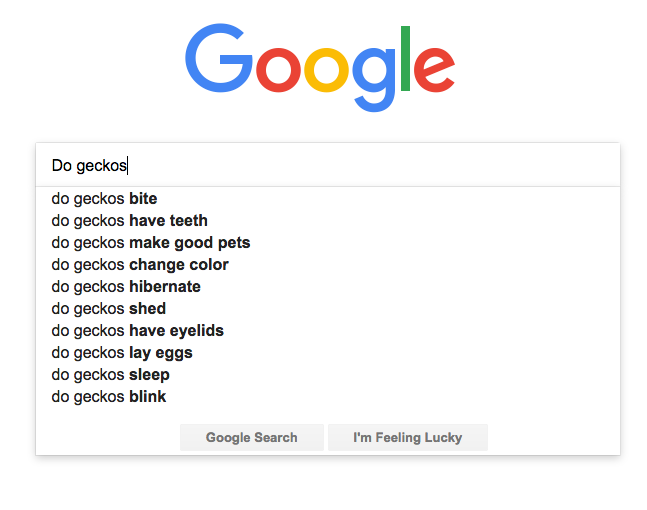
“Do Geckos…” and Other Recent Google Search Ideas

Screen Shot 2017-01-27 at 4.17.55 PM

It may seem too simple, but oftentimes the best ideas are. Looking for a topic? Start typing into your Google search bar and see what others have looked for recently regarding that topic. You may be surprised that many of the questions posed could all be included into one singular blog.

Imitation Is the Greatest Form of Flattery…And Then Do It Better.

Get inspired. Find other content pieces and topics that you love on Pinterest, on competitors’ sites, through popular content publications, by other influencers…and then figure out how you can either a) expand on the topic or b) make it more compelling, interesting, or entertaining.

For example, you find an amazing blog on a competitors site entitled “The First Six Months With a New Puppy.”  It explains all the vaccines you should be getting for your pup, what common health issues might pop up, training qualms to expect and growth patterns. The information is comprehensive and the writing is easily formatted enough to not be overwhelming for users. It’s a 10/10 on the content scale. So how can you do the same but better? We know humans are visual creatures. How about an infographic? How about personal anecdotes from your customers? How about a “Case by Case” scenario or a comparison chart between common breeds? In what way can you take a topic that’s already been done and make it 10X better?

Feeling like your creative well has run dry can be tough, but finding the right brainstorming technique can crack the code for the jackpot of all ideas. We wish you luck and happy writing!

How are you brainstorming content ideas? Have a topic you’d like us to write about?

In 2014, online and eCommerce sales accounted for $101.9 billion of the total holiday retail sales. An increase of 6.8% from the previous year. It’s no surprise that online shopping is growing into a major contributor of holiday sales. So much so that it’s spawned several of it’s own holiday shopping milestones, including Cyber Monday and Free Shipping Day.

So whether you run an online store only or your eCommerce platform supports a physical retail store, it’s important to understand the psychology of online shopping, what motivates buyers and why online consumers make the choices they do. As you put together your seasonal promotions plan, consider these strategies, inspired by how shoppers think, to motivate online purchases on your site.

Make Sure Shoppers Are in the Mindset for Shopping

An important first step is to understand when people are shopping. This way you can “speak” to them when they are in the mindset to make purchases. Shopify has shown that people begin searching Google for Christmas ideas as early as August!

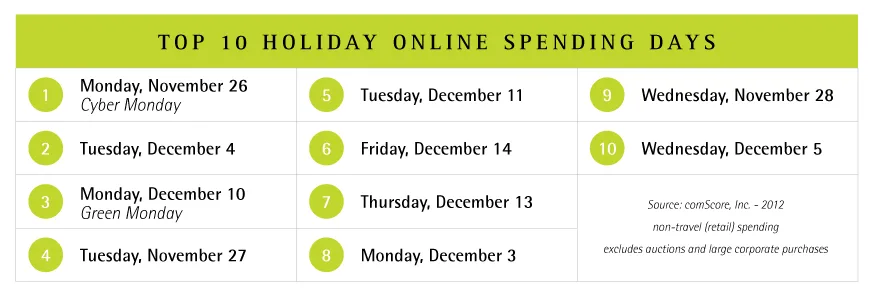
Of course, all retailers prepare for the official kick-off to the holiday shopping season, both in-store and online, Black Friday and Cyber Monday. Additional dates that have become top performers in the lead-up to the holidays are:

  • Green Monday – The second Monday in December is named Green Monday for the influx in cash it brings to retailers. This is the date when people start to feel the crunch and stop procrastinating.
  • Free Shipping Day – In 2015, Free Shipping Day is being celebrated on December 18. Promoted by countless online retailers, they will provide free shipping on standard deliveries, and can still offer delivery by Christmas Eve.
  • Super Saturday – This is the last Saturday before Christmas and a big day for those who typically save their shopping for the last minute.

Keep these dates in mind when you are planning out your sales and promotions throughout November and December.

top holiday spending days

Create A Sense of Online Urgency

psychology of online shopping - limited inventory

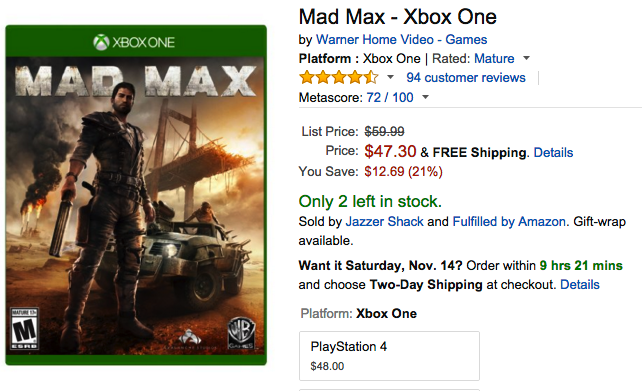
This is a classic example of FOMO! That’s Fear of Missing Out and the struggle is real. No one wants to miss out on the perfect gift or the biggest savings. Take a page from the grandaddy of online retailers, Amazon, and call out items with a dwindling inventory.

Amazon uses “20 left in stock” as their trigger to promote purchase urgency. If you have an item that does sell quickly and goes out of stock, allow online shoppers to sign up for an email alert when inventory is replenished. The follow-up email can also spark a fire for shoppers to get their purchase completed.

psychology of online shopping - countdown

Additionally, you can use a countdown feature to show shoppers exactly how many days, hours, or minutes they have to take advantage of a site-wide sale or special promotion. As the days tick by, add a “Need it By Christmas?” callout to each product page. Tell shoppers how many days are remaining to place their order so that it arrives by Christmas Eve.

Keep Online Shoppers Happy

Did you know that coupons bring happiness? A study from Coupons.com and Claremont Graduate University proved that coupon recipients experience signs of happiness, lowered stress, and relaxation. And while coupons and discount codes are a staple of online promotions, the psychology of online shopping shows that they still bring joy.

So what’s the winning discount strategy? A percentage off? A set dollar amount savings? A BOGO offer? There may not be a concrete answer, as every shopper may be enticed by a different promotion. We recommend implementing A/B testing into your email marketing strategy to see which offer resounds best with your customers. With all else created equal, same subject; same graphics; same delivery date; same products, test two different offer types (20% off or $25 off) to see which results in more purchases.

Also, consider an element of exclusivity in your discount offers. Create a flash sale, a sneak peek event, a bump in savings, or added 2-day shipping for select customers. Segment individuals who have signed on for loyalty programs, repeat customers, or first-time visitors. Making someone feel special is never a bad thing.

Get Online Shoppers Over the Final Hump

psychology of online shopping - shipping dates

One reason that some shoppers choose to shop in retail stores is that they can avoid the added shipping costs associated with ordering online. Shipping charges are often cited as the main reason that an online shopper will abandon their shopping cart. Whether you offer periods of site-wide free shipping or an everyday free shipping thresholds, shipping promotions can break down that mental block that shoppers have about buying online. Be sure that you’re clearly communicating your shipping policies and, more importantly, cut-off dates for packages to arrive in time for the holidays.

Also, consider offering free returns. Many times shoppers are reluctant to purchase products online because if things don’t work, they have to pay to return their items. Zappos was one of the first online retailers to offer Free Shipping & Free Returns and has built a loyal fan base because of this generous customer service strategy.

Need help understanding the psychology of online shopping and what goes on inside the brains of online shoppers? Contact our team for our marketing advice.

The stats on including visuals in your content are staggering. 90% of information transmitted to the brain is visual. 40% of people will respond better to visual information than plain text. Posts generate 94% percent more views if you add compelling visual elements. In addition, all the major social media platforms are giving more prominence and exposure to posts that include a visual element.

If you’re design challenged (raising my hand!) and don’t have a design team at your disposal, I suggest these three tools for visual content marketing that will have you creating Twitter covers, blog headers, infographics, and incorporating top-notch photography like the true artist your 5-year-old self always thought you could be!

canva- tools for visual content marketing

Canva

The beauty of Canva is that they offer templates for any kind of visual content you need to create. Whether it’s a Facebook or Twitter cover photo, Pinterest graphic, blog image or title header, or social ads, they offer numerous templates in a variety of styles. The pre-designed templates, allow you to simply tweak the copy to suit your needs or delete components down to a simple background image and then begin building a unique design.

As a tool for visual content marketing, I tend to use Canva not for template designs, but for smaller graphic pieces. Canva offers, what seems like, an unending supply of modern and quirky little icons, word bubbles, illustrations, photography, and holiday and seasonal images that make Clipart look ridiculously outdated. (Which it is. So please stop. Stop using it.)

There are so many free elements on Canva, but if you fall in love with a background or icon that does cost you something, you’ll find you won’t pay more than $1.

piktochart- tools for visual content marketing

Piktochart

Piktochart is a lot like Canva, but instead of social media or blog images, they offer templates for infographics. They offer over 400 ready-to-use designs, although most of them fall under the Go Pro package ($29 per month/$290 annually). However, there are free themes available and I’ve always found something free that suits my needs. They are eye-catching and modern, and categorized for easy browsing. There is also a gallery of recently created Piktocharts to use as inspiration.

Although you’re starting with a pre-designed template, you can edit just about every element of the design. Change titles and body copy, colors, or images using editing tools that are easy and intuitive. You can even add or remove blocks of content to make your infographic longer or shorter as necessary. Start with a template comparing the benefits of tea and coffee and end up with a infographic comparing different student loan options.

What I like about Piktochart is that for a design illiterate like myself, I don’t have to worry about choosing colors and fonts that work well together. That’s all taken care of for me.

DeathtoStock_SlowDown2

Death to the Stock Photo

I saw this slideshare shared on Google + not that long ago and I loved the ideas they shared on how to turn cold, generic, Stepford stock photos into something a little more edgy and interesting. In addition, I also stumbled across Death to the Stock Photo.

The site was started by two photographers who wanted to make their work available for friends who were writers, artists, freelancers, etc. Once you sign up on the site, a pack of stock photos is emailed to you at the start of each month. You don’t even have to think about it, it just shows up! You download the pack and the images are yours to use. Each month comes with a new theme – Wired, Slow Down, and Creative Space, are a few examples. Some months the images aren’t exactly a good fit for the clients I work with, while other months it’s a total jackpot!

They also have a Premium service, where in addition to the monthly pack, you also have access their library of over 400 images for $20 per month.

Share your go-to tools for visual content marketing! Or if you want to add visual content to your marketing strategy, contact our team!