0

There are countless pieces of advice floating around the internet about best SEO practices for images and what to focus on. We are here to define the only image SEO ranking factors you need to care about and debunk the rest.

SEO Image Checklist

If you would like to save time and be more efficient, we have compiled a free SEO image checklist for your reference below. Make sure to also bookmark this blog so you can visit it anytime you need.

seo image checklist cover image Image SEO Ranking Factors That Actually Matter

Need a simple summary of our Image SEO checklist?

No. 1 SEO Recommended Image File Formats: Best Way To Save An Image For SEO

Generally, Webp is regarded as the current best format for site speed and file size. But many users prefer PNG and JPG due to better image compatibility and chance of indexation. 

However, the best way to save an Image for SEO is by resizing the image to match desired placements and compressing as needed.

Continue reading to learn more about image SEO best practices so you can start seeing real-time movement in your SERP rankings using easily trackable factors you can verify.

Best Practices For Naming Images

Image file names should clearly explain what the image is about and should not involve any keywords that aren’t relevant to the page with the image. If your image shows two general contractors conducting a roof replacement in Lancaster, PA, then you could name the image something like: “2-contractors-performing-roof-replacement-in-lancaster-pa.jpg.” 

This not only allows Google to understand what the image is about, but it also gives you a chance to localize the image and support your local SEO. Because you’re accurately describing the location in which the photo was taken, it can potentially lead to increased relevancy in search results.

Naming the same image something like: “best roof replacement near me lancaster pa roof replacement contractors.jpg” does not describe any action of what’s going on in the image, causing Google to de-prioritize your photo for spam since it doesn’t accurately describe what has been captured. What it can do, however, is most likely to pick up on the fact that numerous keywords are present in an unnatural way.

For multiple images on the same page, you can keep the same naming convention, and just add a number onto each image, as long as it is natural and not “spammy” or “keyword stuffed”. 

Natural examples:

  •  “2-contractors-performing-roof-replacement-in-lancaster-pa-1.jpg”
  • “2-contractors-performing-roof-replacement-in-lancaster-pa-2.jpg”

“Unnatural” examples:

  • “Best-roof-replacement-near-me-in-lancaster-pa-roofing-services-roofing-1.jpg”
  • “Best-roof-replacement-company-near-me-in-lancaster-pa-roofing-services-roofing-maintenance-2.jpg”

Ideally, your images should also be organized and easy to recall. Naming images after the primary keyword may be advisable as well. But ensure those images are used only for that page or post.

Does Using Other Pages’ Images In Your Website Hurt SEO?

While there may not be a direct consequence, we advise using unique images on each page to help Google better establish relationships between your website pages. Additionally, this helps add a unique layer of freshness to your pages that reused images and stock photos cannot simply match.

One of the greatest builders of trust for new users on a local business’s website is the photos. So, it would be best practice to have a process in place to ensure only the best and original photos are being used across the site overall.

Are duplicate images a ranking factor for SEO? The answer is, it depends. Low-quality, poorly described images can appear spammy to Google, but properly optimized images help with crawling and accessibility.

How To Write Alt Text For Images In Seo

Alt image text should accurately reflect what the image is about, while also including details that help build further context for accessibility crawlers.

For SEO, you can include the location of where the image is taking place if it’s on a location page and that image is unique to this page. This could definitely help improve relevance and rankings in your local area when done correctly.

Examples:

  • “Women’s pickleball practice at Long’s Park in Lancaster, PA Feb 2025”
  • “Air Jordan 5 Retro Black Metallic Reimagined side profile view”
  • “Customer browsing carrots in produce aisle of Stauffers in Mount Joy, PA”

Ultimately, image alt text is your chance to describe exactly what an image is about so anyone or anything trying to read the image without visual capabilities can properly understand.

Geotagging Images For SEO

Our latest consensus is that geotagging images (embedding location metadata in EXIF data) does not directly influence rankings in Google Search. Google has stated that they do not use EXIF data as a ranking factor. However, there may be indirect benefits:

  • Local SEO: Providing location information in EXIF data made more of a difference in the past few years than it does now. There is evidence that it was once helpful to include, even if it isn’t as much anymore.
  • Image Search & Metadata: While Google does not currently use EXIF data directly for rankings, it can sometimes display EXIF metadata in image search results, which may help with user engagement.
  • User Experience & Context: Geotagging can provide more context for users and image accessibility tools; especially in travel, real estate, and local business industries.

SEO Image Schema

Google Image Search primarily relies on text-based signals like surrounding text, alt tags, and page context​. However, image schema can help improve discoverability by providing clearer metadata for crawling.

If you want to use schema markup effectively, here are a few use cases you can use to do so.

Use ImageObject schema in JSON-LD format:

{
  "@context": "https://schema.org",
  "@type": "ImageObject",
  "contentUrl": "https://example.com/product-image.jpg",
  "name": "Nike Air Max 2024",
  "description": "A pair of Nike Air Max 2024 running shoes in red and black.",
  "thumbnailUrl": "https://example.com/product-thumb.jpg"
}

For an eCommerce website, add Product schema:

{
  "@context": "https://schema.org",
  "@type": "Product",
  "name": "Nike Air Max 2024",
  "image": "https://example.com/product-image.jpg",
  "description": "A lightweight running shoe with improved cushioning.",
  "brand": {
    "@type": "Brand",
    "name": "Nike"
  },
  "offers": {
    "@type": "Offer",
    "price": "120.00",
    "priceCurrency": "USD"
  }
}

But, at the end of the day, image relevancy will always be the top factor in determining what images are shown by Google.

Recommended Image Sizes For SEO

Unfortunately, there is not a “one-size-fits-all” for sizing images that magically makes them work for all desired placements of various shapes and orientations.

However, there are some guidelines we can follow on a case-by-case basis that may require adjusting as needed. They are the following:

1. Best Resolution By Image Type

Image TypeRecommended Size
Blog/Article Images1200 x 628 px (Good for Google Discover)
E-commerce Product Images1000 x 1000 px (Ensure zoom capability)
Hero/Banner Images1920 x 1080 px or 1280 x 720 px (for full-width)
Thumbnail Images150 x 150 px (For previews, smaller sizes are fine)

2. Best Aspect Ratios For Image SEO

Google Images often prefers standard aspect ratios (like 4:3 or 16:9).

  • Best aspect ratios:
    • 4:3 (Most common for photos, natural look)
    • 16:9 (Best for widescreen & featured images)
    • 1:1 (Square, good for product images & social media)

Avoid extreme aspect ratios (e.g., very tall and narrow images), as they may be cropped in search results.

3. Use Responsive Sizing For Images

You can make images responsive using CSS so they adapt to different screen sizes.

Use CSS for flexible sizing:

img {
    max-width: 100%;
    height: auto;
}

Serve multiple image sizes using <picture> or srcset:

&lt;picture&gt;
  &lt;source srcset="image-large.jpg" media="(min-width: 1200px)"&gt;
  &lt;source srcset="image-medium.jpg" media="(min-width: 768px)"&gt;
  &lt;img src="image-small.jpg" alt="Optimized Image"&gt;
&lt;/picture&gt;

This should help ensure fast loading on mobile while maintaining high-quality imagery on desktop.

4. Optimize Image File Size With Compression

Google ranks faster pages higher, so keep images lightweight:

  • Ideal file size:
    • ≤150KB for general images
    • ≤300KB for high-detail images (e.g., product photos)

To help, we gathered our favorite choices for online image compression tools:

5. Use Next-Gen Formats When Possible (WebP, AVIF, JPEG XL)

Although many users online still use PNG and JPG/JPEG, Google recommends switching to next-gen image formats for speed:

FormatAdvantagesWhen to Use
WebP30% smaller than JPEG, supported by all modern browsersBest general-purpose format
AVIF50%+ smaller than PNG/JPEG, excellent for detailed imagesBest for high-resolution images
JPEG XLSuperior quality at low file sizes, supports transparencyFuture-proof, but limited browser support

If you still find yourself having speed issues using JPEG/PNG, consider converting them to WebP.

6. Use Lazy Loading For Faster Page Speed

Lazy loading defers image loading until the user scrolls to them, which may help improve your page speed.
Add loading=”lazy” to images:

&lt;img src="image.jpg" alt="Example Image" loading="lazy"&gt;

SEO Experts In Lancaster, PA

Using best practices for image SEO from sources such as Google’s official documentation should help ensure proper compliance and could help boost organic performance when done correctly.

Interested in learning more about strategy and implementation? Tower Marketing uses efficient strategies to audit and optimize images on a large scale and quickly start seeing a difference in the SERP.

Contact us today and one of our Business Development Specialists will reach out to you to schedule a free consultation.


They say a picture is worth a thousand words, but did you know a video is worth 1.8 million? That’s over 3,000 pages of text for just one minute of video. Visual content packs a punch and can elevate your brand by combining the impact of words with striking graphics. For a successful internet marketing strategy, you can’t forget about visual content marketing. 

What is Visual Content Marketing? 

Visual content marketing is when you use visuals such as videos, images, graphics, and other multimedia pieces in your content mix. Visual content helps explain concepts that would be difficult to understand with just text. Think about how you can provide value and tell your brand’s story through unique visual opportunities. 

Why is Visual Content Important? 

To grasp the importance of visual content, you need to understand how humans process visual stimuli. 

We are visual creatures.

visual content marketing hands typing Why You Should Have a Visual Content Marketing Strategy

A study at MIT found that it takes only 13 milliseconds for our brains to identify a photo. Images also have a greater emotional impact than words, so they affect people’s behavior and memory. 

One thing is clear: there’s power in visuals.

The Benefits of Visual Content 

There are many benefits of visual content. However, that doesn’t devalue the importance of writing. Blogs and other text-based content help you rank for keywords and appear in search engine results pages (SERPs). But when combined with visuals, this elevates your marketing strategy in several ways. 

Boosts SEO

Google prioritizes websites with engaging visuals. By including these in your content mix, it helps you rank better on SERPs. When optimized for SEO, visuals also increase your visibility in image and video searches. 

Increases Engagement

Visual content is extremely shareable on social media. This gives you lots of opportunities to increase brand awareness and reach by driving traffic back to your website. 

Keeps People on Your Site

People prefer interactive and visual content. It grabs their attention, increases readability, and helps guide them through your site. Adding visuals improves the user experience and reduces your bounce rate. Videos are especially good at encouraging people to stay on your website longer and explore further.  

Triggers a Desired Action

One of the strengths of visuals is that they can impact your audience’s emotions. This gives your content the power to shape your reader’s mood and impact their actions. 

Establishes Yourself as an Expert

Use your content as a way to show your expertise and authority on a subject. Whether that’s visual case studies, white papers, ebooks, how-to guides, or more,  you can signal your expertise by providing high-quality information to your audience. 

7 Types of Visual Content (Pros and Cons) 

Visual content comes in all shapes and sizes, but here we’ll talk about some of the most common examples, and their pros and cons. 

1. Video

Video makes up the majority of internet traffic, and 91% of users said they want to see more online videos from brands. As short-form video is on the rise, it’s a great option to add to your visual content strategy. You can use videos for your business in many ways. Create a homepage video, product demonstration, client testimonial, animation, and more. 

Venture Lititz animated video

Pros: 

Cons: 

  • Time consuming and costly 
  • Hard to update once published 
  • Can be less accessible than other content 

2. Infographics

Infographics are a great addition to your content mix. They use data visualization to simplify complex ideas and make information easy to comprehend. Plus, they’re extremely shareable! 

Malvern Behavioral Health infographic on social anxiety in young adults. Includes 4 ways to overcome social anxiety and a photo of a woman looking sad.

Malvern Behavioral Health infographic 

Pros: 

  • Easy to understand and retain information  
  • Shareable 
  • Showcases your expertise 
  • Eye-catching 

Cons: 

  • Time consuming to create 
  • Often lack focus 
  • If the design isn’t good, they can be overwhelming for a reader

3. Gifs and Memes

Gifs and memes are a fun, casual way to add humor to your marketing content. You can use these to earn your audience’s trust and relate to them. Don’t just use them for the sake of adopting a trend. Always have a strategy behind it. 

Meme with two photo of leaves: one that's healthy and one that's patchy. Text above the two images says, "Waiting for that summer glow-up like..."

Root and Vessel meme 

Pros: 

  • Good way to stay relevant 
  • Do well on social 
  • Relate to your audience 
  • Can customize them for your brand 

Cons: 

  • Not right for every brand 
  • Potential copyright issues if you don’t customize them
  • Often have a short lifespan 

4. Printable Asset

Printable pieces can be anything from posters and flyers to checklists and brochures. As with most types of visual content, design is key to their success. Always keep these assets on-brand, with a clear call to action. 

Post with a blue background and a border of Easter eggs and tulips. A logo with Markets at Shrewsbury

Markets at Shrewsbury poster 

Pros: 

  • Targeted and hyperlocal 
  • Can raise awareness quickly 
  • Easy to produce 
  • Good for simple messages 

Cons: 

  • Printing costs
  • Need a good design to be effective 
  • Location restrictions
  • Hard to edit once printed 

5. Downloadables

Website downloads are a convenient way for your customers to get information on a subject. As a brand, it allows you to go more in-depth on a topic and continue the conversation offline. Popular types of downloadables include product guides, white papers, and ebooks. These can be free or gated. 

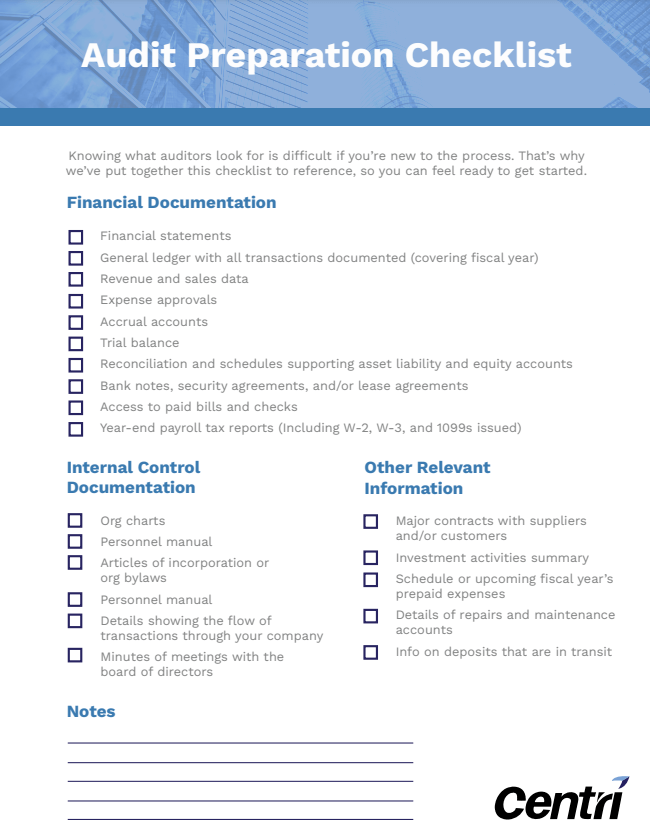
Audit Preparation Checklist with a blue header.

Centri Consulting Downloadable Checklist 

Pros: 

  • Lead to more engaged sessions on your site
  • Can assert yourself as an authority on a topic
  • Gated content is good for lead generation 
  • Ungated content builds trust with your audience 
  • More cost-effective than physically printing something 

Cons: 

  • Gated content may deter some people 
  • Your audience may not understand the value of the product
  • Ungated content means you can’t gather lead information 

Tips for A Successful Visual Content Strategy

Developing a visual content strategy is key to success. Here are a few tips on how to optimize your visual content efforts to see long-term results. 

Optimize for Each Platform

When creating visual content, always keep in mind where the piece is going. Design for the platform where you are going to share it. For example, always reduce image sizes on your website so you don’t impact site speed. 

Repurpose Content

To incorporate visual content into your marketing strategy, you don’t have to come up with something brand new. Consider turning a high-performing blog into an infographic to share on social media. Or turn a web page into a short video. 

Be Strategic

As with any marketing initiative, you need to develop a strategy. In order to reach the right people on the right platforms, ask yourself: Where is my audience? What information do they want from me? What questions do they have that I can answer? These questions will be the foundation of your visual content strategy.  

Use High-Quality Images and Videos

Using low-quality images may actually hurt your brand’s reputation online. For companies that don’t have access to photography, stock images are a good place to start. However, keep in mind that stock images reportedly perform the worst out of all visuals.

Balance Text and Images

Everything works best in moderation. Know when to use text and when to use visual elements to enhance your message. When creating visuals, make them bite-sized and easy to consume so they complement the story you’re telling. 

Make Visuals Easy to Share

Create everything with an audience-first mindset. What does your audience want out of your content and what would make them share it? This will help expand your content’s reach. Make things easy to share by adding share buttons on your site or email. 

Stay On-Brand

The best way to stay consistent with your branding is by creating a visual content marketing style guide. This is especially important when people begin sharing your content on different platforms. That way, your brand is always front and center. 

Include a Clear CTA

Content is only as good as the action your audience takes because of it. Whether you’re creating a video, downloadable ebook, infographic, or beyond, always include a clear call to action. 

Need help creating visuals for your business? Take a look at some of our past projects to see visual content in action!

Creating a marketing video could be just the thing to bring your business to the next level. If done correctly, videos can be extremely effective marketing tools and ensure you’re getting the attention and revenue you deserve. 

However, before you dive into creating a marketing video, you should be familiar with the different factors that will affect your professional video production costs. In this blog, we will break down what goes into video production and how you can plan a realistic video budget. 

What are Marketing Videos?

The main purpose of marketing videos is to address your audience’s problem, propose how your product or service can fix it, and then explain why the audience should choose your company over your competitors. 

There are many different names or types of marketing videos, like: explainer videos, corporate videos, and promotional videos. However, all of these short films are primarily used to highlight a company’s product, service, or business idea. 

Your video may even be used to present your company’s financial results to stakeholders, highlight a new initiative your company is partaking in, or be used as a business introduction for potential clients. 

No matter what topic your video is focusing on, in order for it to be successful, it should be high quality, represent your company’s brand identity well, and incorporate a strong call to action. Your videos should be compelling and well executed, leaving your target audience informed, as well as intrigued. 

5 Major Stages of Marketing Video Production

Making a marketing video usually involves 5 stages. Below is an outline you can follow when going through your video production process. 

1. Development

The development stage of video production is all about your concept and end goal. You’ll want to decide what you plan to get from this video and how you plan to achieve that. 

This is also the stage where you can create a timeline and marketing budget for your project. (More on video marketing costs to follow below.) Understanding the purpose of your video is key, because it will serve as the foundation for the entire production process. 

2. Pre-Production

The pre-production stage is where you begin to figure out the details of your video. Preparing a schedule will help you stay organized and on track as you work. 

You’ll also need to finalize your video script, as well as hire any staff or actors you need for your production team. Make sure you gather whatever equipment you may need and decide on location(s) for your video to take place.

3. Production

The production stage is when filming happens. All of the raw footage and content that will be presented in your video is created. This includes any video, audio, B-roll, and/or cut-away shots. Depending on how long or complex your video is, production could take anywhere from one day to one week. 

4. Post-Production

The post-production stage involves all the editing. This includes video editing, mixing audio and sound, adding sound effects, color grading, and/or adding any animation or motion graphics.

Another piece of this stage is video rendering and compression. These steps involve transferring your footage into an editing system, rendering it into a presentable format post editing, and eventually uploading it to wherever it will be hosted. 

5. Marketing & Distribution

This stage should be where you share your final video to reach your target audience and the general public. Your end goal and overall purpose that you determined in the development stage should be fulfilled in your distribution of your video. 

Woman working on editing and distributing marketing video.

Professional Video Production Cost Breakdown

Professional video production cost can be broken down into different factors or categories. Not every element is necessary for every video, and depending on what type of video you’re creating, you may only have some of these expenses. 

The prices for different services will also vary depending on what type of video production team you use.  where your business is located. Below are the most common factors that will affect your professional video production cost. 

Project Management and Project Coordination Expenses

Project managers or project coordinators are necessary to ensure your production costs don’t exceed your video production budget. In addition, these individuals help to manage the production timeline. When you’re on a schedule, you want to be sure that everyone is meeting their deadlines and staying on track. 

Depending on who you hire for this role, you may spend anywhere from $25-$250 an hour. The experience of the project manager or project coordinator will be the deciding factor in how expensive their rate is. 

Script Development Costs

This cost is only necessary if your video project requires a script. Hiring a professional script writer will help coordinate what your on-screen speakers will say. These prices will vary depending on the length of the script and the experience of the script writer. 

If you choose to use an experienced script writer, you could spend anywhere from $50-$150 an hour. Many professional script writers will provide you with a video concept, storyboard, and script for your video project.

Cost of On-Screen Talent

On-screen talent is optional when it comes to video production. If you don’t want to be on screen, you’ll need to hire actors, models, or voice-over talent to be the face of the video. 

The factors that go into these costs depend on their experience, as well as how much time they will be spending working on the project. In addition, the price for on-screen talent varies greatly depending on where you’re located.

Costs Associated with Visual Assets

Marketing videos often incorporate shots that supplement what’s being said on screen. In the video production industry, these are known as B-roll or cut-away shots

These are visuals that can be used to describe a product or service in your video. Some of the most common types of supplemental visuals include:

  • Still images
  • Stock photos
  • Licensed photos
  • Custom photography
  • Video
  • Stock video
  • Licensed video
  • Custom video
  • Illustrations/3-D elements
  • Stock illustrations
  • Custom illustrations
  • Purchased 3-D models

The price of supplemental visuals will depend on the quality of the photos, videos, or illustrations, as well as the time needed to film the extra footage. Most often, cut-aways and B-roll shots make up about 15%-50% of your filming budget.

Costs to Add Special Effects

Depending on the type of video you’re producing, you may include special effects like animations, motion graphics, or title overlays. Using these elements will add to your overall video production budget. If you’re creating a brand video intended to sell a product or service, you may want to include a call to action with the help of special visual effects.

Some videos only require simple graphics, while others may be entirely animated. For basic special effects editing, you may spend anywhere from $65-$225 an hour. However, the cost of high-quality 3-D animation will depend on the complexity of the project and range anywhere from $95-$300 an hour. 

Man editing professional marketing video.

Location Costs 

The location of where you plan on shooting your video will also play a role in your production costs. There are multiple factors that will determine your video shoot location, such as: 

  • Are you shooting indoors or outdoors?
  • Do you need a sound stage or studio?
  • Will you be filming in more than one location?
  • Are you shooting with a green screen?
  • Will you need to travel between locations?

Considering these questions will help you decide what you have to incorporate into your budget. Studio rental, fees and permits, travel fees, and building rentals may be required depending on where you’re shooting. You’ll also need to take into account the total time you’ll need at your designated location. 

Music Licensing Fees

If you intend to have any special sound effects or music in your video, you’ll need to add certain music licensing fees to your budget. Some websites offer license-free music. Just make sure you read all of the fine print to ensure the music is legal to use. There are also other options you can use, such as:

  • Stock music (royalty-free)
  • Licensed music
  • Custom scores

Royalty free music could be anywhere from $11 for a 2-3 minute track. If you’re considering hiring an audio engineer, you could spend anywhere from $500-$1,000 or more depending on the ability, experience, and tools needed for the project. 

Video Production Crew Costs

The size of your production crew will depend on the complexity of the project, the length of the video, and your budget. The people involved in the production of your video may include:

  • Director
  • Director of photography
  • Camera operator
  • Lighting professional
  • Sound professional
  • Grip professional
  • Makeup/hair artist
  • Video editor
  • Motion graphics artist/animator

The cost of hiring any of these personnel will depend on where you’re located, their experience, and the amount of time they will be working for you. 

Overhead Costs of Video Production

The overhead costs include any equipment or insurance required for your video production. In terms of equipment, this may include cameras, lights, sound, computers, and software. When it comes to insurance, this covers liability and workers compensation. These costs will vary depending on what equipment you use and the quality of those products. 

Takeaway: How Much Does Marketing Video Production Cost?

There is no simple answer to the question, how much does a marketing video production cost? because of the variables that go into creating a video production budget. 

However, there are baseline costs which you can use as a starting point. According to most production companies, the average cost of video production is about $1,000-$5,000 per finished minute. 

Video production can be a valuable marketing tool, no matter how you decide to create one. The most important thing to remember is to set a realistic budget that will allow you to accomplish your goals and stick to it. 

Video production team filming.

Ready to take your business to the next level? Find out how our team can help execute your video project and achieve your marketing goals within your budget.

This blog was updated March 2017.

Who loves stats??? I love stats! And there is no topic with more abundant stats than the impact of videos on potential customers. Here’s data-driven confirmation showing why you need to start exploring the different elements of video in your content marketing strategy:

  • 87% of online marketers use video content
  • 90% of users say product videos are helpful in the decision process
  • 1/3 of all online activity is spent watching video
  • 80% of users recall a video they viewed in the past 30 days
  • 22% of small businesses plan to post a video in the next 12 months

Making the decision to create video content opens you up to a lot of avenues so we’re recommending five elements of video that you should include in your video content strategy.

recording video on a iPhone, DIY videos, elements of videos

1. Mini Videos

Until recently, Vine was the king of mini videos, with its looping 6-second videos that were perfect for social media consumption. Now the king is dead, but that’s fine. There are plenty of ways to add a video to your social content strategy without Vine. The newest way to get quick videos into your social feeds is with the use of Boomerang. If you’re not familiar with Boomerang, it’s part hyper-lapse, part GIF, and lots of fun! With the use of the Boomerang app and the click of a button, you can create a 1-second looping video that can have a big impact. Even in such a quick burst, using Boomerang video you have the opportunity to:

  • highlight a product feature
  • show off your personality
  • tease something new

2. DIY Videos

Some companies may be reluctant to get started with video content because they mistakenly think they need big budgets and professional resources to create a successful video. That’s not necessarily the case. So grab your iPhone and don’t be afraid to get a little down and dirty. Even though a DIY video is meant to have a grassroots feel you still want to take care to create a quality product, so take the necessary steps to stabilize your phone with a tripod, use proper lighting, and ensure good sound quality. Use DIY video production to create:

  • a tips or advice video series
  • instructional or how-to videos
  • a “day in the life” video

3. Splashy Production Videos

While we advocate for giving DIY video a try, we also realize that there are circumstances when you’ll need the services of a professional videographer and big-time production value. Hiring a videographer will give you a more polished end product because he or she will expertly fine-tune all aspects of the production process, including lighting, sound quality, framing, and editing. Add a budget line item for professional video production when you want to create:

  • product launch videos
  • branding videos
  • company culture videos

4. Animated Videos

Animated videos may be the trickiest addition to our elements of video list, as it not only requires professional video production but also a talented illustrator. That being said animated videos can play a special role in your content marketing strategy and have been given the nickname “explainer animation.” Animation’s strength is that it can break down complex information and present it in a format that simply and visually presents information to the viewer. Here are a few examples of explainer animation videos that consistently top the “best of” lists:

5. User-Generated Videos

Some brands have uncovered the secret of creating loads of video content – letting their customers do the work for them! User-generated content (UGC) is a photo, a tweet, or in this case, a video that features a user or fan promoting a product or brand, instead of the brand promoting itself. User-generated content is a fantastic tool to address the trend that consumers, especially those in the millennial demographic, trust personal recommendations and endorsements over traditional advertising messages. Use these examples of successful user-generated videos to inspire your own UGC campaign:

Are you ready to put these elements of video to work in your content marketing strategy?