0

We’ve all done it. We’ve all gone online and searched for a business using the formula “service + city.” So as a business owner, it makes sense to optimize your website for these keywords.

For example, you run a preschool with a single location that serves families in Lancaster, PA. You’d be smart to optimize your homepage, About Us page, and Contact page using keyword variations of “preschool + Lancaster.” However, things get tricky for small businesses that fall into one of these categories:

  • Single location serving multiple areas
  • Multiple locations serving multiple areas

If your small business operates as one of these business models, it makes good SEO sense to create location pages on your website for each city you serve or operate out of. This will allow you to optimize your homepage, About Us page, and other key pages for your brand and concentrate the “service + city” keywords on your individual locations pages. Sounds simple enough right?

But here’s the catch, you need to present all the local information in such a way that you avoid the issue of duplicate content on multiple locations pages. But that leads to the next question—how bad is duplicate content in local SEO?
TWR Blog DupeContent 01 min Is Duplicate Content on Multiple Locations Pages Really Bad?

What’s The Issue With Duplicate Content?

Google’s SEO best practices identify duplicate content as content that “either completely matches other content or is appreciably similar.” Duplicate content may come as a result of content that has been “templated” and is not uniquely crafted for each page. Titles may be too similar or the content may be virtually the same from page to page with only minor keyword changes.

So, when a user performs a search, the search engine struggles with which piece of content to return to satisfy the user’s needs. As a result, the search engine may not return any of these pages in the search results.

While you won’t be actively penalized for duplicate content by Google, having unique content for each page on your site is a ranking factor. Without it, you may see drops in your organic traffic.

Additionally, multiple location pages with content that is too similar can be flagged as doorway pages. These are template pages that are keyword optimized (in this case for “service + city”) but offer no real value to the user. Their only purpose is to drive users to another part of the site. If you’re going to include location pages on your site, make sure they include everything a user needs to know.

How Does Duplicate Content Impact Your Local SEO?
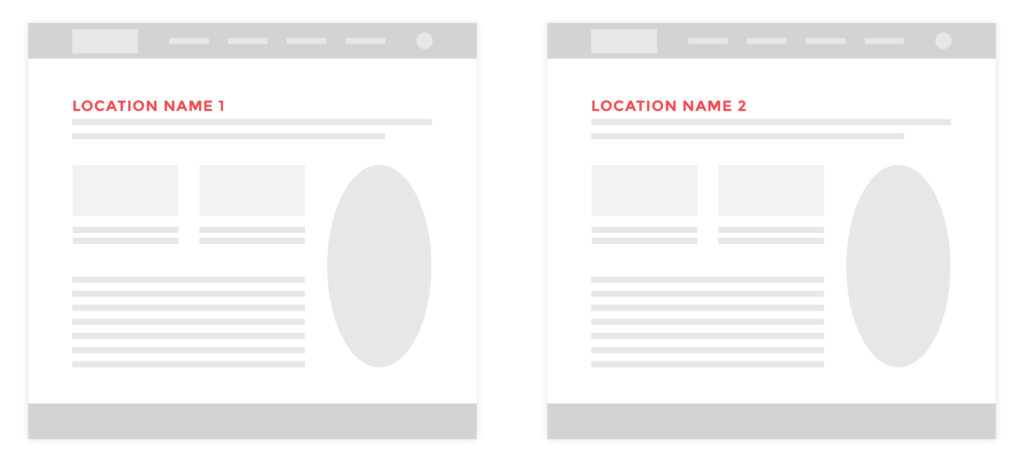
example of duplicate content on multiple locations pages

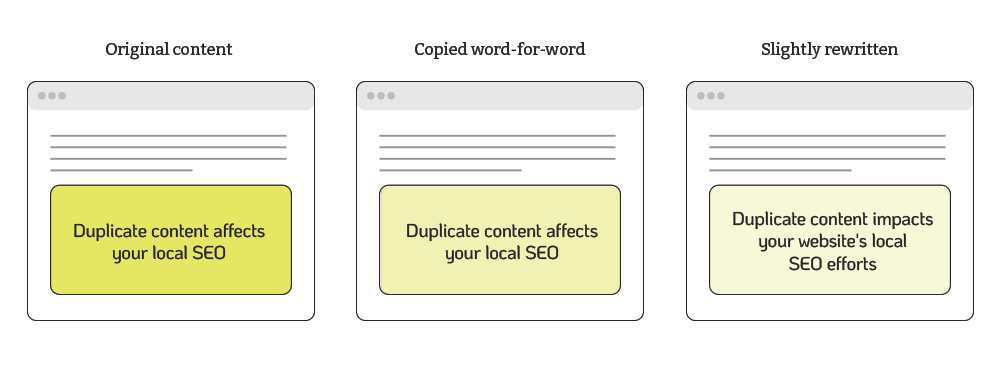
For a long time, it was easy to produce content for your location or service area pages. You created a template page, with the same word-for-word content, and then simply popped the correct city onto each page.

The trouble with this practice is that when search engines encounter multiple locations pages with identical content, they have trouble telling them apart. This can cause several problems for your SEO efforts.

It Can Hurt Your Rankings

A search engine’s goal is to present searchers with results that have helpful information. Not pages that simply rehash content already found elsewhere, including content within your website.

This is why they have search ranking systems designed to prioritize original content when ranking results. So, if you have multiple pages that look similar, Google will try to identify which page is the original.

But if it can’t identify the original, your rankings could suffer and the page might not rank at all. And if your content does rank, the version that gets chosen might not be the version that you want to appear in search engine results pages (SERPs).

It Can Distribute Backlinks Unequally
TWR Blog DupeContent 02 min Is Duplicate Content on Multiple Locations Pages Really Bad?

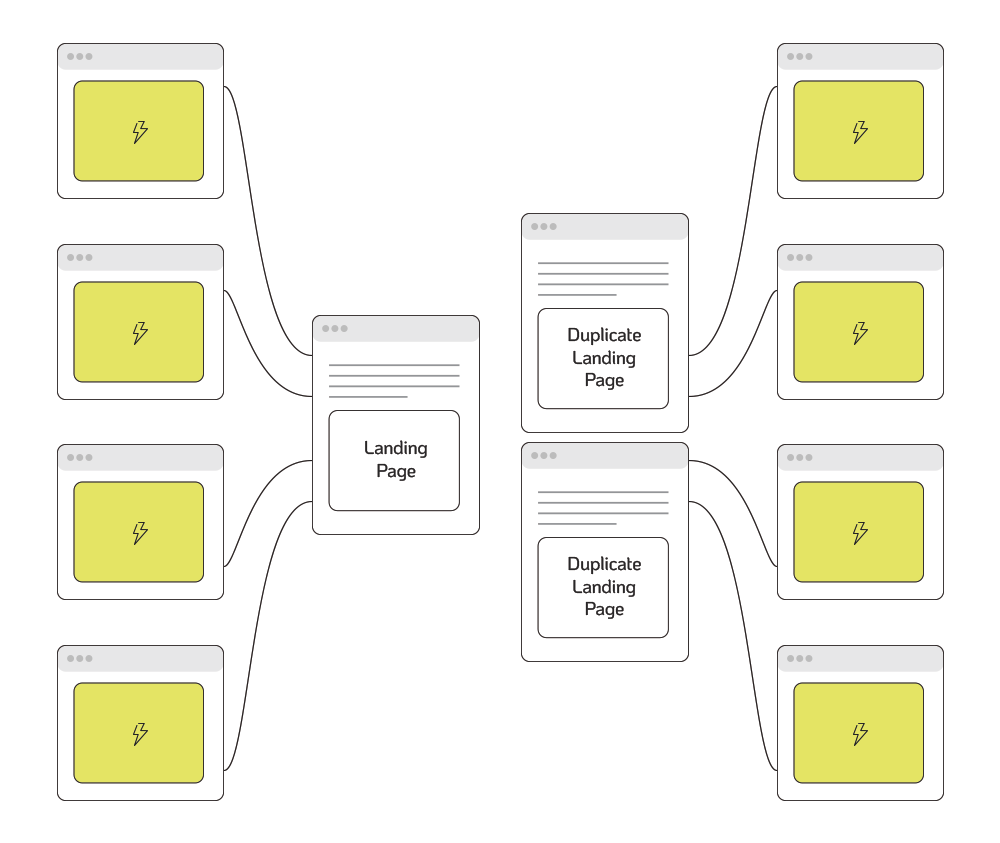
Backlinks are crucial for local SEO, but if duplicate content exists across multiple pages, the link value weakens. This reduces the overall impact of your backlinks.

Each backlink is like an endorsement from another website, which tells Google that your content is probably accurate and helpful.

For example, you have two identical pages with similar URLs. Instead of having all your backlinks go to one page, they’re split between the two. So instead of having one page strengthened with all the backlinks, you get two weaker pages with fewer links.

This distribution could lead to lower rankings since neither page gains as much authority as a single page would.

It Can Hurt Your Site’s Crawlability

Search engines need to crawl and index your content for it to show up in search results. Duplicate pages waste your crawl budget, which is the amount of time and resources search engine crawlers devote to crawling your site before moving on.

If you have too much duplicate content, crawlers can end up reviewing multiple versions of the same content. This reduces the number of pages that can get crawled. The fewer pages that get crawled the more this can impact your site’s visibility in search results.

It Can Hurt Your Credibility

Having unique content on your site shows that you are an expert in your field and helps you gain your audience’s trust. Duplicate content doesn’t let you stand out from your competition and can cause people to turn away.

And that’s if they can find your site in the rankings.

By showing content targeted to your audience, you can improve your user experience and show why someone would look to your site as the authority on a specific topic.

How to Find Duplicate Content

Now that we’ve covered what duplicate copy is and why it hurts you, the next step is to check your location pages and site for it.

Finding Duplicate Content

Not sure if you have duplicate content? There are several ways to find out.

The first way is to do a search using “site:yoursite intitle:keyword.” This will find all the pages on your site that have the keyword in the title.

Several online tools can audit your site and find any duplicate content:

This isn’t a complete list but will give you a starting point to do your research and see which tool will work best for you.

How You Can Individualize Locations Pages

example of avoiding duplicate content on multiple locations pages

There are several practices that you can incorporate to avoid duplicate content on multiple locations pages. If you can use them all, great! But even incorporating just a few will help you avoid the issue of duplicate content and the confusion it causes for search engines and users alike.

Write Truly Unique Content

This one is non-negotiable. You must take the time to present the key information about each location so that it doesn’t mirror another page. You need to go beyond the quick fix of simply swapping out the city name

Add Photo or Videos

Showcase photos or videos specific to each location or service area you work from. Remember to add appropriate alt text for each image to individualize the page for an exact location.

Include Staff Bios

Whether your staff includes teachers, accountants, electricians, or chefs, including staff pictures and bios is an easy way to add unique content to your locations pages.

Share Customer Review or Case Studies

Another easy way to get over the hump of duplicate content on multiple locations pages is to include customer reviews or testimonials that are submitted for each of your business’ locations. Also, consider creating case studies to spotlight the great results you’ve produced for clients in those areas.

Provide Directions and a Local Map

Driving directions and maps are fantastic ways to localize your individual locations pages and provide key information to your customers. Do your locations pages suffer from “cut and paste” duplicate content? It may be a huge time investment, but individualizing your pages can only help your search result rankings.

Realizing Your Pages Have Duplicate Content?

Do your location pages suffer from “cut and paste” duplicate content? It can be a huge time investment to fix them, but individualizing your pages can only help your search result rankings.

Do you need to update your location pages to avoid duplicate content in your local SEO? Fix the problem by contacting our expert team.

First Things First

Before we dig into how Google obtains website metrics to assess quality, it should be stated that small businesses must regularly track user engagement metrics on their websites. This should include evaluating the quality of the organic search traffic (SEO) the site is receiving. Increased website engagement will result in increased conversion rates and ROI.

User Interaction on Your Website

Assessing a user’s behavior on a website will offer strong insight as to their goals.

  1. A user lands on a site.
  2. They visit seven pages.
  3. They find a product they want.
  4. They add the product to the shopping cart.
  5. They purchase the item.

It is clear from this example that the user found what they were searching for on the website. Now, compare this with a visitor who lands on a web page and hits the browser’s “back button” in less than a few seconds. Who had the better user experience? Who engaged with the site more?

The above are examples of user engagement signals that search engines are using as data points in their algorithms to assess the quality of a site. These signals are not easily understood by the likes of Google. Search engines are private about their algorithm information because this is what separates them from the competition.

We have learned that user engagement signals are valuable in calculating search quality and may also be used as ranking signals. When a user lands on a page that does not match what they searched for, this will more than likely result in poor engagement.

If your company has a website, poor user experience is something you want to reduce and keep to an absolute minimum.

How Google Collects User Engagement Metrics

Google has a huge quantity of data sources available to them. Some of the most important ones are as follows.

SERPS (Search Engine Results Pages)

How a user interacts with the listed search results is a fundamental source of data. For example, if a user does a search in Google and decides not to click on the first or second result, but instead clicks on the third option, that can act as a signal to Google that the third result might actually be the best result for that query.

In the future, Google may adjust the ranking position of the result that was originally in third place.

Google Analytics Data

If you have Google Analytics tracking on your site, Google is able to learn how users interact with your site. This information is used by Google to learn trends and many more search abhors of users. Google Analytics can also be used to help your company improve its site so you target the right audience.

Mobile Operating Systems

With Google entering the mobile market, it’s changing how people interact with the web. Google’s Android mobile phone operating system is the most used operating system on mobile devices in the world, with more than 50% market share.

Android connects people to Google Maps, Search, and Images, impacting how a user finds and interacts with your site. Having a website that is mobile friendly and responsive is not a choice anymore.

Every business website should have these mobile features included.

Different Browsers

Browsers are influential data sources since they can monitor every action taken by a user. Microsoft’s Internet Explorer used to have the major market share back in early 2011. That all changed as Firefox and Google Chrome became more predominant.

Display Advertising

Google AdSense offers websites the ability to place ads on their sites and earn revenue when users click on them. This click data is something that helps Google understand how users interact with the site.

Toolbars

Users who install the Google Toolbar in their browsers help search engines better understand how a user navigates the web. These toolbars provide users with a lot of accessibility that can offer a better online search experience.

Goo.gl URL Shortner

There are many URL shorteners such as Bit.ly and Ow.ly. Google created a URL shortener of its own called Goo.gl. A URL shortener allows Google visibility into sharing content, even in social networks where it does not otherwise have access (for example, private Facebook pages.)

Different Forms of Online Voting

There is another set of signals that search engines measure, which we call voting mechanisms. These voting mechanisms are methods by which users directly indicate their approval or disapproval of content, services, or products. Here are some examples:

Facebook Likes

We are all familiar with Facebook’s like feature, which indicates content we like on the web. Ultimately, search engines can see what content is “liked” and gives that content more value.

Reviews

Reviews allow users to express appreciation or frustration with a product or service. Google takes these very seriously, as they are personal and inform other users.

Google is able to measure the amount of positive or negative comments to ascertain whether a website is providing quality to the user. Reviews are especially impactful when it comes to optimizing your site for local search.

Brand Name Searches

Another signal of importance is a large number of brand name searches. For example, brands like Nike and Amazon have searched hundreds of thousands of times per month.

This causes them to show up more often in results to generic search queries like athletic shoes or fiction books over lesser-known brands.

User Engagement Signals That Could Affect Rankings

Google has an in-depth collection of data sources that allow it to quantify a wide range of online user behaviors. Mentioned below are some of the major signals that Google can extract (and that you can extract, too, by looking into Google Analytics):

Bounce Rate

Bounce rate measures the percentage of users who visit only one page on a website and then leave. Bounce rate can also define the interaction of the user with the search results.

For example, if a user clicks on a search result, then returns to the SERPs and clicks on another result, that could be an indicator that the first result was not a good response for that search query.

Generating New Searches

A user may observe a set of search results, then come back to the search engine and modify his search query to better refine the results.

Click-Through Rate (CTR)

Google measures the click-through rate on links presented in the SERPs, on web pages in URL shorteners, on RSS feed readers, PDFs, and more. Many SEOs believe that CTR is actually a ranking factor when applying SEO best practices.

Time on Page

Google can measure the amount of time spent on a given page. Time on page could be considered a signal of higher quality pages(for example, the user spent time reading the whole article.)

Time on Site

Similarly, time spent on a website, as a total, is considered a positive signal. If the average user spends more time on your site than on the sites of your competitors, that might signify your site is of higher quality and relevance.

Pages per Visit

More pages viewed by a user on your site suggests greater user engagement. Viewing more pages usually signifies interest and that is something Google considers important.

There many metrics that measure the effectiveness of SEO and internet marketing in general. For small to medium-sized businesses it can be overwhelming trying to keep track of these metrics and understanding what is driving these numbers. Domain Authority is one metric Tower Marketing uses to measure SEO progress and success of a client’s website campaigns in comparison to competitors. DA looks at a variety of broad spectrums, taking into account many of the factors Google considers important.

What is Domain Authority?

Domain Authority (DA) is scored on a scale of 0-100 and was developed by the analytics software team Moz.com. The DA metric predicts how well a website will rank on search engines. You use DA when you’re comparing one site to another or tracking the “strength” of your website and content efforts over time.

Where did the Metric Domain Authority Originate From?

Domain Authority is comprised of several metrics that are calculated to show a picture of how well a domain is likely to have its pages ranked in Google’s search results (SERPs). It is based on data from the Mozscape web index and includes the total number of links, MozRank and MazTrust scores, and dozens of other factors outside of Moz. DA uses a machine-learning model to predictively find an algorithm that best correlates with rankings across thousands of search results that Moz predicts against.

lightbulb full of neon colors is shattered.

Is Domain Authority a Stable Metric to Measure Against?

Yes, it is, but it is important to understand that the Domain Authority is affected by several organic factors that will always continue to fluctuate. DA is a slow-growing score because it is based on organic elements of marketing (unlike paid search which is almost instant).

Don’t expect to see your DA jump from 23 to 47 in just six months worth of SEO. There are too many factors involved to make the DA index move that fast.

How is Domain Authority Calculated?

Moz has calculated this metric by combining all other link metrics. These metrics include the number of domains linking to your site, number of pages linking to your site, number of total links (internal and external), ‘followed’ vs ‘nofollowed’ links (equity passing links) as well as MozRank, MozTrust, etc.—into a single score.

DA is heavily link-based, but it takes into account the quality of content and social linking signals too. So, why is there so much emphasis on links?

People link and share content they like. No one shares an ugly looking website or a website they can’t find. Links are still arguably the strongest signal of how popular a website and its pages are.

A piece of paper reads "Do you know about domain authority?" with two checkboxes.

How Should Your Business Apply Domain Authority to Its Site?

As mentioned earlier, Domain Authority uses machine-learning. This helps it build up a better understanding of Google’s algorithm, which is constantly changing, so that it can best model how search engine results are generated.

There are over 40 signals included in the calculation of DA. This means your website’s Domain Authority score will often fluctuate. For this reason, it’s best to use Domain Authority as a competitive metric against other sites, as opposed to non-industry specific websites.

If your website content is education-related, don’t compare your DA against a sports website. Compare apples to apples and oranges to oranges, capiche?

Additionally, since it’s not a precise metric, it’s not the best data to measure the success of your internal SEO efforts with. Instead, you should look to other important engagement metrics to assess your efforts.

How is DA Scored?

The Domain Authority score ranges from 0 to 100 and is a logarithmic scale (non-linear scale for large ranges in quantities). Thus, it’s easier to grow your score from 20 to 30 than it would be to grow from 70 to 80. As your DA grows it will be harder to acquire more points.

How can Businesses Influence their own Domain Authority?

Unlike other SEO metrics, Domain Authority is difficult to influence directly. It is made up of an aggregate of metrics (MozRank, MozTrust, link profile, and more) and each have an impact on this score. This was done intentionally; this metric is meant to approximate how competitive a given site is in Google’s SERPs. Since Google takes a lot of factors into account, a metric that tries to calculate it must incorporate a lot of factors, as well.

The best way to influence this metric is to improve your overall SEO. In particular, you should focus on your link profile and getting more links from other well-linked-to pages that are relevant. Links from other websites act as a vote of endorsement. The more links for relative industries that have good quality content on their sites and that are active on social media, the greater the chances of your DA growing.

What is my DA Score?

There are free tools to find out what your DA is and also what your competitors are ranking at. Moz has created a toolbar for Chrome that you can download onto your browser. You will see a new menu above your navigation bar showing you the DA authority scores as well as some other handy metrics. Click here to download the MozBar.

Now that you have a better understanding of what DA is, what will you do to improve your score? Work with our expert team to grow your DA.